9CyScan Positioning System • Installation and Maintenance Guide r1.1
GC S
GC S
Power Supply Unit (continued)
! IMPORTANT: 0V is not the same as GND. 0V is the power supply return whereas
GND is a digital ground connection for the communication ports. If 0V and GND
are crossed or joined, the system will not function correctly.
! IMPORTANT: When replacing the lid on the PSU, ensure that the rubber seal is
smeared with silicone grease (Dow Corning® DC4) to maintain a watertight fit.
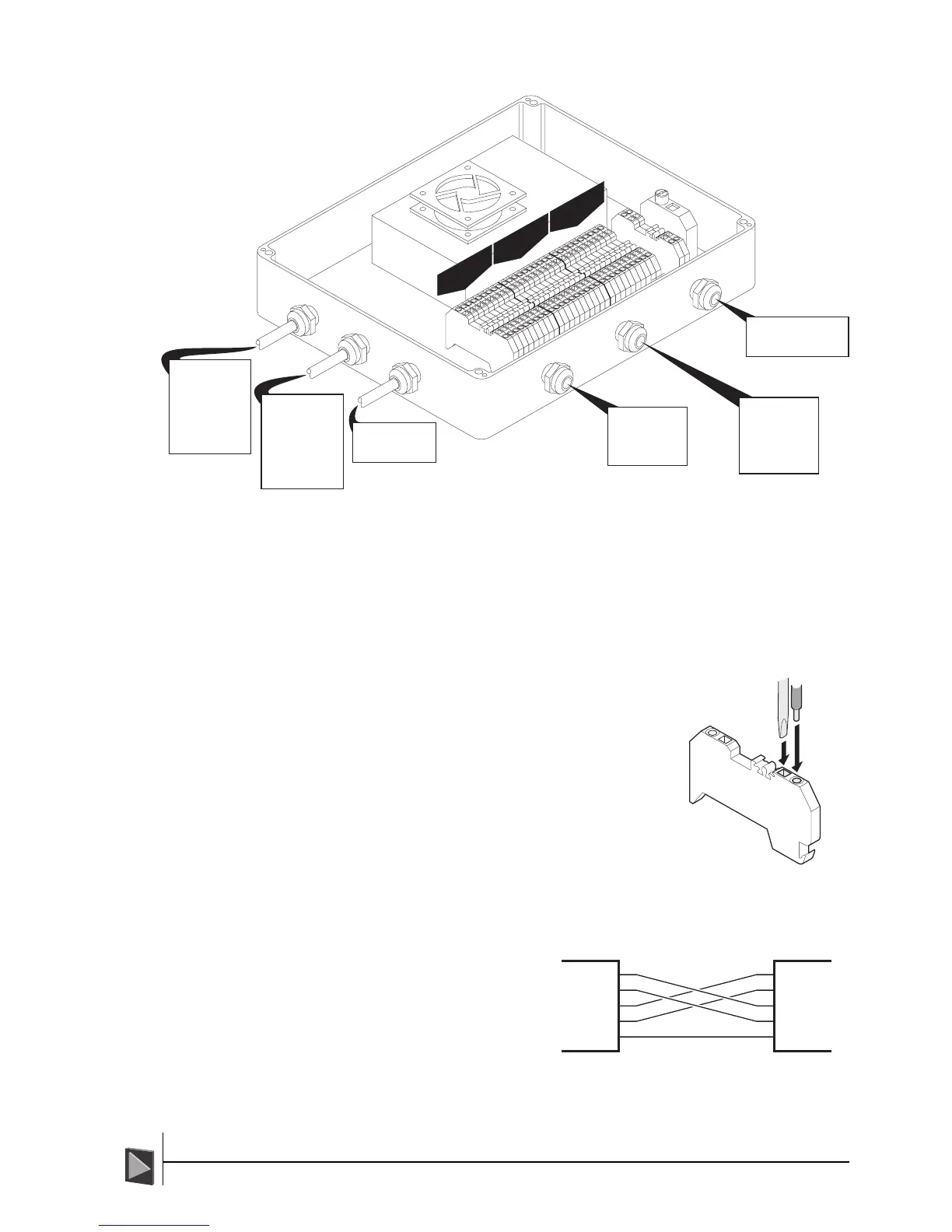
To insert wires:
! WARNING: Ensure all power is removed from the
system before altering any wiring.
1 Push a small flatblade screwdriver into the square
vertical hole at the front of the connector block
and press down on the lever inside.
2 While pressure is applied to the screwdriver, insert
the required wire(s) into the round hole adjacent to
the square hole.
3 Remove the screwdriver. Check that the cable is
securely held in place.
DP Signal Crossover
The RS485 connection between the
CyScan PSU and the vessel’s DP
system requires a crossover in order
that transmit and receive signals are
correctly routed. Ensure that the
crossover is correctly performed as
the cable from the DP system is
wired into the PSU.



 To Next Page