38CyScan Positioning System • Installation and Maintenance Guide r1.1
GC S
GC S
CyScan Admin Console Quick Start
1 Switch on the CyScan notebook and login as described on the previous page.
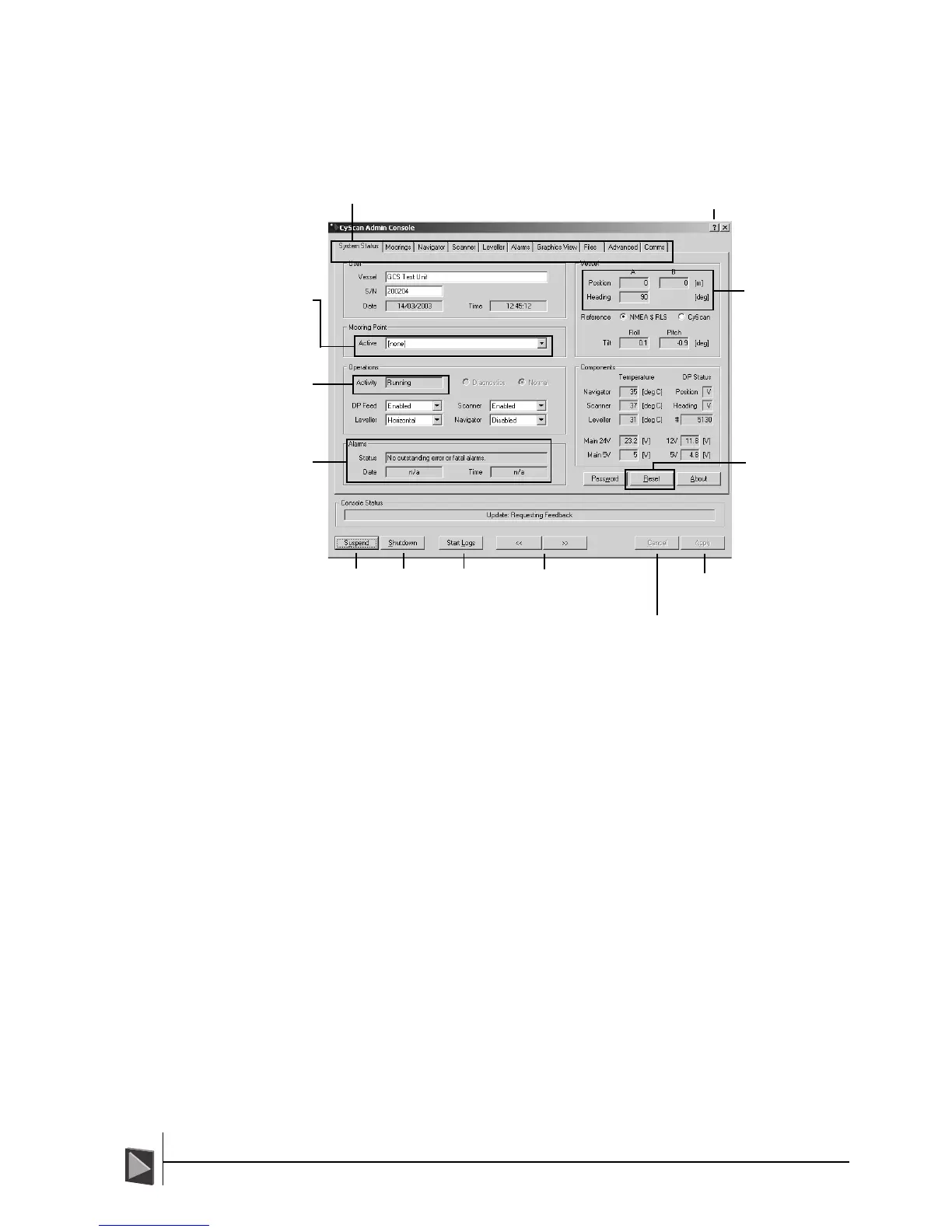
2 A System Status screen similar to that shown below will be displayed:
3 Ensure that the Activity field in the Operations section indicates Running.
• If the Activity field shows Link lost or Initialising (continuously) then there
may be a problem with the sensor communication link.
<< and >>
Click these
to change
between
the various
information
pages.
Cancel – Click to undo any
changes made to the current
page since the Apply button
was last clicked.
Apply – Click to activate
any changes made to the
current page.
? – Click to invoke the help feature. The
cursor will gain a ? mark – subsequently,
when you then click on any item, a brief
explanation of that feature will be given.
Tabs – Click these to change
between the various pages of
information.
Start Logs –
Click to begin
recording
system
information
that can be
used for
diagnostic
purposes.
Position &
Heading – These
indicate the vessel’s
current calculated
position and
heading relative to
the currently
selected mooring
point.
Activity
Indicates the current
status of the link
between the sensor
and the console.
Mooring Point
Allows you to select
a pre-configured
mooring point or
invoke single target
mode.
Alarms
Indicates the source
and timing of any
detected problems
with the system.
Suspend –
Maintains
power to
the sensor
but stops
all
mechanical
motion.
Shutdown –
For Service
Technicians
only. Click to
quit CyScan
Console. A
dialog will
be displayed
to offer a
number of
options prior
to leaving
the
application.
Reset – For Service
Technicians only. Used to
interrupt and stop
communications between
the console and the GUI
as well as to restart and
establish communications
after it has previously
failed
or it had been manually
stopped.



 To Next Page