17
General Set Up Screen
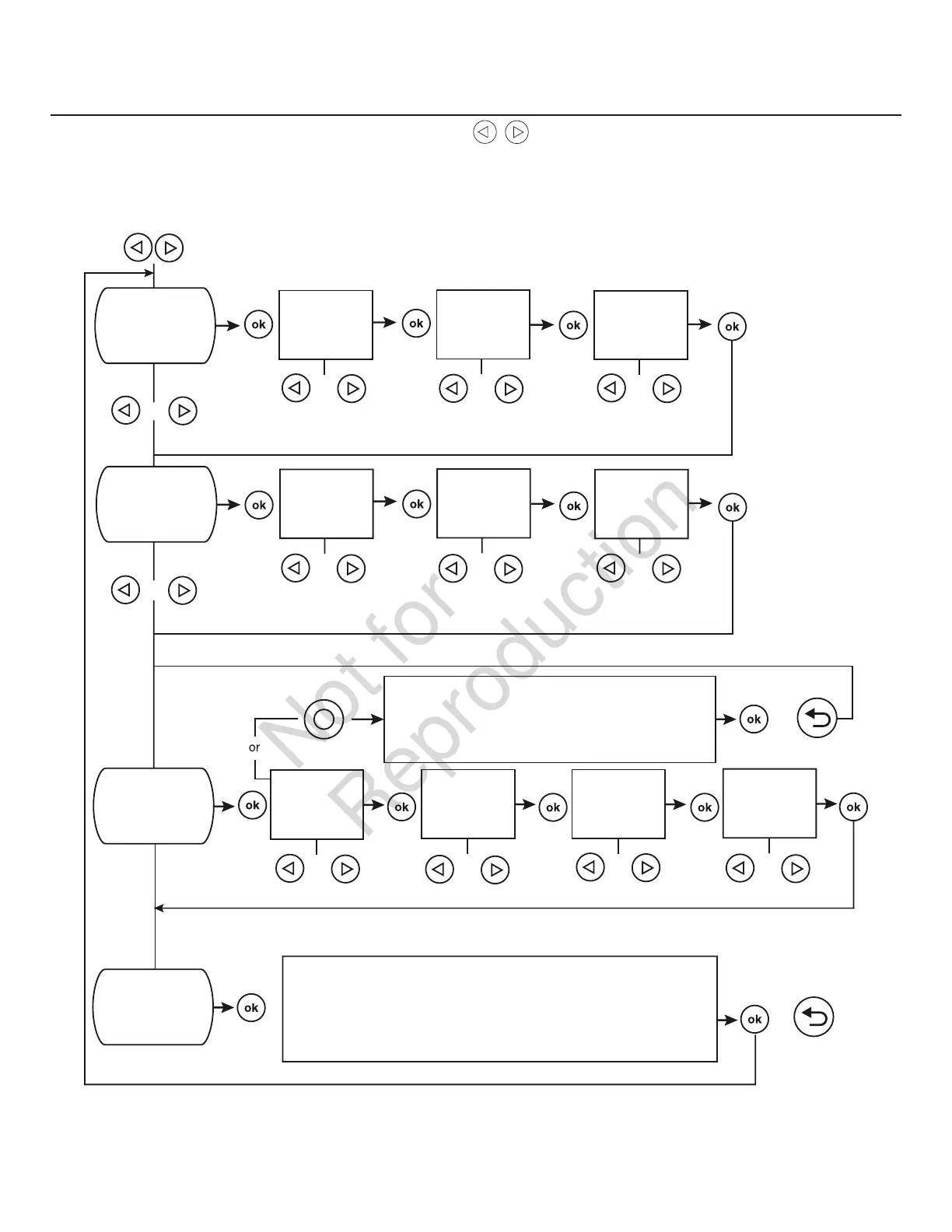
For general set up, press and hold the left arrow and right arrow for 3 seconds. Follow the prompts as outlined below.
NOTE: Date and Time were set at the factory and stored in the control panel memory. The Exercise Cycle was also set at
the factory. The default exercise cycle occurs on Tuesdays, at 2:00 P.M. Central Standard Time. To update or change these
settings, follow the steps below.
SET DATE
If set to OFF, display will read:
EXERCISE CYCLE OFF
or
YEAR
FLASHING
MONTH
FLASHING
DAY##
FLASHING
SET TIME
HOURS
FLASHING
MINUTES
FLASHING
AM/PM
FLASHING
or or or
or
or or or
or
or
or or or or
DAY OF WEEK
FLASHING
HOURS
FLASHING
MINUTES
FLASHING
AM/PM
FLASHING
SET EXERCISE
CYCLE
EVENT LOG
Display will scroll last service code event, date, time,
and ambient temperature of when the event occurred.
or
IF DURING PROGRAMMING NO BUTTONS ARE PRESSED FOR 30 SECONDS,
THE CONTROL PANEL WILL AUTOMATICALLY EXIT THE PROGRAM MODE.


 To Next Page