User Manual Druck DPI620G-IS
29 July 2016 116M5464 Revision - Page 143 of 248
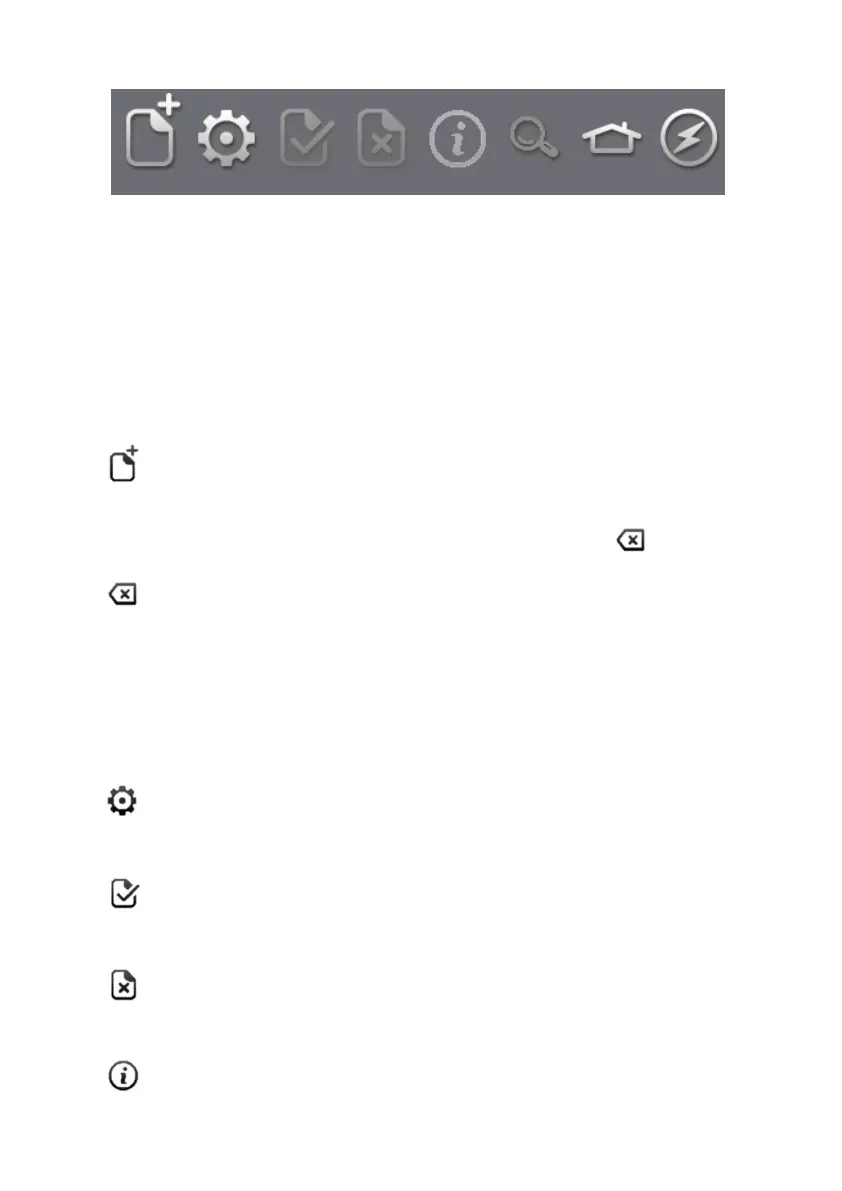
FOUNDATION™ Fieldbus Toolbar 8.4.1
Figure 8-8 FOUNDATION™ Fieldbus Toolbar
On entering the FOUNDATION™ Fieldbus application, the
toolbar is displayed. Icons that are not currently active are
greyed out.
The ICON functions are described below:
OPEN CONNECTION – Only available when awaiting an
open connection. (When navigating devices OPEN
CONNECTION is replaced by the CLOSE icon ).
CLOSE – Only available in Navigation Tree (refer to
Section 8.5.28.5.2) and Folder Variables (refer to Section
8.5.4).
Closes down connection and returns to Device Focus View
(refer to Section 8.5.1).
SETTINGS – Application configuration settings and DD
library details (refer to Section 8.8).
COMMIT – Commit updated values back to the device
(refer to Section 8.5.7).
ABORT – Abort Update of parameters, reverts to
previous values (refer to Section 8.5.7).
STATUS – Provides Device profile of currently connected
device (refer to Section 8.5).




 To Next Page