EasyManua.ls Logo

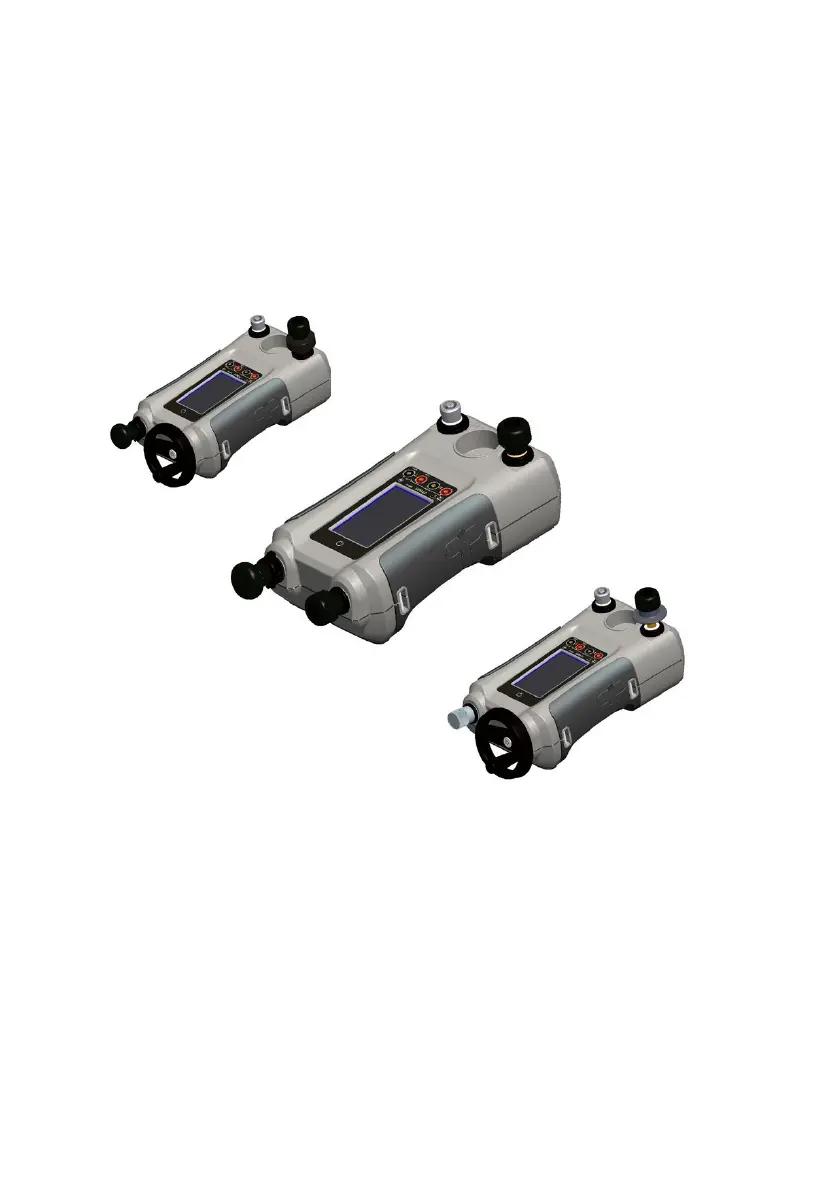
GE Druck DPI612 - User Manual

GE Druck DPI612
105 pages
Print Icon
To Next Page IconTo Next Page
Loading...
GE
Measurement and Control
© 2014 General Electric Company. All Rights Reserved.
Specifications are subject to change without notice. GE is a
registered trademark of General Electric Company. Other company
or product names mentioned in this document may be trademarks
or registered trademarks of their respective companies, which are
not affiliated with GE.
Druck DPI612
Portable Pressure Calibrator
User Manual – 109M4017
g

Table of Contents

Questions and Answers

  • A
    astevensAug 17, 2025
    Why does my GE Druck DPI612 have an excessive leak rate (pressure or vacuum)?
    • K
      kmartinAug 17, 2025
      An excessive leak rate in your GE Test Equipment could be due to several reasons: * The system might be incorrectly connected (DPI612 to DUT). Ensure that connecting accessories are fitted according to instructions and that the correct sealing method is in use. * The DUT (Device Under Test) may have a leak. Isolate the DUT from the DPI612 and check for leaks in both independently. * There might be a worn pressure seal on the outlet port ('O' ring & backup ring). Inspect the seal on the pressure port for signs of wear and replace if necessary. * The Release Valve might not be fully closed. Make sure the Release Valve is firmly closed.
  • D
    Dawn SolomonAug 20, 2025
    What to do if my GE Test Equipment unit will not generate pressure with integral pump?
    • M
      Margaret NguyenAug 20, 2025
      If your GE Test Equipment unit is not generating pressure with the integral pump, consider the following: * The mode selector may be incorrectly set. Ensure the mode selector is in the “+” position. * The sensor may not be fitted to the sensor port. Ensure a sensor (or blank IO620-BLANK) is fitted to the sensor port. * The output port may not be connected. Ensure the output port is connected to the DUT or fitted with a suitable blanking plug. * The release valve may not be closed. Ensure the release valve is firmly closed.
  • M
    mcdonaldamberAug 22, 2025
    What to do if my GE Druck DPI612 Test Equipment unit will not generate vacuum with integral pump?
    • J
      John JohnsonAug 23, 2025
      If your GE Test Equipment unit is not generating vacuum with the integral pump, check the following: * The mode selector may be incorrectly set. Ensure the mode selector is in the “-” position. * The sensor may not be fitted to the sensor port. Ensure a sensor (or blank IO620-BLANK) is fitted to the sensor port. * The output port may not be connected. Ensure the output port is connected to the DUT or fitted with a suitable blanking plug. * The release valve may not be closed. Ensure the release valve is firmly closed.
  • M
    Michael WernerAug 26, 2025
    What to do if my GE Druck DPI612 unit will not reach desired pressure?
    • D
      Donald BarnettAug 26, 2025
      If your GE Test Equipment unit is not reaching the desired pressure, it could be because the PRV (if fitted) is operating at a lower pressure than required. Check the PRV range (if fitted) and adjust the PRV if the range is suitable. If not, fit the correct range PRV or re-fit the PRV blanking plug supplied with the unit.
  • A
    Anthony CobbAug 28, 2025
    What to do if my GE Druck DPI612 unit will not generate pressure with integral priming pump/hydraulic ram?
    • J
      Jaime PriceAug 28, 2025
      If your GE Test Equipment unit is not generating pressure with the integral priming pump/hydraulic ram, consider these potential causes: * There may be insufficient hydraulic fluid in the reservoir. Verify the reservoir has sufficient fluid to generate pressure, aiming for at least 75% of its capacity. * The system may not be primed correctly. Follow the priming instructions to ensure air is removed from the system. * The output port may not be connected. Ensure the output port is connected to the DUT or fitted with a suitable blanking plug. * The release valve may not be closed. Ensure the release valve is firmly closed.
  • P
    patrickleeAug 31, 2025
    What causes excessive leak rate in GE Druck DPI612?
    • L
      Lori HernandezAug 31, 2025
      An excessive leak rate in GE Test Equipment can stem from: * The system not being primed correctly. Follow the priming instructions to ensure air is removed from the system. * An incorrectly connected system (DPI612 to DUT). Check that connecting accessories are fitted in accordance with instructions and the correct sealing method is in use. * The DUT (Device Under Test) having a leak. Isolate the DUT from the DPI612 and check for leaks in both independently. * A worn pressure seal on the outlet port (‘O’ ring & backup ring). Inspect the seal on the pressure port for signs of wear and replace as necessary. * The release valve not being closed. Ensure the release valve is firmly closed.
  • C
    Christopher BlackwellSep 3, 2025
    What to do if pressure remains trapped in my GE Test Equipment system?
    • G
      gregory14Sep 3, 2025
      If pressure remains trapped in your GE Test Equipment system, check that the refill valve is open (minimum 1 turn counter-clockwise) and that the release valve is also open (minimum 1 turn counter-clockwise). The refill/release valve may be closed.
  • L
    Lisa SmithSep 5, 2025
    What to do if my GE Druck DPI612 Test Equipment unit will not Switch On?
    • C
      Cathy KimSep 5, 2025
      If your GE Test Equipment unit will not switch on, the issue might be a faulty or flat battery. Try using an external power supply or remove the battery and replace it.
  • A
    Amber CarrilloSep 8, 2025
    What to do if GE Druck DPI612 unit will not connect to calibration management software?
    • S
      Summer AndersonSep 8, 2025
      If your GE Test Equipment unit will not connect to calibration management software, it might be because the communications mode is set to storage. From the DASHBOARD, select SETTINGS, then DEVICES; the USB client port should be set to Communications.
  • J
    Jenna TurnerSep 12, 2025
    How to fix unresponsive GE Druck DPI612 Test Equipment unit?
    • M
      Melanie BartlettSep 12, 2025
      If your GE Test Equipment unit is unresponsive, it may be due to a processor lock-up. To resolve this, press and hold the power switch. Then, remove the battery/power and replace it.

Summary

Revision History

Document Part Number

The part number for the DPI 612 Portable Pressure Calibrator User Manual.

Introduction and Safety

General Safety Precautions

Essential safety guidelines for operating and maintaining the DPI612 instrument.

Warnings

Electrical Safety

Safety measures related to the electrical input and connections of the DPI612.

Rechargeable Battery Warnings

Critical safety warnings and precautions for handling rechargeable battery packs.

Pressure Warnings

Important safety warnings concerning pressure operations and connections.

Instrument Preparation

Initial Checks

Steps to perform before the first use, including checking for damage and missing items.

Battery Installation

Instructions for installing rechargeable and dry cell batteries in the instrument.

Operations

Common Operations

Basic operations applicable to all DPI612 models, including attaching devices.

Pneumatic Pressure Operations

Procedures for using the DPI612 pFlex and pFlexPro for pressure operations.

Hydraulic Operations Overview

Instructions for the DPI 612 hFlexPro, including filling, priming, and pressure application.

Calibration

Calibration Check and Adjustments

Procedures for checking and adjusting the instrument's calibration.

Current Calibration Procedures

Detailed steps for calibrating the current measure and source functions.

Pressure Indicator Calibration

Steps for calibrating the pressure indicator function of the DPI612.

Troubleshooting

DPI 612 Model Troubleshooting

Common fault symptoms and their possible causes and checks for DPI 612 models.

GE Druck DPI612 Specifications

General IconGeneral
TypePressure Calibrator
Accuracy±0.025% of full scale
Pressure Unitsbar, psi, kPa, MPa
DisplayGraphical LCD
Battery LifeUp to 8 hours
Operating Temperature-10 to 50 °C
Storage Temperature-20 to 70°C (-4 to 158°F)
Communication InterfaceRS232
CertificationsCE

Related product manuals