Chapter 1: System operation
EST iO64 and iO500 Technical Reference Manual 45
Disabling a panel NAC
A disabled panel NAC does not report an off-normal condition to the
panel while it is disabled. When you disable a panel NAC:
• The common Disable LED turns on
• A message indicating the NAC that is disabled is displayed on
the LCD display
• The disabled points and active points counters on the LCD
display increment
• The common Trouble LED flashes and the panel goes into a
trouble state
• The common trouble relay changes state
Resetting the panel has no effect on a disabled NAC, but removing
all power from the panel clears the disable and enables the NAC.
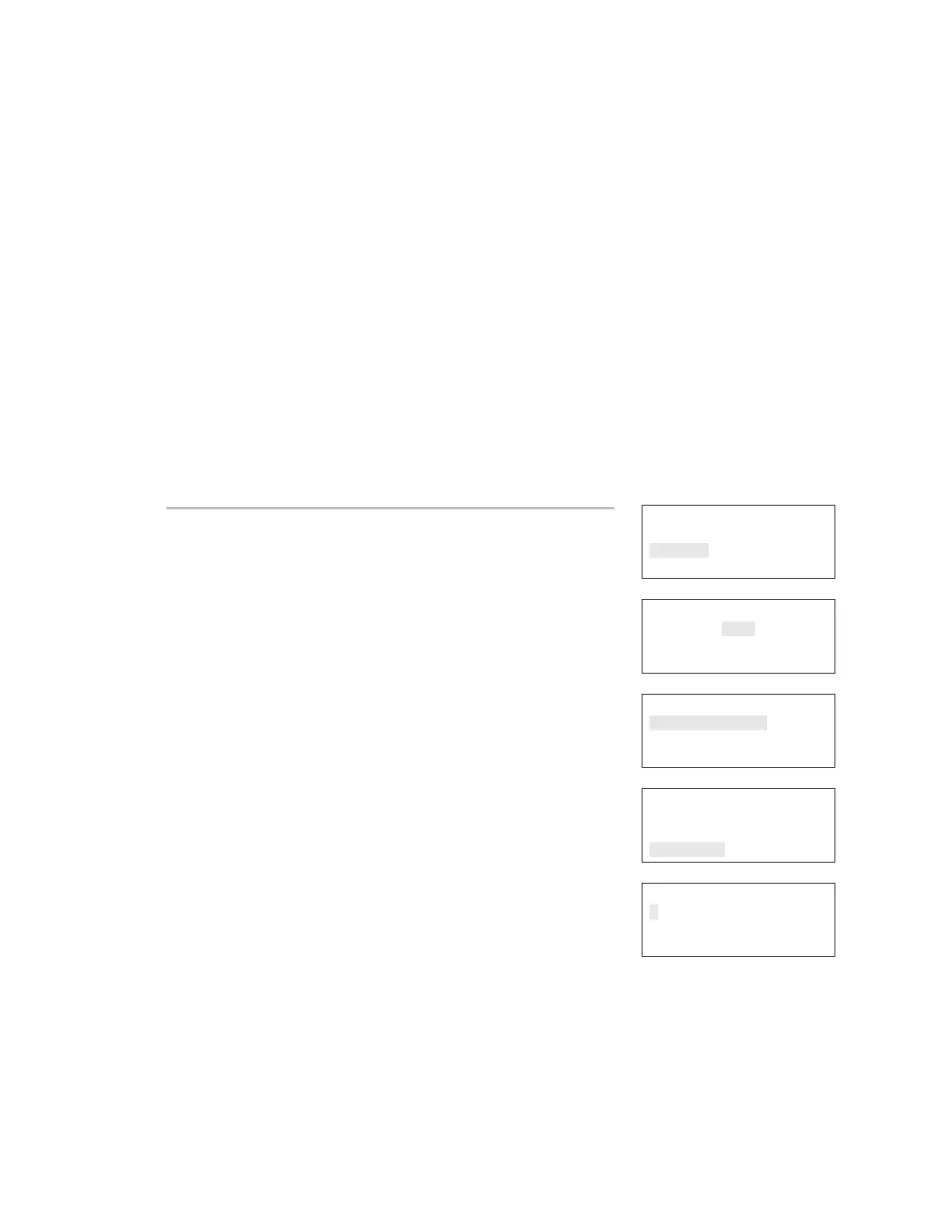
Reports
Test
Control
Program
⇩
Enter Password
0000
⇩
Control
Enable/Disable
Activate/Restore
⇩
Enable/Disable
Panel Event
Loop Event
Panel NAC
⇩
To disable a NAC:
1. Press the Menu button.
2. Choose Control.
3. Enter your password (the minimum of a level one password is
required).
4. Choose Enable/Disable.
5. Choose Panel NAC.
6. Select the NAC that you want to disable.
7. Press Enter.
The NAC is disabled and a message indicating that the NAC is
disabled is displayed on the LCD.
8. Press Cancel to return to the previous menu.
— or —
Press the Menu button to exit menu mode.
Panel NAC Disable<>
1
NAC 1



 To Next Page