A–14 LM10 MOTOR PROTECTION SYSTEM – INSTRUCTION MANUAL
LM10 AND GE FANUC 90-30 WITH DEVICENET™ CHAPTER A:
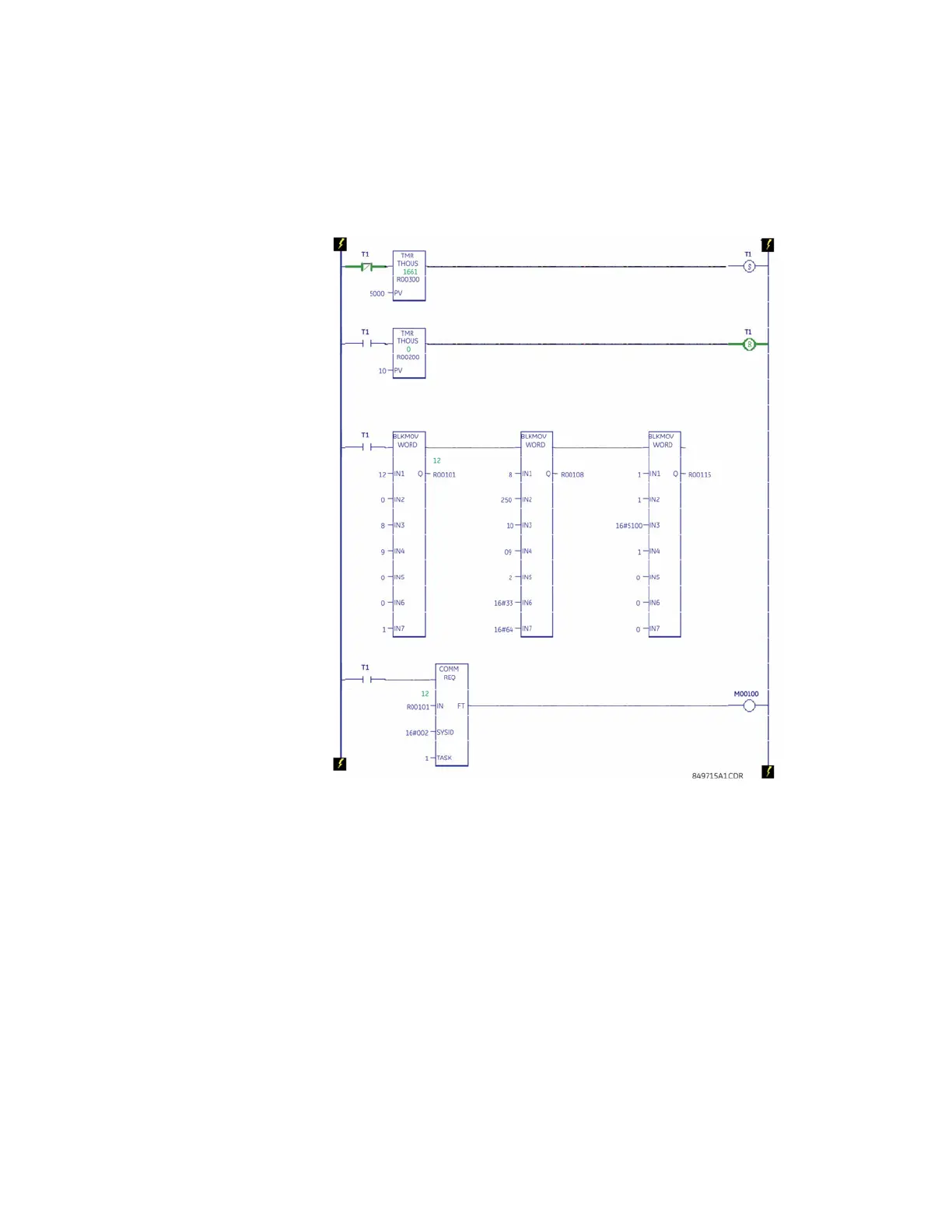
• Word 13: Login, User Level (for example, 16#33 [Login, User Level])
• Word 14: Object Class to which the Request is directed (for example, 16#64)
• Word 15: Instance of Object Class (for example, 1)
• Word 17: Attribute (for example, 16#5100 [Configuration])
• Word 18: Passcode, value: 1
FIGURE A–2: Ladder Logic for Login (Configuration)
Making Setting Changes:
The ladder logic for making setting changes in the LM10 using COMMREQ is shown below.
The logic shows the FLA Run1 parameter being set using COMMREQ. The ladder logic is
configured as follows:
Refer to DeviceNet Object Model Class 64, Instance for additional details.
In the ladder shown. we are setting the FLA Run1 parameter of the LM10 relay from slave 9
(MAC ID 9). Some key word settings are shown below:
• Word 11: Slave MAC ID setting (for example, 9)
• Word 13: SET Attribute (for example, 16#10 to write)
• Word 14: Object Class to which the Request is directed (for example, 16#64)
• Word 15: Instance of Object Class (for example, 1)


 To Next Page