CHAPTER A: LM10 AND GE FANUC 90-30 WITH DEVICENET™
LM10 MOTOR PROTECTION SYSTEM – INSTRUCTION MANUAL A–15
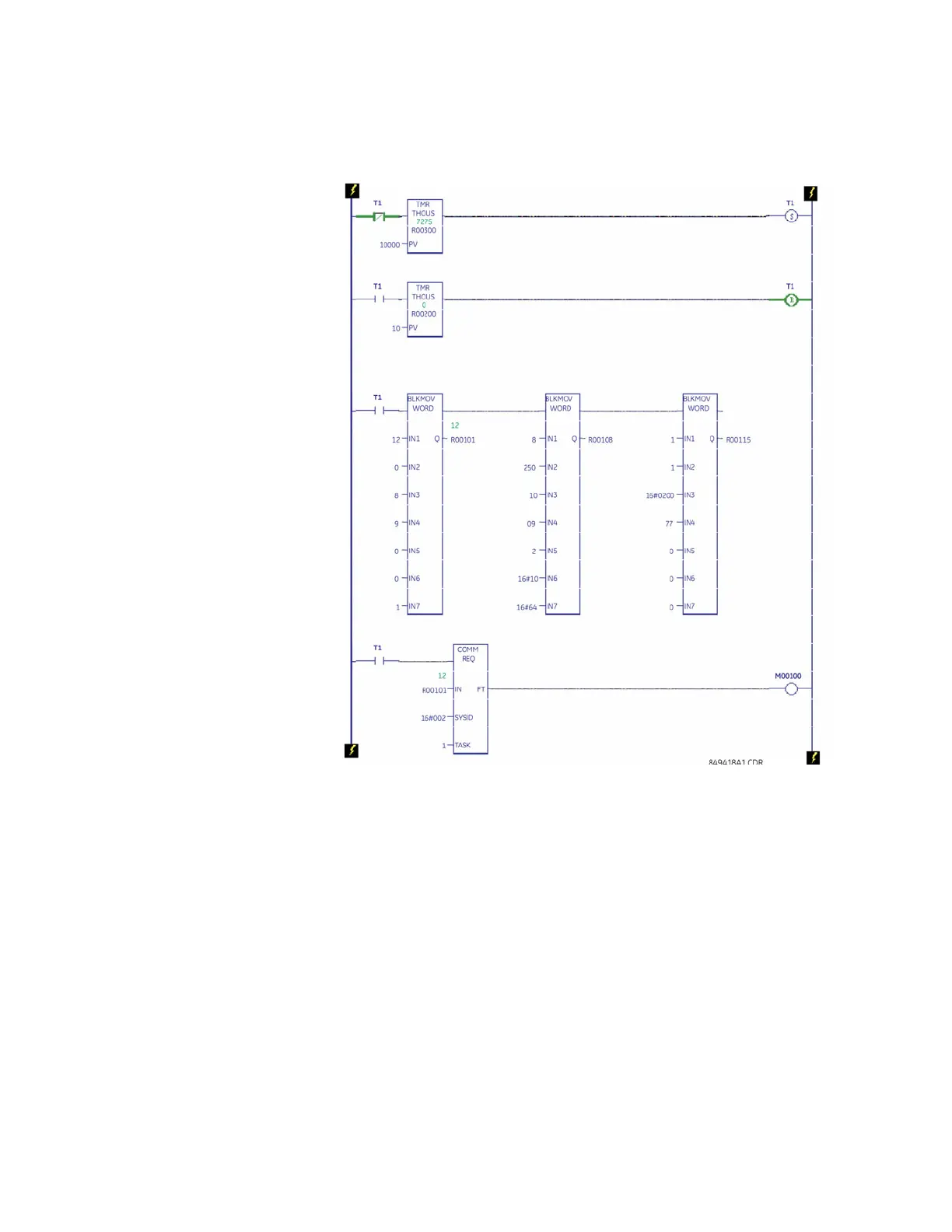
• Word 17: Attribute (for example, 16#0200 [FLA Run1])
• Word 18: Attribute (for example, 77 [77 × 0.1 amps])
FIGURE A–3: Ladder Logic for Setting Changes
Login (User Level) to the LM10:
The ladder logic for login (user level) to the LM10 using COMMREQ is shown below. Some
key word settings to login (user level) to the LM10 from Slave 9 are shown below:
• Word 11: Slave MAC ID setting (for example, 9)
• Word 13: Login, User Level (for example, 16#33 [Login, User Level])
• Word 14: Object Class to which the Request is directed (for example, 16#64)
• Word 15: Instance of Object Class (for example, 1)
• Word 17: Attribute (for example, 16#5000 [User])
• Word 18: Passcode, value: 1
The changed parameters will be reflected in Reference View Table at address %R00256
and the FLA Run1 parameter will be displayed. Change the display format to unsigned
decimal.


 To Next Page