,
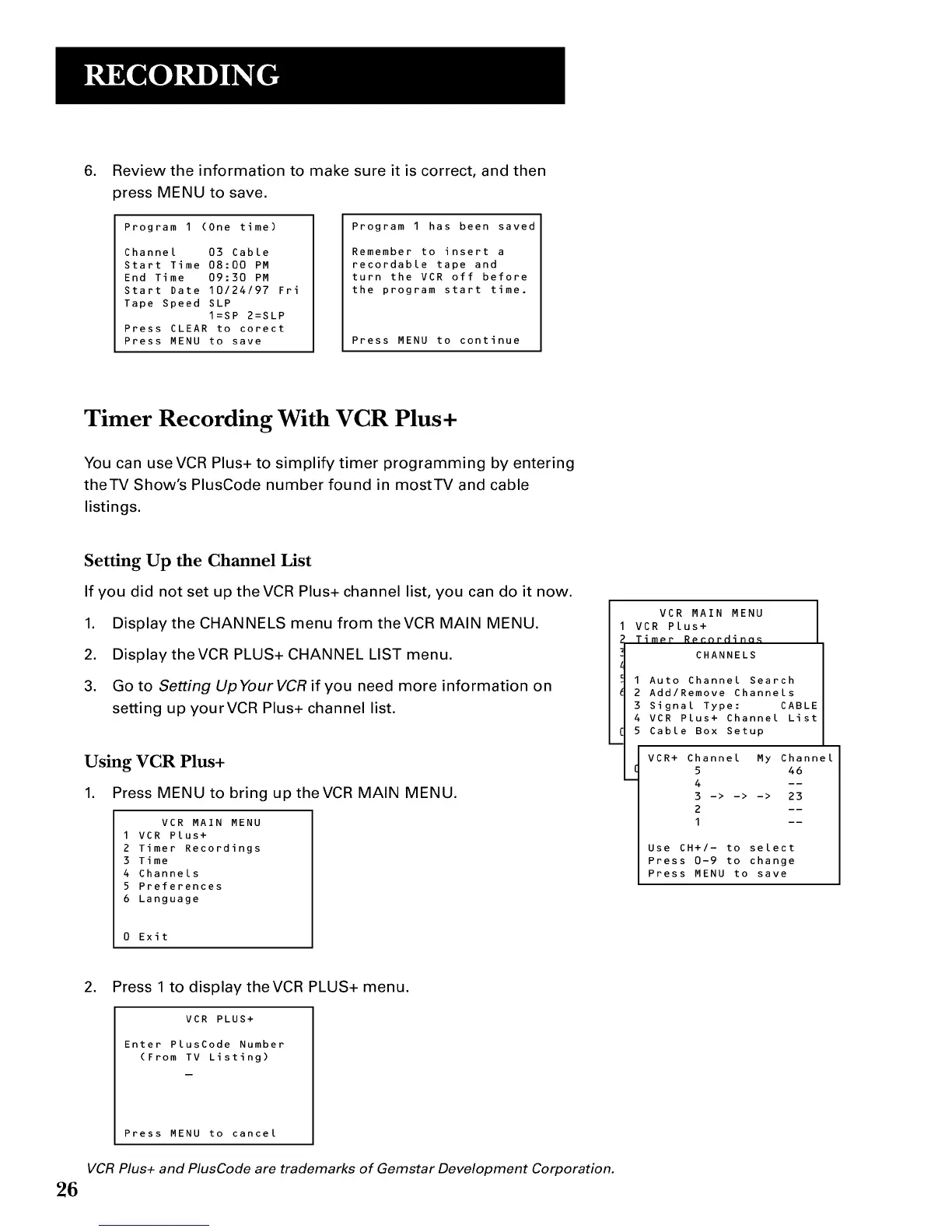
Review the information to make sure it is correct, and then
press MENU to save.
Program 1 (One time)
Channel 03 Cable
Start Time 08:00 PM
End Time 09:30 PM
Start Date 10/24/97 Fri
Tape Speed SLP
I=SP 2=SLP
Press CLEAR to corect
Press MENU to save
Program 1 has been saved
Remember to insert a
recordable tape and
turn the VCR off before
the program start time.
Press MENU to continue
Timer Recording With VCR Plus+
You can use VCR Plus+ to simplify timer programming by entering
theTV Show's PlusCode number found in mostTV and cable
listings.
Setting Up the Channel List
If you did not set up theVCR Plus+ channel list, you can do it now.
1. Display the CHANNELS menu from theVCR MAIN MENU.
2. Display the VCR PLUS+ CHANNEL LIST menu.
3. Go to Setting Up Your VCR if you need more information on
setting up yourVCR Plus+ channel list.
Using VCR Plus+
1. Press MENU to bring up theVCR MAIN MENU.
VCR MAIN MENU
I VCR Plus+
2 Timer Recordings
3 Time
4 Channels
5 Preferences
6 Language
0 Exit
VCR MAIN MENU
VCR Plus+
Timer R_nrHinn_
CHANNELS
I Auto Channel Search
2 Add/Remove Channels
3 Signal Type: CABLE
4 VCR Plus+ Channel List
5 Cable Box Setup
VCR+ Channel My Channel
5 46
4 --
3 -> -> -> 23
2 --
I --
Use CH+/- to select
Press 0-9 to change
Press MENU to save
,
Press 1 to display theVCR PLUS+ menu.
VCR PLUS+
Enter PlusCode Number
(From TV Listing)
26
Press MENU to cancel
VCR Plus+ and PlusCode are trademarks of Gemstar Development Corporation.


 To Next Page