9 / 48
1435
e
Pos
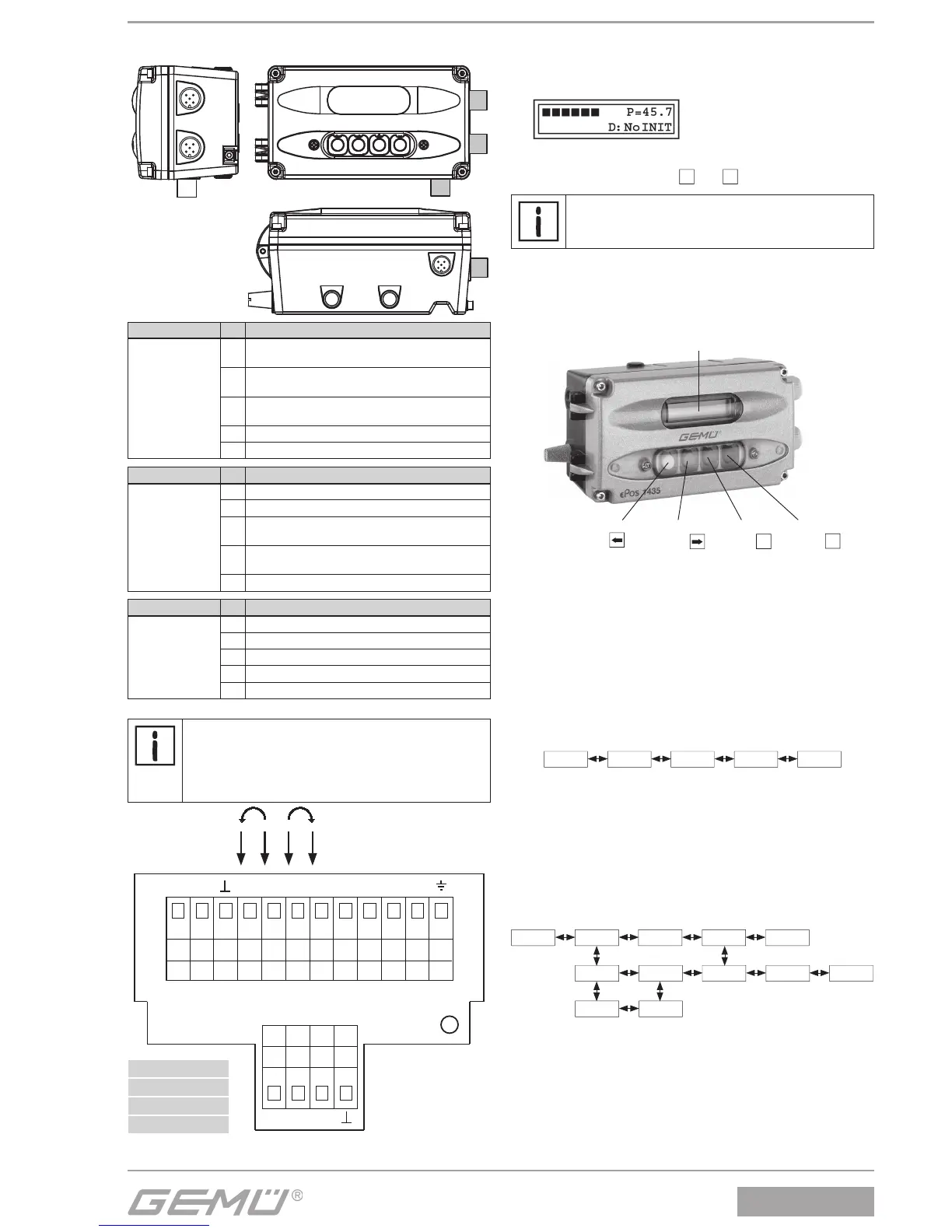
6.2 Version with connector (optional)
Connection Pin Signal name
X1
A-coded
M12 plug
1
Uv, 24 V DC
supply voltage
2
Uo, error message output,
24 V DC
3
Uv, GND
supply voltage
4 Uo, alarm output 1, 24 V DC
5 Uo, alarm output 2, 24 V DC
Connection Pin Signal name
X2
A-coded
M12 plug
1 Iw+, set value input 0/4-20 mA*
2 Iw-, set value input 0/4-20 mA*
3
X+, actual value output
0-10 V / 4-20 mA
4
X-, actual value output
0-10 V / 4-20 mA
5 n.c.
Connection Pin Signal name
X3
A-coded
M12 socket
1 Uv, actual value supply 10 V DC
2 Usig, actual value input 0-10 V DC
3 Uv, actual value supply GND
4 n.c.
5 n.c.
* for set value input U
w
= 0 - 10 V on-site rewiring is required
Important:
For a set value input signal of 0-10 V DC the
positioner must be opened and the two wires of the
set value input must be reconnected from terminals
"I
w
+" and "I
w
-" to terminals "U
w
+" and "U
w
-".
or orange
gn green
bl blue
gr grey
10 V X U
W
+ I
W
+ I
W
- U
W
- X+ X-
GND 24 V
or or or gr gr gr gr gr gr bl bl gn
gr gr gr gr
A1 A2
ERR
6.3 Checking the mounted assembly
1. Connect positioner to power and air supply.
2. The following message is displayed:
The mounted actuator can be moved to the OPEN and
CLOSED positions using the
+
and
ـ
keys.
The displayed valve position must be between 2 %
and 98 %.
7 Operation
7.1 Operating and display elements
Back key
(yellow)
2-line display, 16-digit
Forwards key
(green)
Plus key
(red)
+
Minus key
(black)
ـ
7.2 Operator interfaces
The GEMÜ 1435 ePos off ers a choice of two diff erent operator
interfaces ( System mode). These can be selected in the
"SYSTEMMODE" parameter.
7.2.1 System mode " CLASSIC" (simple basic functions)
When "CLASSIC" is selected all available parameters are in a
sequential chain.
7.2.2 System mode "ADVANCED"
(extended diagnostic facilities)
When " ADVANCED" is selected all available parameters are
divided into diff erent categories and into diff erent submenus. In
addition a large number of additional parameters are available,
providing additional information and adjustments to the GEMÜ
1435 ePos .


 To Next Page