Operation
Synergy Automatic Standby Generator Owner’s Manual 17
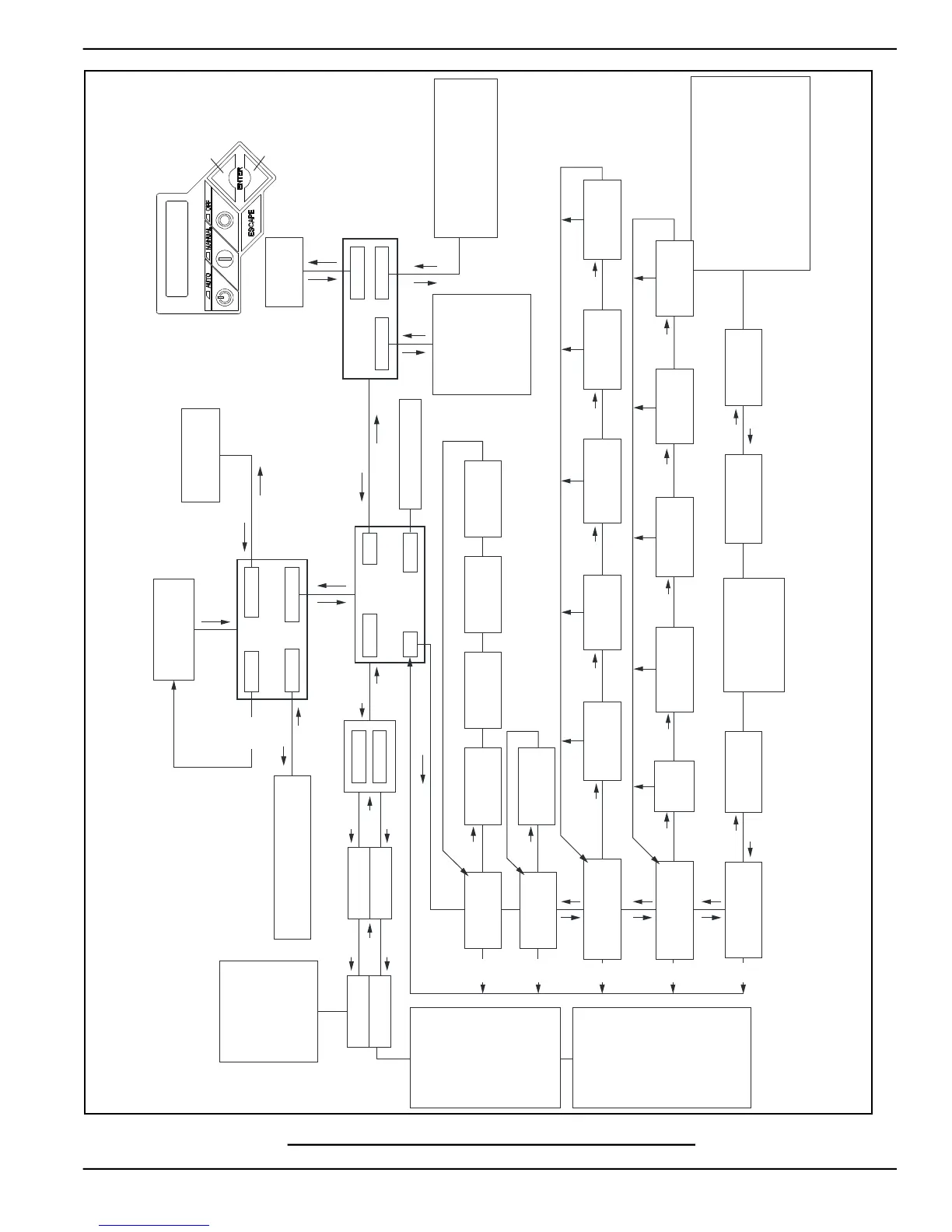
Figure 3-3. Navigation Menu
SYNERGY HSB MENU MAP
UP ARROW =
+
DOWN ARROW =
-
“Run Log”
ESC
ENTER
ENTER
ESC
SYSTEM
BATTERY
DATE/TIME
SUB MENUS
HISTORY
EDIT
MAINT
DEALER
EXAMPLE:
Inspect Battery 200 RnHr or 12/27/13
and
Next Maintenance 200 RnHr or 12/27/13
Exercise Time
14:00 Wed Weekly
Firmware Update
Press Enter
Current Date/Time
02/14/13 07:40
ESC
ESC
ESC
ENTER
ENTER
Current Date/Time
2/12/13 12:22
ESC ENTER
ESC
ESC ESC ESC
ENTER
ENTER
ESC
ESC
ESC
ESC
ENTER
ENTER
ENTERENTERENTER
ESC
ESC
ESC
ENTER
MAINT:
Maint. Log
Run Hrs
Scheduled
ENTER
ESC
ENTER
ENTER
ENTER
ENTERENTER
ENTER
ENTER
Select Month (1-12)
- 2 +
Run Hours (H)
0.0
ENTER
Select Date (1-31)
- 13 +
ENTER
Select Year (0-99)
- 13 +
ENTER
ENTER
ENTER
ENTER
ESC
Switched to “OFF”
Hours of Protection
0 (H)
Access Requires Password
Language
English
Fuel Selection
NG or LP
Possible Message(s)
Corrupted File
Invalid File
File Not Found
Unsupported Device
"Current:V XXXX "
"USB: V XXXX"
"Are You Sure?"
"- Yes or No +"
ESC
ENTER
Firmware Update
Insert USB
Weekly
Bi-Weekly
Monthly
“Alarm Log”
- Alarm Log +
- Run Log +
- 1 thru 50 +
- 1 thru 50 +
ESCENTER
ESCENTER
Select “Yes” then Press “Enter” to continue or Press
“ESCAPE” to escape out of updating.
During update process the Blue “Manual” light
flashes, then the Green “Auto” light flashes.
Sequence does this twice. When update is complete
the unit returns to Install Wizard menu.
When the controller powers up the very first screen
displays the version number for a few seconds.
When update is complete remove Thumb Drive,
then follow the Install Wizard Menu.
- 1 thru 50 +
"Battery Maintained"
"Schedule A Serviced"
"Schedule B Serviced"
"Maintenance Reset"
"Inspect Battery"
"Service Schedule A"
"Service Schedule B"
Warning Message(s)
"Low Battery"
"Exercise Set Error"
"FIRMWARE ERROR-9"
"Fuel Pressure"
"Battery Problem"
"Charger Warning"
"Charger Missing AC"
"Overload Warning"
"Overload Cooldown"
"SEEPROM ABUSE"
"USB Warning"
"Download Failure"
Running Manual
Running-Utility Lost
Running-Remote Start
Running-2 Wire Start
Running - Exercise
Switched Off
Stopped - Auto
Stopped - Alarm
Alarm Message(s)
"High Engine Temp."
"Low Oil Pressure"
"Overcrank"
"Overspeed"
"RPM Sense Loss"
"Underspeed"
"Internal Fault"
"FIRMWARE ERROR-7"
"WIRING ERROR"
"Over Voltage"
"Under Voltage"
"Overload Remove Load"
"Low Volts Remove Load"
"Stepper Over Current"
"Fuse Problem"
ESC
Select Min (0-59)
- 0 +
ESC
ESC
Select Hour (0-23)
- 14 +
ESC
Select Min (0-59)
- 0 +
ESC
Select Hour (0-23)
- 14 +
ESCESC
Quiet Test Mode ?
- YES or NO +
Quiet Test Mode only
on certain models
Language
+ English -
Fuel Selection
+ NG or LP -
Language
+ Espanol -
Language
+ Francais -
Language
+ Portuguese -
+
-
+
-
+
-
+
Battery Condition
“Good” “Inspect Battery” or “Check Battery”
Select Day
- Wednesday +
For complete listing of alarms and warnings,
see Section 5 Troubleshooting.



 To Next Page