Genevac HT-8 & HT-12 Series II Evaporating Systems
04-4541 Issue 1-9 – June 2008 Page 27 of 64
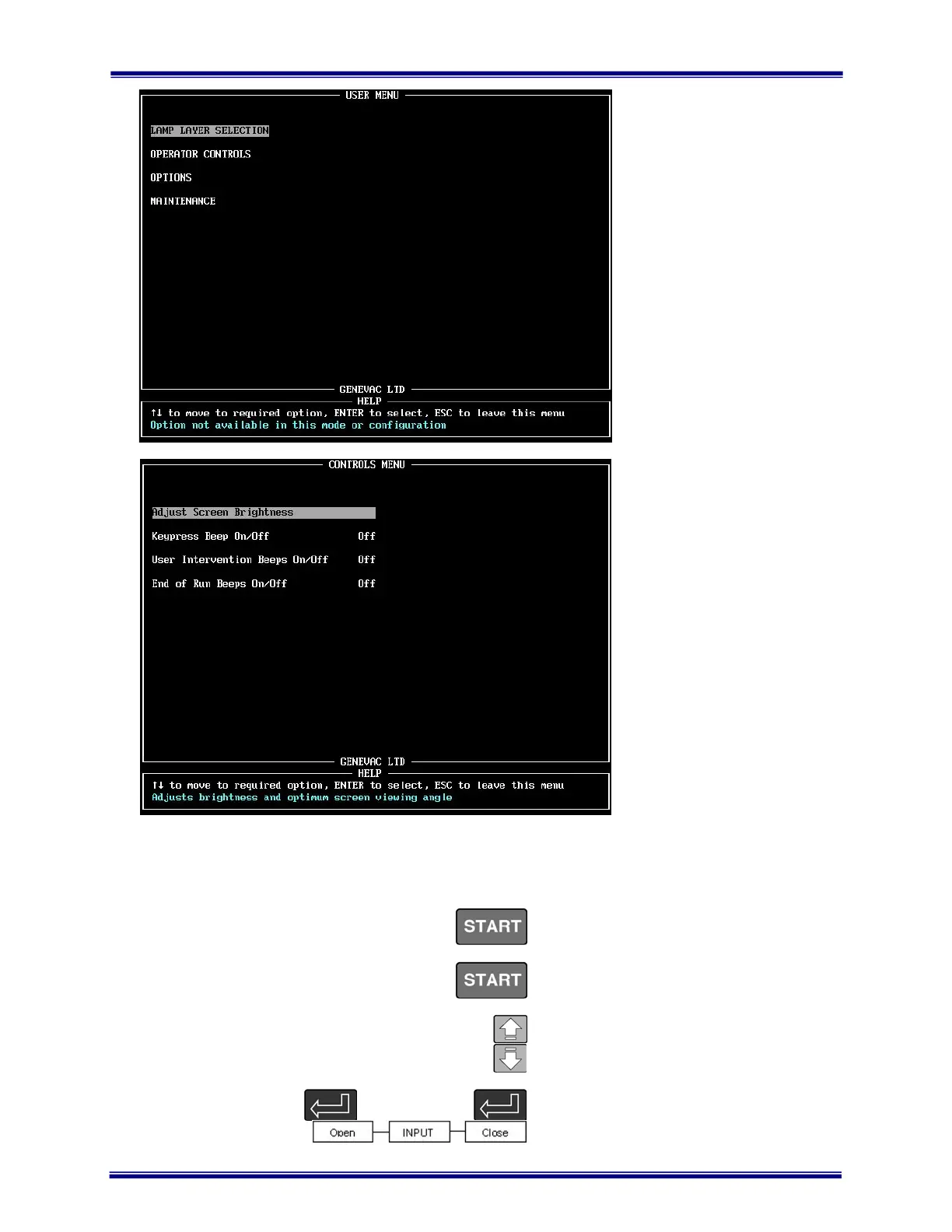
• The USER MENU is
displayed by pressing the
MENU key only when the
chamber is vented and the
rotor stationary.
• Lamp Layer Selection is
not an option for the HT-4
or Mega.
• In Operator Controls you
can adjust the screen
brightness to suit your
viewing angle.
• You can turn the audible
warning off or on.
• Press ESC to leave this
menu
Use the cursor keys to select
the OPERATOR CONTROLS
and press ENTER.
• Use the UP and DOWN
cursor keys to adjust the
screen brightness to suit
your viewing angle.
• Toggle the beep ON or
OFF.
• Press ESC to exit this
screen.
5.5 How to enter control data
All control data is entered from the RUN
DATA screen.
From start up of the system and the
software control screen, press START to
display the SELECT RUN screen.
Select the VIEW/EDIT DETAILS option and
press START to display the RUN DATA
screen.
Use the UP and DOWN cursor keys to
move between fields.
Unless otherwise stated, press ENTER to
‘open’ a field, input your requirement and
press ENTER again to ‘close’ the field.
Artisan Technology Group - Quality Instrumentation ... Guaranteed | (888) 88-SOURCE | www.artisantg.com



 To Next Page