
 Need help?
Do you have a question about the GENPOWER FORTRUST 6110D and is the answer not in the manual?
Description of the Stop key function and its immediate stop capability.
Description of the Start key function in manual mode.
Explanation of Manual and Auto mode selection keys.
Function of Open/Close keys for genset breaker in manual mode.
Details on Set/Confirm, Up/Increase, Down/Decrease, Home/Return keys.
Function of the Reset key for alarms and fault display.
Specifies the total physical size of the controller unit.
Provides the dimensions for the controller's panel mounting hole.
Steps to enter and navigate the controller's settings menu using keys.
Configuration for scheduled start and stop times for the genset.
Settings for automated daily start/stop cycles for testing purposes.
Overview of remote access, monitoring, and initial connection steps.
Detailed instructions for downloading and configuring the mobile application for cloud service.
Final steps to connect the mobile phone to the controller and indicators for connection status.
How to monitor generator status, faults, and operations via the mobile app after connection.
Options for sharing data and modifying controller parameters remotely via the application.
Process for an administrator to set parameters remotely using the mobile application.
Instructions to access the cloud service controller via the official website using credentials.
Guide to download and use the mobile application for remote access to the controller.
Wiring instructions for connecting RS485, GPS, and 4G signals to the external device.
Description of the status indicators on the external cloud device.
Specifies the mounting dimensions and methods for the cloud module.
The FORTRUST 6110D/6120D Controller is a sophisticated device designed for the automation and management of gensets. It serves as a central control unit, enabling users to efficiently monitor, operate, and maintain their generator systems. The 6110D model is primarily used for single machine automation, handling the start and stop functions of a genset based on remote signals. The more advanced 6120D model builds upon this functionality by incorporating mains monitoring and Automatic Mains Failure (AMF) capabilities, making it suitable for applications where seamless power transfer between mains and generator is critical.
The controller's primary function is to automate the operation of a genset. This includes initiating the start sequence, monitoring various engine and generator parameters, and executing shutdown procedures. For the 6120D, it also manages the transfer of electrical load between the mains supply and the genset, ensuring continuous power availability.
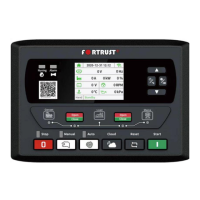
The controller features a user-friendly interface with a clear display and a set of dedicated keys for various operations.
Operating Modes: The device supports multiple operating modes:
Key Functions:
Alarm Management: The controller provides visual and audible alarms for various fault conditions. The alarm light illuminates, and the alarm message is displayed on the screen. The "Reset" key can clear alarms, but if the fault is still present, the alarm will persist.
Calendar Settings:
Parameter Setting: A comprehensive menu allows users to configure various operational parameters, including delays, voltage thresholds, speed settings, and sensor curves. Access to these settings is protected by a password ("1921").
The FORTRUST 6110D/6120D Controller incorporates features that aid in maintenance and troubleshooting:
The FORTRUST 6110D/6120D Controller is designed to provide reliable and flexible control over genset operations, with a strong emphasis on automation, remote management, and user-friendly configuration.
 General
| Storage Temperature Range | -40 °C to +85 °C |
|---|---|
| Cranking Dropouts | Able to survive 0 V for 50 mS, providing supply was at least 10 V before dropout and supply recovers to 5 V afterwards. This is achieved without the need for internal batteries. |
| Alternator Input Range | 15 - 305 VAC RMS |
| Alternator Input Frequency | 50 - 60 Hz at rated engine speed |
| Magnetic Input Range | +/- 0.5 V to 70 V Peak |
| Magnetic Input Frequency | 10, 000 Hz (max) |

 To Next Page