6
2. Overview
2.1 GV-IP Decoder Box Series
2.1.1 Front View
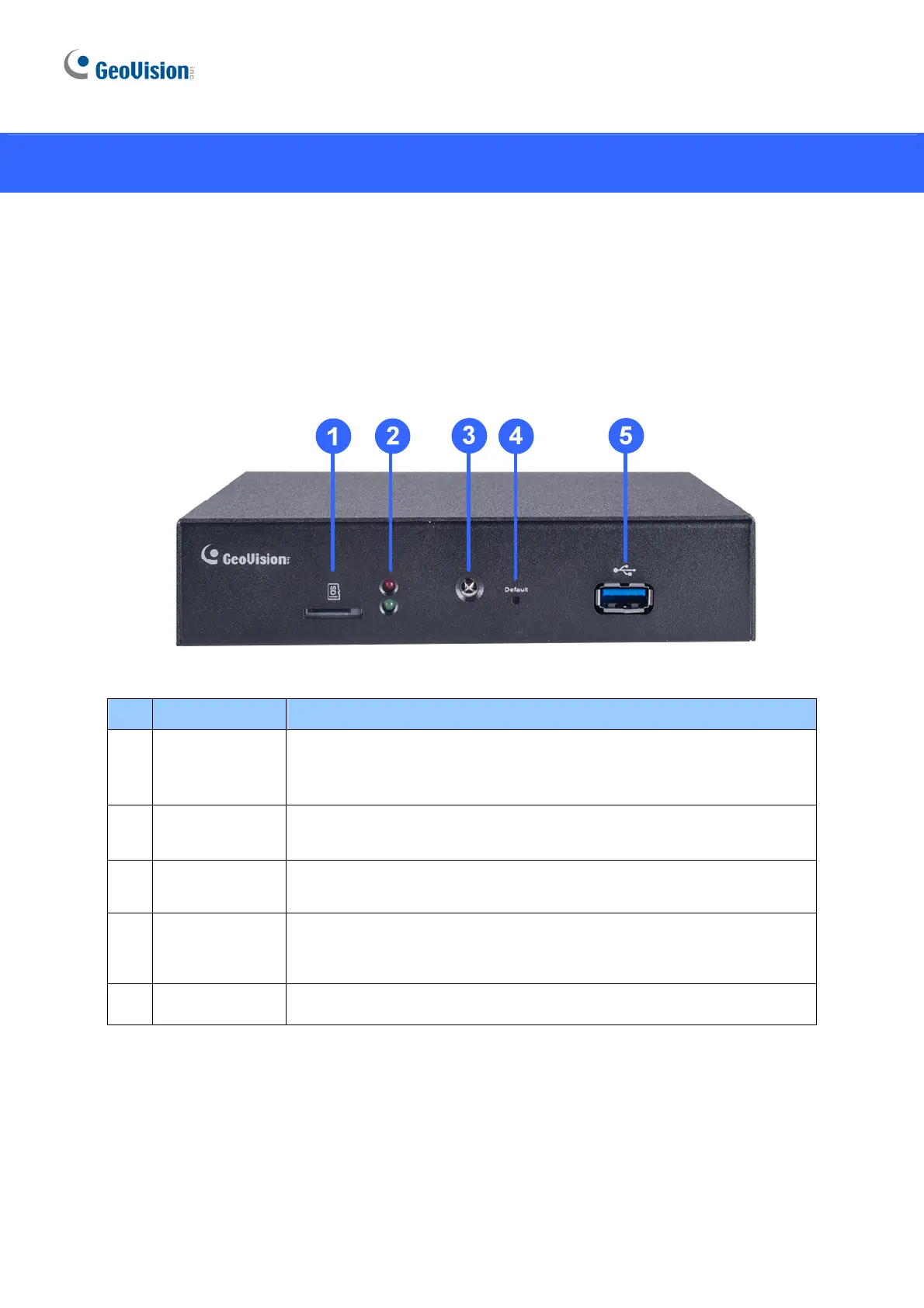
GV-IP Decoder Box Ultra
No. Name Function
1
Micro SD Card
Slot
Connect to a micro SD card for local storage of snapshots and
firmware upgrade.
2 LED Indicators
The red LED indicates the power is supplied.
The green LED indicates the system is ready for use.
3 IR sensor
Receive signal from GV-IR Remote Control for controlling the user
interface at the maximum operation distance of 7 m (22.97 ft).
4 Default
Reset the device to the default factory settings. Use a pin to press the
default button for about 10 seconds. The system will then reset and
reboot itself shortly. See 5.2 Restoring Default Settings.
5 USB 3.0 Connect to a GV-Joystick V2, USB mouse, or USB storage device.


 To Next Page
 Loading...