1 - 12
M510C Series Notebook PC
Connecting the Power
Your Notebook PC is equipped with a high-capacity 8-cell Li-ion battery pack,
and it can operate either on the battery’s power or AC power. However, for the
first time to use your Notebook PC, it is recommended to connect the AC
adapter and use the AC power. When the AC adapter is connected, the battery
is charged immediately.
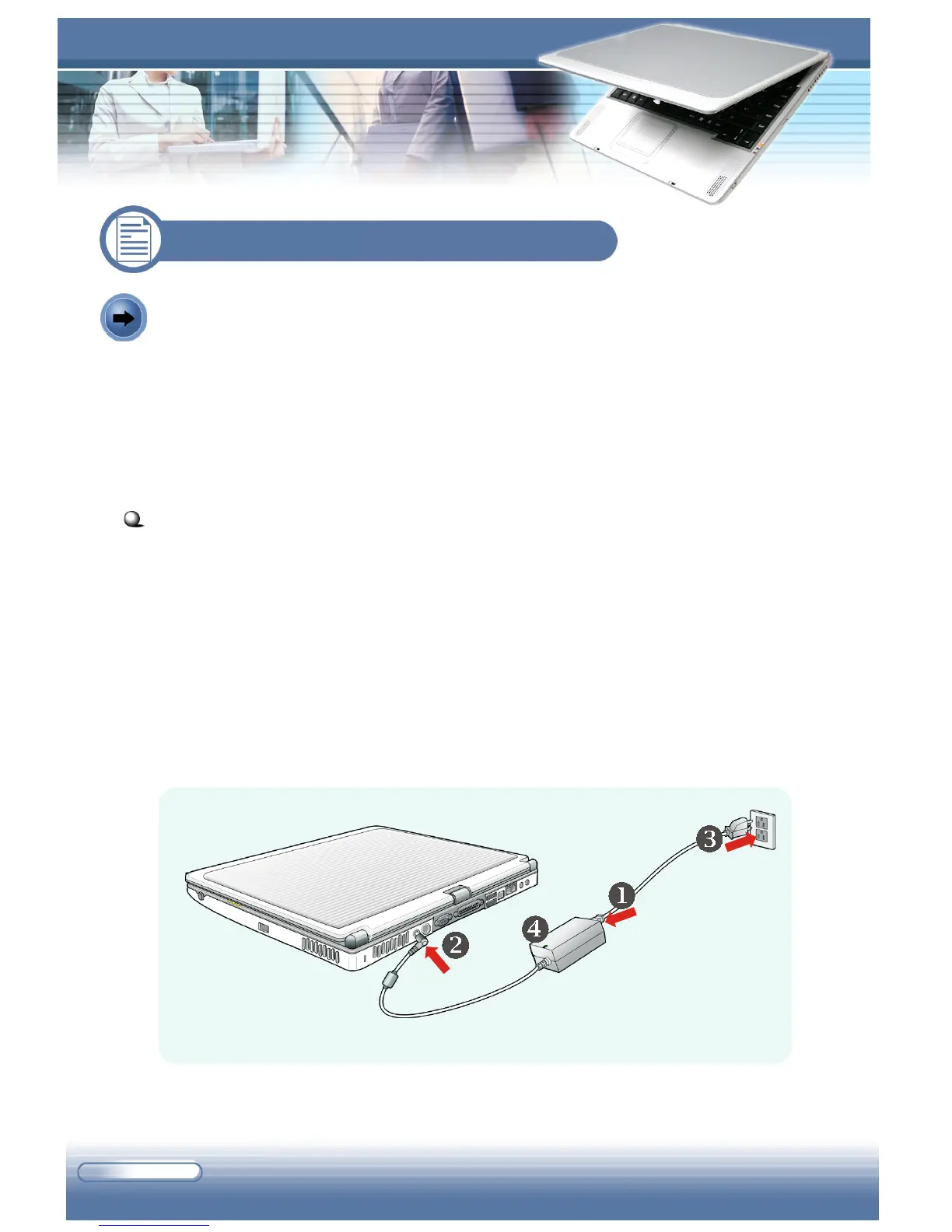
Connecting the AC Power
1. Unpack the package to find the AC adapter and power cord.
2. Attach the power cord to the connector of the AC adapter (
).
3. Plug the DC end of the adapter to the computer (
), and the male end
of the power cord to the electrical outlet (
).
4. When the AC adapter is connected, the green LED on the AC adapter
will light up (
) to indicate that the computer is powered from the
electrical outlet.
Connecting the AC power
1.3 Preparing to Operate



 To Next Page