UserManual
SYNESTHESIA
(FirmwareV1.0.2)
8
TogglingbetweenPresetModeandStompboxMode:
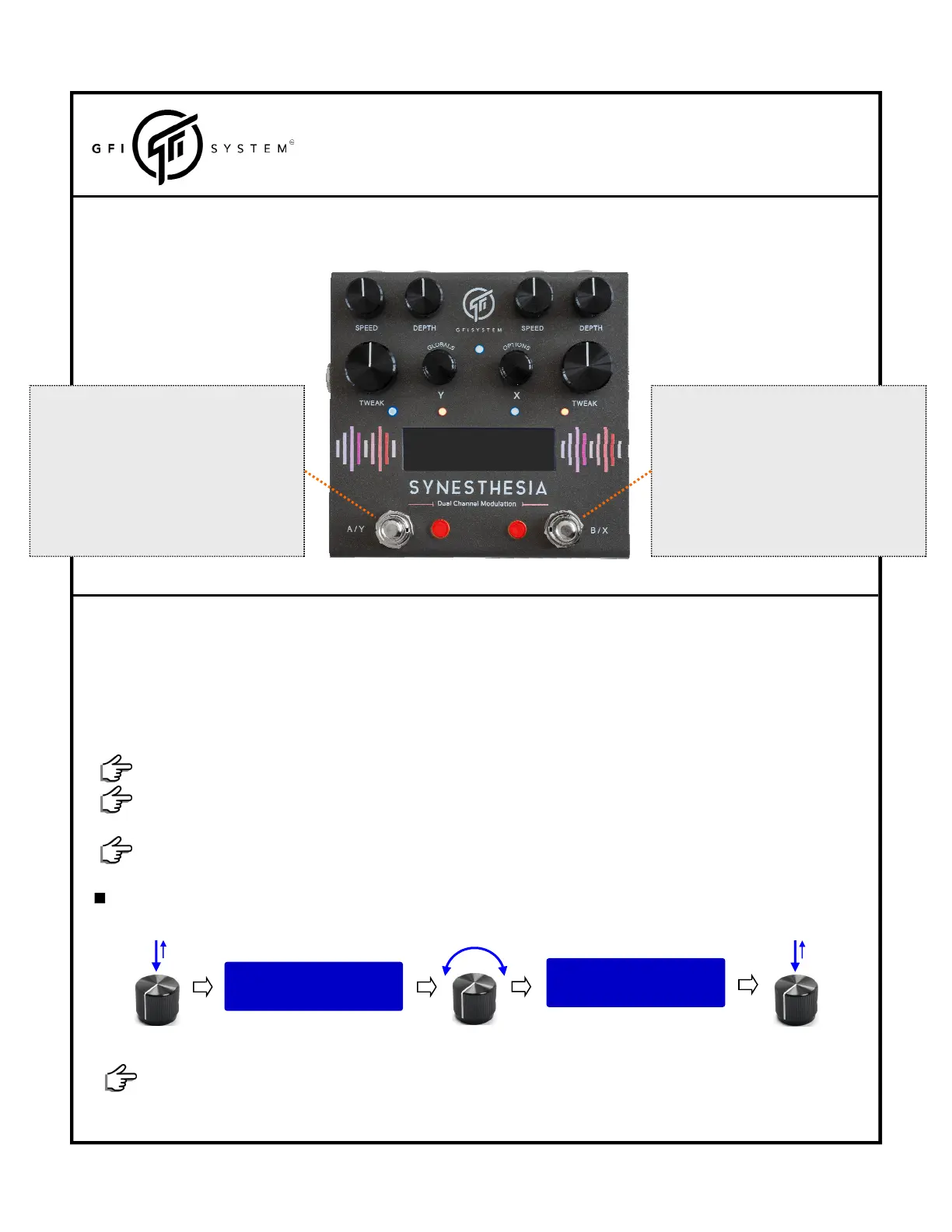
Pressandholdbothfootswitches,tillthebankLEDsblinks3x<thescreenwilltemporarilydisplaytheactivemode>.
TAP
‐>bypass/engageDSP‐X
HOLD(whenbypassed)formorethan500ms
‐>engagesDSP‐Xmomentarily
HOLD(whenengaged)formorethan500ms
‐>engagesDSP‐Xramping.
TAP
‐>bypass/engageDSP‐Y
HOLD(whenbypassed)formorethan500ms
‐>engagesDSP‐Ymomentarily
HOLD(whenengaged)formorethan500ms
‐>engagesDSP‐Yramping.
‐StompboxMode‐
>>Foxchaser \3
FILTER ++ s&hPHI
RampingSpeed
Therampingspeedmaybesetindependentlyforeachknob:
Ramp speed: SLOW
<Turn to change>
Ramp speed: FAST
<Tap to confirm>
pushtheknobofinterest
pushagaintosavethechange
Turntheknobtoselectthespeed:SloworFast
1.10PARAMETERSRAMPING.
DotheabovestepswithfootswitchB/XtorampDSP‐Xparameter.
Theparametersthatyouwanttorampmust firstbemappedforrampingfunction(seechapter2.3).Themap‐
pingprocedurealsosetstheendvalueoftheramping.
Rampingfeatureallowsyoutoautomaticallyrampupto3parameterssimultaneously.
HolddownfootswitchA/Y,forapproximately0.5seconds.
<theDSP‐Yparameterswillstartrampingfromthecurrentpositionoftheknobuptotheendvalue>
Releasethefootswitchtoreversetheramp,restoringtheparametertoitsstartingvalue.
Anexternalauxswitchcanbeusedtoengagerampinginstantlywithoutanyholdingperiod.
Toreturntothemainscenewithoutsavinganychanges:turnanyotherknobsorpushanybuttons/switches.



 To Next Page