Set Clock / Set Odometer
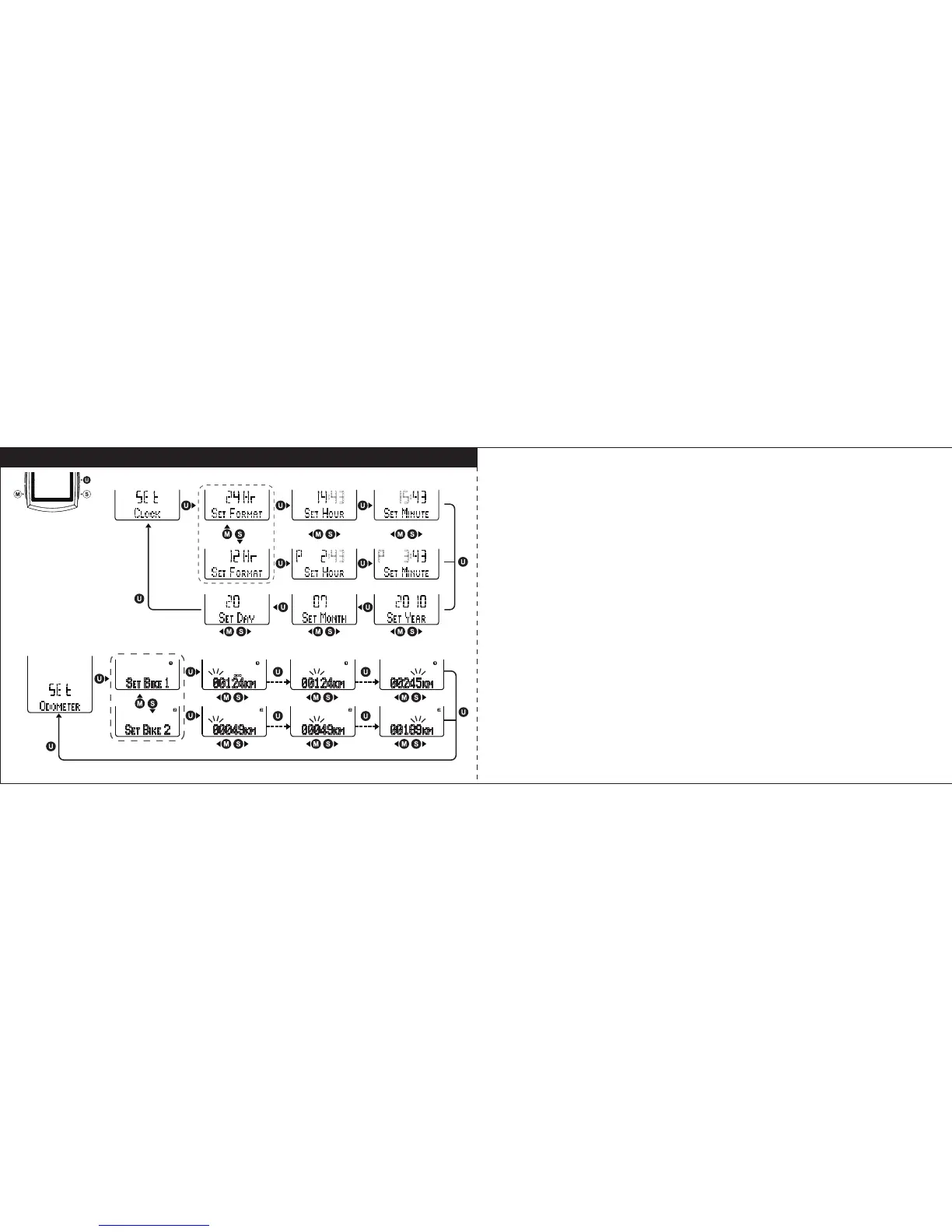
Set Clock
Select “
CLOCK
” in setting mode, and press U key to enter Clock setting. Follow
the key flow diagram. Select 24 hours set or 12 hours set by pressing S or M
key and confirm it by U key. Press S or M key to adjust the hour, minute, year,
month and date and confirm it by U key. (Tips: press and hold S or M key will
speed up the digital number setting).
Set Odometer
Select “
ODOMETER
” in setting mode, and press U key to enter Odometer setting,
Follow the key flow diagram. Press S or M key to select Bike1 or Bike2, and
press U key to enter the odometer digits setting. Adjust the number in blinking
digit by pressing S or M key, and press U key go to next digit. Press U to
confirm the number in each digit and leave the Odometer setting mode.
19 20



 To Next Page