Set Stopwatch
Set Stopwatch
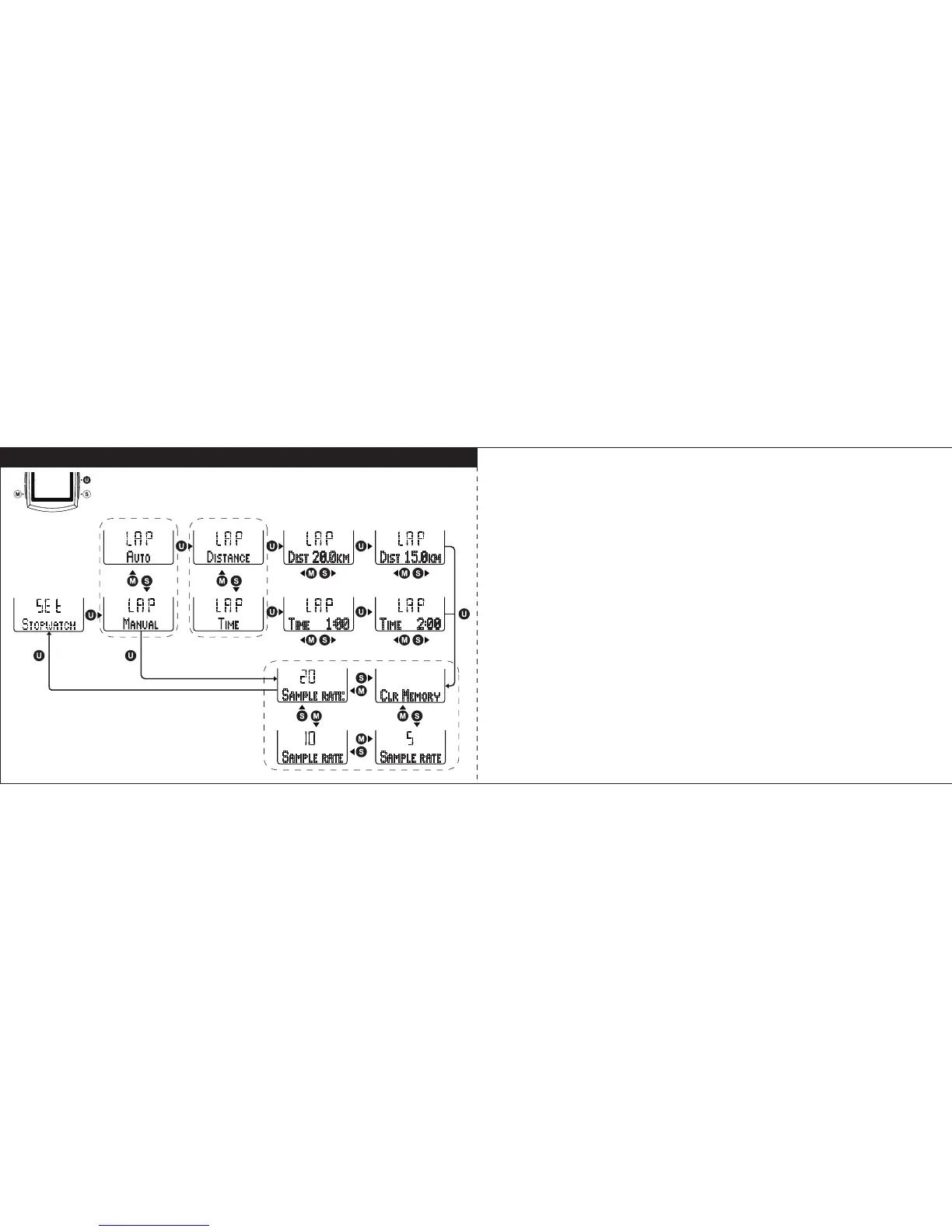
Select “
STOPWATCH
” in setting mode, and press U key to enter Stopwatch
setting. Follow the key flow diagram. Press S or M key to select lapping by
Manual or Auto and press U key to enter the setting. In Manual Lap setting,
select sample rate in 5, 10, 20 seconds to record the data or Clear Memory by
pressing S or M key. Confirm it by the U key and return to the previous mode.
In Auto Lap setting, select auto lapping by Distance or Time (hh:mm), and
preset the lapping distance or lapping time. The lapping distance range is from
0.5 to 99.9km. The lapping time range is 1 minute (0:01) to 9 hours and 59
minutes (9:59). (Tips: press and hold S or M key will speed up the digital
number setting).
23 24



 To Next Page