BIOS Setup - 66 -
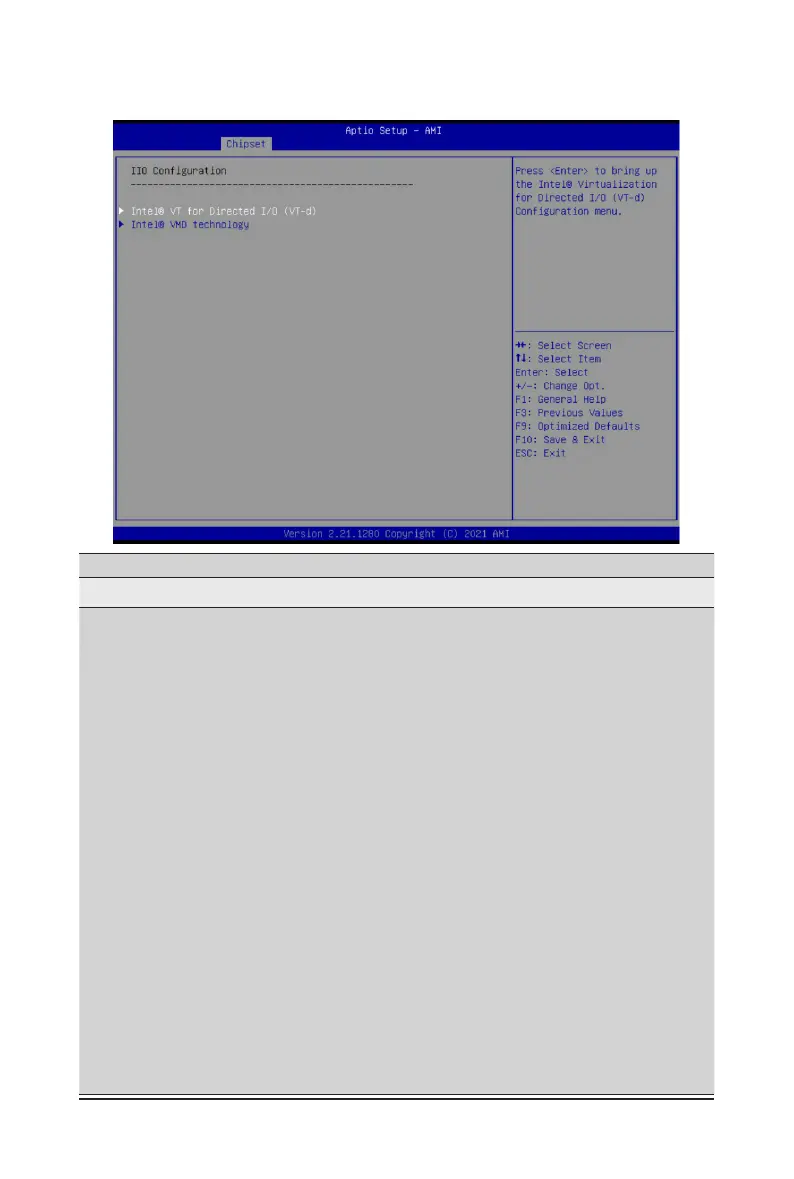
2-3-5 IIO Conguration
Parameter
Description
IIOConguration
Intel
®
VT for Directed I/O (VT-d)
Press[Enter]tocongureadvanceditems.
Intel
®
VT for Directed I/O
– Enable/Disable the Intel VT for Directed I/O (VT-d) support
function by reporting the I/O device assignment to VMM through
DMAR ACPI Tables.
– Options available: Enable, Disable. Default setting is Enable.
ACS Control
– Enable: Programs ACS only to Chipset PCIe Root Ports Bridges.
– Disable: Programs ACS to all PCIe bridges.
– Default setting is Enable.
DMA Control Opt-In Flag
– Enable/Disable DMA_CTRL_PLATFORM_OPT_IN_FLAG
in DMAR table in ACPI. Not compatible with Direct Device
Assignment (DDA).
– Options available: Enable, Disable. Default setting is Disable.
Interrupt Remapping
– Enable/Disable the interrupt remapping support function.
– Options available: Auto, Enable, Disable. Default setting is Auto.
x2APIC Opt Out
– Options available: Enable, Disable. Default setting is Disable.
Pre-boot DMA Protection
– Options available: Enable, Disable. Default setting is Disable.


 To Next Page