BIOS Setup - 76 -
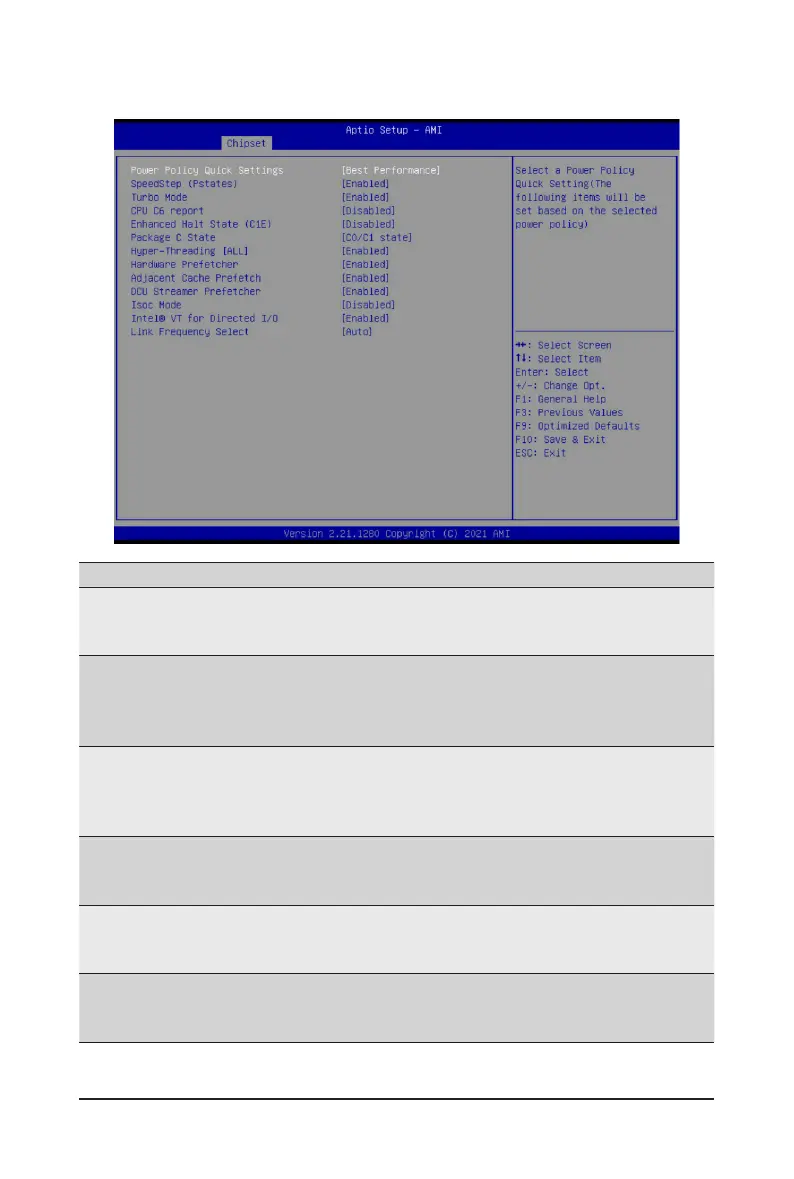
2-3-11 Power Policy
Parameter
Description
Power Policy Quick Settings
Selects a Power Policy Quick Setting.
Optionsavailable:Standard,BestPerformance,EnergyEfcient,Turbo
Lock. Default setting is Best Performance.
SpeedStep (Pstates)
Conventional Intel SpeedStep Technology switches both voltage and
frequency in tandem between high and low levels in response to processor
load.
Options available: Enabled, Disabled. Default setting is Enabled.
Turbo Mode
When this item is enabled, the processor will automatically ramp up the
clock speed of 1-2 of its processing cores to improve its performance.
When this item is disabled, the processor will not overclock any of its core.
Options available: Enabled, Disabled. Default setting is Enabled.
CPU C6 report
Enable/Disable the BIOS to enable the report from the CPU C6 state (ACPI
C3) to the OS.
Options available: Disabled, Enabled, Auto. Default setting is Disabled.
Enhanced Halt State (C1E)
Enable/Disable the C1E support for lower power consumption. Takes effect
after reboot.
Options available: Enabled, Disabled. Default setting is Disabled.
Package C State
CongurestheC-Statepackagelimit.
Options available: C0/C1 state, C2 state, C6(non Retention) state,
C6(Retention) state, Auto. Default setting is C0/C1 state.


 To Next Page