User Guide
GD32450Z-EVAL
38
Learn to use TLI to control LCD for displaying different images
Learn to use IPA to process image data
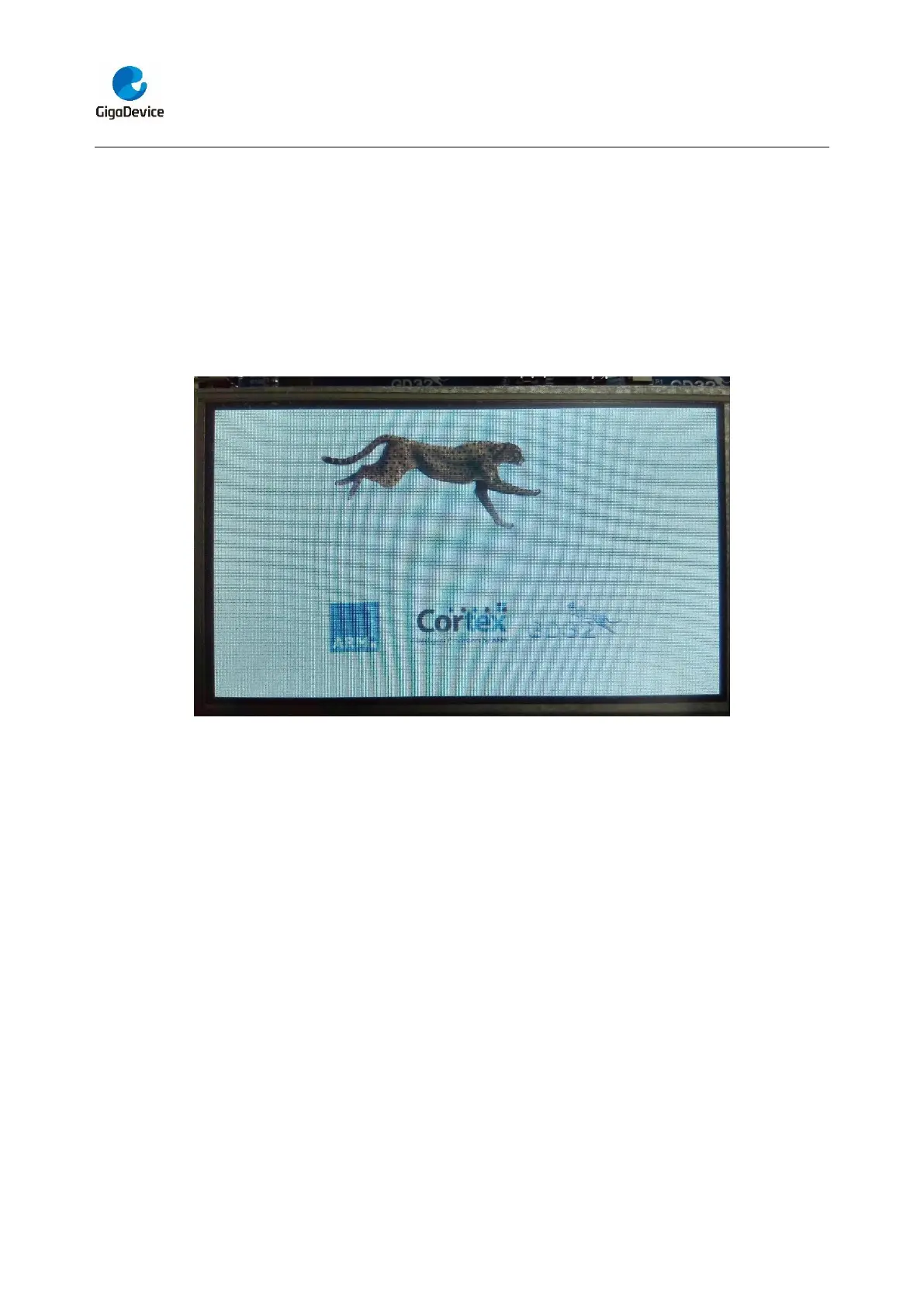
5.24.2. DEMO running result
Jump the JP12 to LCD, and download the program <24_TLI_IPA> to the EVAL board
and run. After downloading program to board, a running cheetah on the background of
GD logo is appeared on the LCD, which outputs as following. DC-5V power supply is
recommended due to the large current consumption caused by LCD screen.
5.25. TRNG_Get_Random
5.25.1. DEMO purpose
This demo includes the following functions of GD32 MCU:
Learn to use TRNG generate the random number
Learn to communicate with PC by USART
5.25.2. DEMO running result
Jump the JP13 to USART with the jumper cap, and download the program
<25_TRNG_Get_Random> to the EVAL board and run. Connect serial cable to COM0,
open the serial terminal tool supporting hex format communication. When the program is
running, the serial terminal tool will display the initial information. User can use the serial
terminal tool to input the minimum and maximum values (for example, the minimum value
is 0x03, the maximum value is 0x0F), then application will generate random number in
the input range and display it by the serial terminal tool.
Information via a serial port output as following:


 To Next Page