3
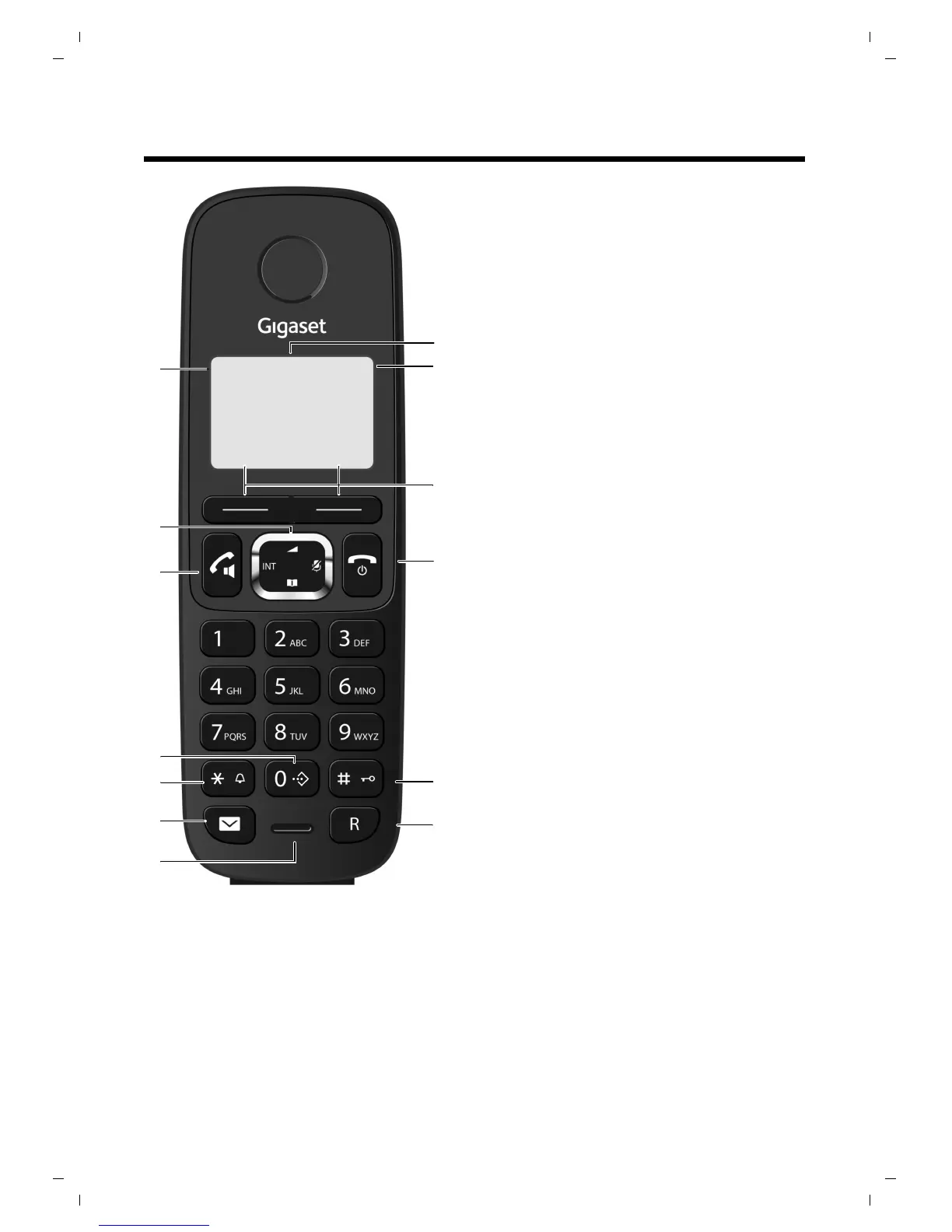
The handset at a glance
The handset at a glance
1 Display in idle status
2 Battery charge status (
¢ page 4)
3 Display keys (¢ page 21)
4 End call key, On/Off key
End call,
cancel function, go back one menu
level (pres
s briefly), back to idle status (press
and hold), activate/deactivate handset (press
and hold in idle status)
5 Has
h key
Ke
ypad lock on/off (press and hold in
idle status)
6 Re
call key
–
Consultation call (flash)
– Insert a dialling pause (press and hold)
7 Microphone
8 Message key (
¢ page 30)
Access to call list
9 Star key
Ri
ngtone on/off (press and hold);
with an open connection: switch between dial
puls
ing/tone dialling (press briefly)
10 Pr
iority key (
¢ page 26)
Memory key (press and hold)
11 Talk key
Flashes: incoming call;
Accept a call (press briefly);
12 Control key (
¢ page 21)
u initiate an internal call;
v mute the microphone during a call;
t open audio settings;
s open the directory;
13 Si
gnal strength symbol of the c
onnection to
the base
You can register up to four handsets to the
Gigaset A730 (
¢ page 24).


 To Next Page