EasyManua.ls Logo

Gigaset A730 - Handset Display Symbols; Call Log

Gigaset A730
40 pages
Print Icon
To Next Page IconTo Next Page
To Previous Page IconTo Previous Page
Loading...
4
The handset at a glance
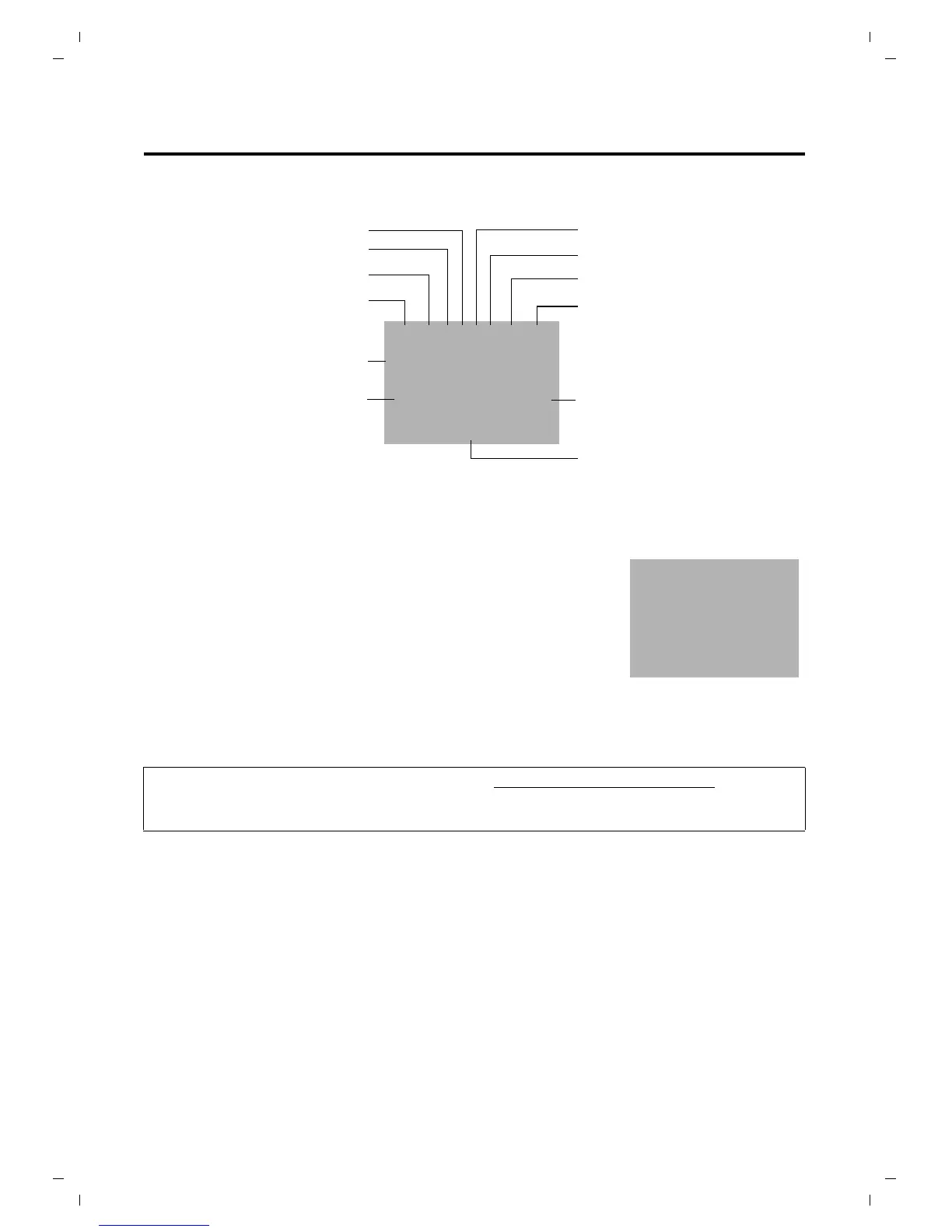
Handset display symbols
The following symbols are displayed dependent on the settings and the operating status of
your telephone:
Display in idle status
Ringtone switched off
Microphone mute
Reviewing phonebook
Signal strength
Alarm activated
Keypad locked
Reviewing call log
Battery charging state
Ð Z h ô ¼ ˝ Ë U
07/15
10/14
Current date
Current time
REDIAL E MENU
Up /Down indication
1
Internal number of the handset
u Reception signal between the base and handset:
Ð Steady on: connected with base; blinking: connection lost.
If the handset goes out of range a warning tone will be heard.
u Battery charge status:
= e V U (empty to full)
= low warning tone: batteries almost empty
e V U during charging, the symbol is outlined red
while the cha
rging state changes periodically
For more information about your telephone, visit
www.gigaset.com/gigasetA730.
Have fun using your new phone!

Ð U
07/15
10/14
REDIAL E MENU

Table of Contents

Related product manuals