C= Digital clock;
D= Speedometer;
E= Odometer;
F= Partial odometer gauge;
G= Maximum speed indicator;
01_04
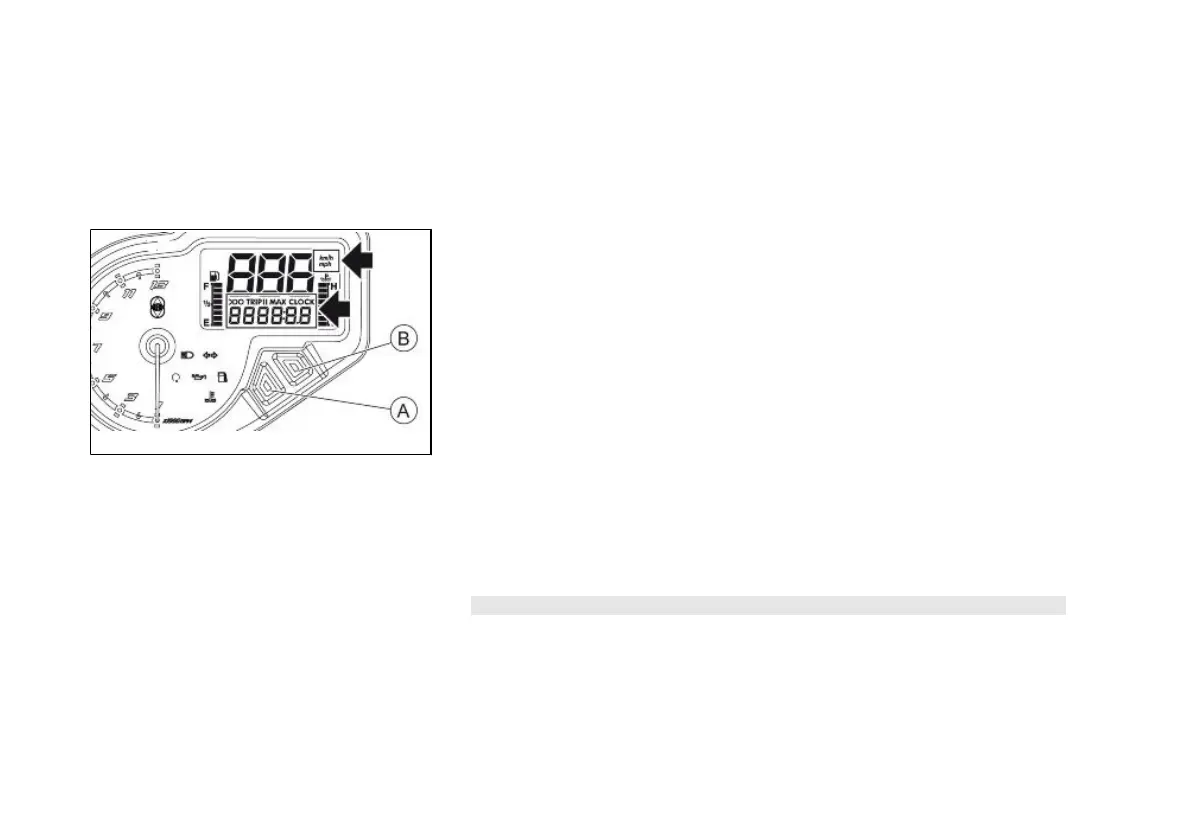
Setting the total and trip odometers (01_04)
When the "MODE" «A» key is pressed briefly, the following functions are obtained
simultaneously:
1. TOTAL ODOMETER - the word "ODO" and "km/h" or "mph" appear (in ac-
cordance with the unit of measurement set). The value displayed corre-
sponds to the total distance travelled by the vehicle and cannot be reset to
zero.
2. TRIP ODOMETER - the word "TRIP I" or "TRIP II" appears and "km/h" or
"mph" (in accordance with the unit of measurement set). The value shown
corresponds to the distance of the journey travelled since the device was last
reset to zero. The value can be reset to zero by pressing and holding (for
more than 3 seconds) the "SET" «B» key.
3. MAXIMUM SPEED- the word "MAX" and "km/h" or "mph" appear (in ac-
cordance with the unit of measurement set). The value shown corresponds
to the maximum speed reached by the vehicle and can be reset to zero by
pressing and holding (for more than 3 seconds) the "SET" «B» key.
4. CLOCK - the word "CLOCK" appears. The displays shows the set time.
N.B.
WHEN THE VEHICLE IS STOPPED AND WITHIN FIVE SECONDS OF TURNING
THE KEY SWITCH TO THE "ON" POSITION, IT IS POSSIBLE TO SWITCH FROM
DISPLAYING KILOMETRES (Km/h) TO MILES (mph), BY PRESSING THE
"MODE" «A» AND "SET" «B» KEYS SIMULTANEOUSLY FOR MORE THAN TEN
SECONDS.
12


 To Next Page