CAUTION
IT IS STRONGLY ADVISED NOT TO USE THE FUNCTIONS OF THE DIGITAL
DISPLAY PANEL WHILE THE VEHICLE IS MOVING.
01_05
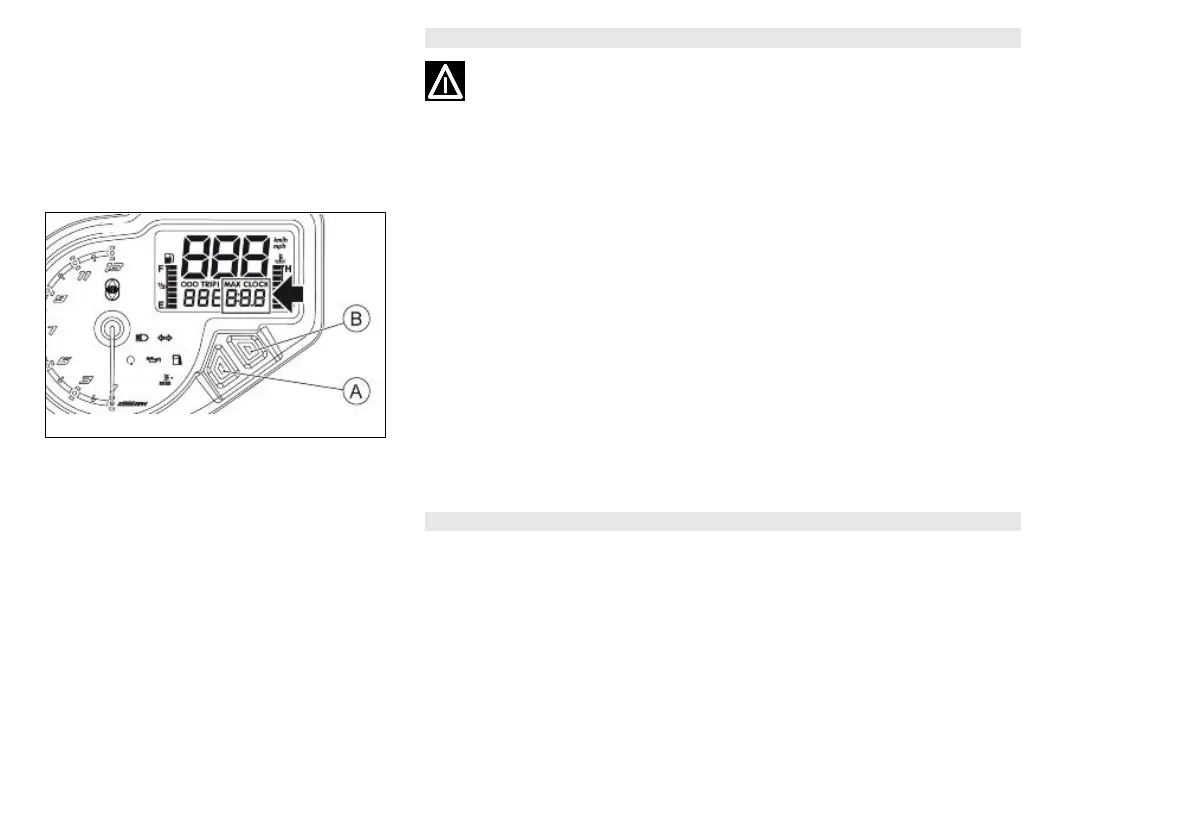
Setting the hour/minutes function (01_05)
To set the clock press the "SET" «B» key for more than three seconds, with the
"CLOCK" function active. The figures showing the hours start to flash.
Set the hour using the "MODE" «A» key.
When the "SET" «B» key is pressed again, the figures which represent the minutes
will begin to flash.
Set the minutes using the "MODE" «A» key.
Press the "SET" «B» key again for more than three seconds to exit the adjustment
mode.
During the update process, not pressing any buttons for an extended period auto-
matically end the process and the display will automatically show the modified time.
CAUTION
IT IS ONLY POSSIBLE TO SET THE TIME WHEN THE VEHICLE IS STOPPED AND
THE KEY IS «ON».
13


 To Next Page