6. Operation
6.1 Main Menu
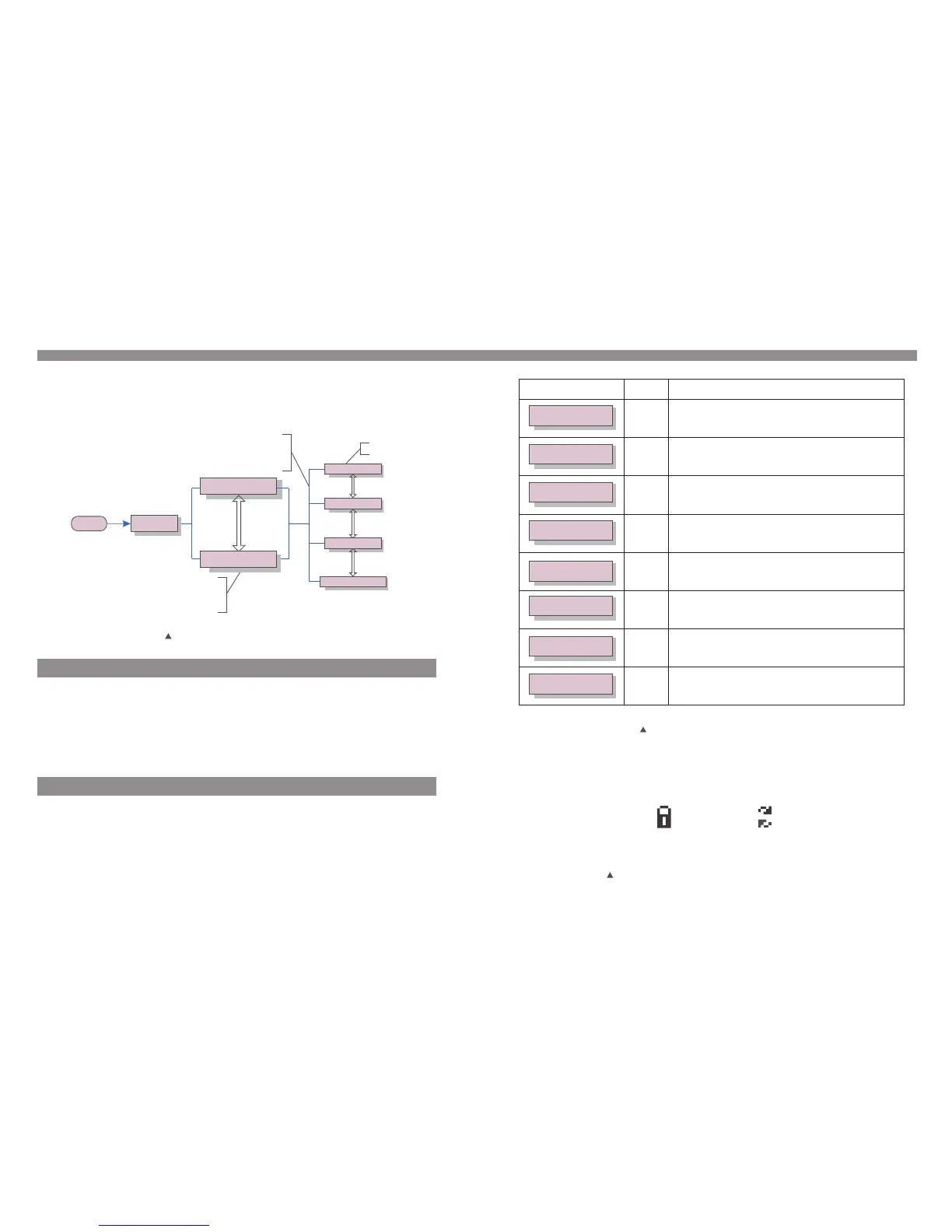
During normal operation, the display shows the power and the operation status alternately
with each screen lasting for 10 seconds (see Figure 6.1). Screens can also be scrolled
manually by pressing the UP and DOWN keys. Pressing the ENTER key gives access to
Main Menu.
Figure 6.1 Operation Overview
5 sec
Model name
Start
Power 9424W
01-01-2010 09:04
Status: Generating
01-01-2010 09:04
Information
Settings
Advanced Info.
Advanced settings
UP/DOWN
UP/DOWN
UP/DOWN
UP/DOWN or
auto-scroll
(10 sec)
Pressing the
ENTER key
gives access to
the main menu.
Pressing the
ESC key
calls back the
previous menu.
Main Menu
There are four submenus in the Main Menu (see Figure 6.1):
1. Information
2. Settings
3. Advanced Info.
4. Advanced Settings
6.2 Information
The Solis three phase PV inverter main menu provides access to operational data and
information. The information is displayed by selecting "Information" from the menu and
then by scrolling up or down.
6. Operation
Pressing the ESC key returns to the Main Menu. Pressing the ENTER key to lock (Figure
6.2(a)) or unlock (Figure 6.2 (b)) the screen.
V_DC1 350.8V
I_DC1 5.1A
V_DC2 350.8V
I_DC2 5.1A
V_Grid 400.4V
I_Grid 8.1A
Status: generating
Power: 1488W
Grid Frequency
F_Grid 50.06Hz
Total Energy
0258458 kwh
This Month: 0123kwh
Last Month: 0123kwh
Today: 02kwh
Yesterday: 01kwh
10 sec
10 sec
10 sec
10 sec
10 sec
10 sec
10 sec
10 sec
V_DC1: Shows input 01 voltage value.
I_DC1: Shows input 01 current value.
V_DC2: Shows input 02 voltage value.
I_DC2: Shows input 02 current value.
V_Grid: Shows grid voltage value.
I_Grid: Shows grid current value.
Status: Shows status of the inverter.
Power: Shows output power value.
F_Grid: Shows frequency of grid value.
Total energy output value (since the last time
energy was cleared).
This Month: Total energy generated this month.
Last Month: Total energy generated last month.
Today: Total energy generated during this Day.
Yesterday: Total energy generated last Day.
Display
Duration
Description
Table 6.1 Information Indicator
5.2 Stop the Inverter
Figure 6.2 Lock and Unlock the Screen of LCD
(b)(a)
.20. .21.


 To Next Page