25
Section 2.0 — Appendix / Reference
2.3 Control Head Configuration
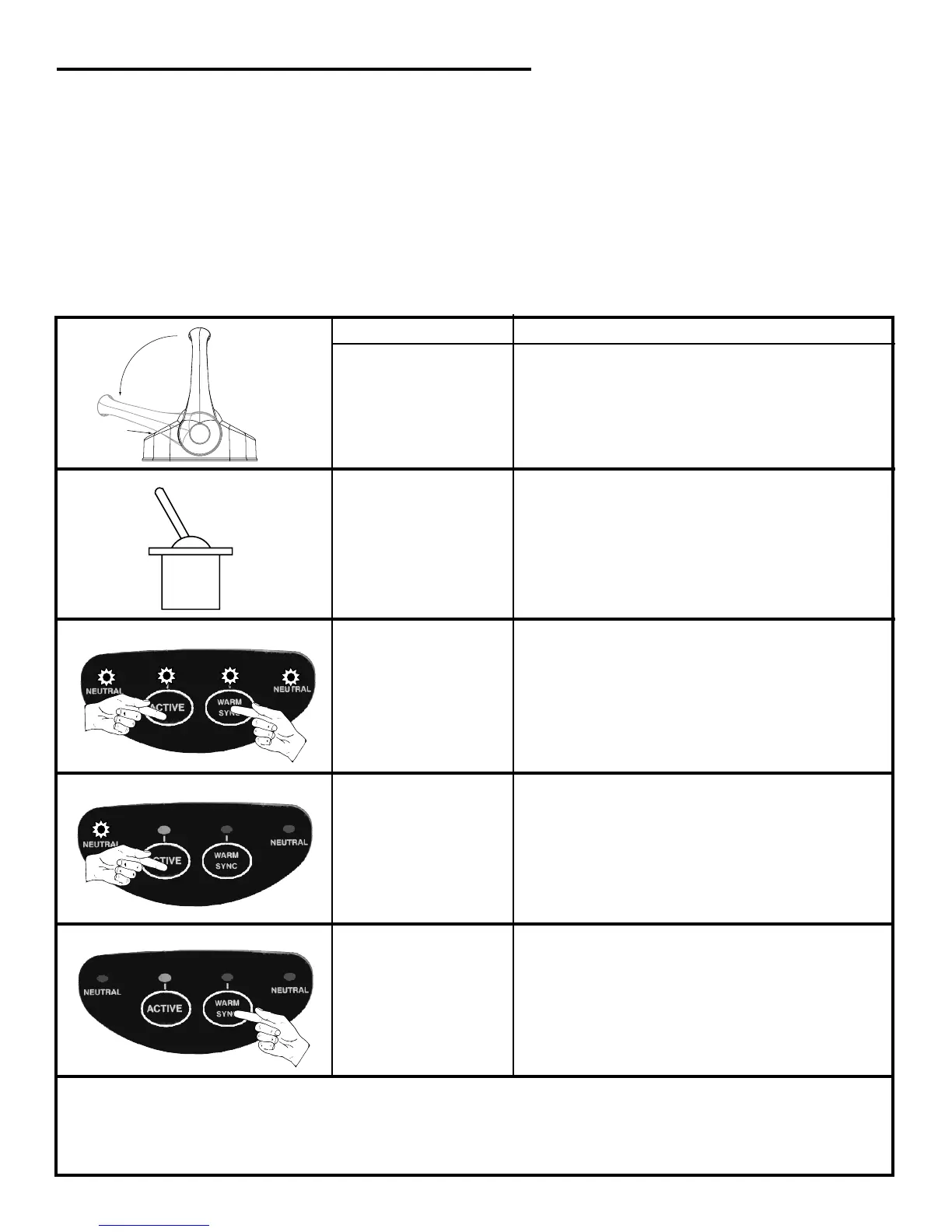
In order for each Control Head to communicate with the Control Processor, each Control Head must have a unique Handle
Identifier. If you purchased a complete system, configuration and handle identification was performed by the factory.
If you purchased a control head separately, you will NEED to set the handle identifier for that control station. Follow the 8
steps below:
Move control
station handles to
FULL ASTERN
positions
No result
Turn
power ON
to the system
TAKE LED will begin to flash
All 4 LEDs begin to flash
Press & Release the
ACTIVE button one
time to select
Handle Identifier
Mode
PORT NEUTRAL LED will begin to flash
Press & HOLD the 2
center buttons
(ACTIVE & WARM)
for approximately 2
seconds until all 4
LEDs begin to flash-
RELEASE buttons
ACTION RESULT
To Change Handle Identifier, Follow These 8 Steps:


 To Next Page