PAGE 38 INSTRUCTION MANUAL G-COMBO
4-7 AIS Settings
AIS feature requires an optional AIS receiver.
To go to the AIS settings:
1 Press and hold MENU.
2 Select the AIS icon.
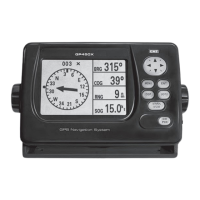
4-7-1 Display filter
There are a couple of methods to filter AIS vessel in this unit
as below.
Filter by Type: The type of vessel which is selected will not
be displayed on the chart.
Filter by distance: Vessels outside the radius of selected
distance from own ship is filtered.
Filter by speed: Vessels with speed below the set value are
filtered.
Show Dangerous Only: When this option is selected, it
shows dangerous vessel only.
4-7-2 Alarm option
Dangerous Vessel Alarm: When this option is selected
an alarm will activate. Even if this option is not selected,
dangerous vessels will still show on the chart.
TCPA Limit: Set the Time of Closet Point of Approach limit.
CPA Limit: Set the Closet Point of Approach limit.
Proximity alarm: Trigger an alarm when any AIS equipped
vessel is within a set proximity radius.
Proximity radius: Set a radius for proximity alarm.
4-7-3 Display options
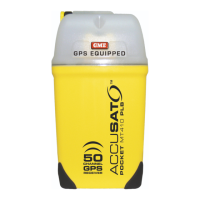
Projected course: Set a time for projected course. The
project course shows the estimated course of vessel based on
the given time.
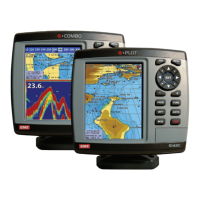
Range rings : Select a number of Range rings.
4-7-4 Restore default
Returns every AIS setting to default.


 To Next Page