NOTE: The arrival and anchor watch alarms cannot both be
activated at the same time.
ARRIVAL AND ANCHOR WATCH ALARMS
Arrival Alarm
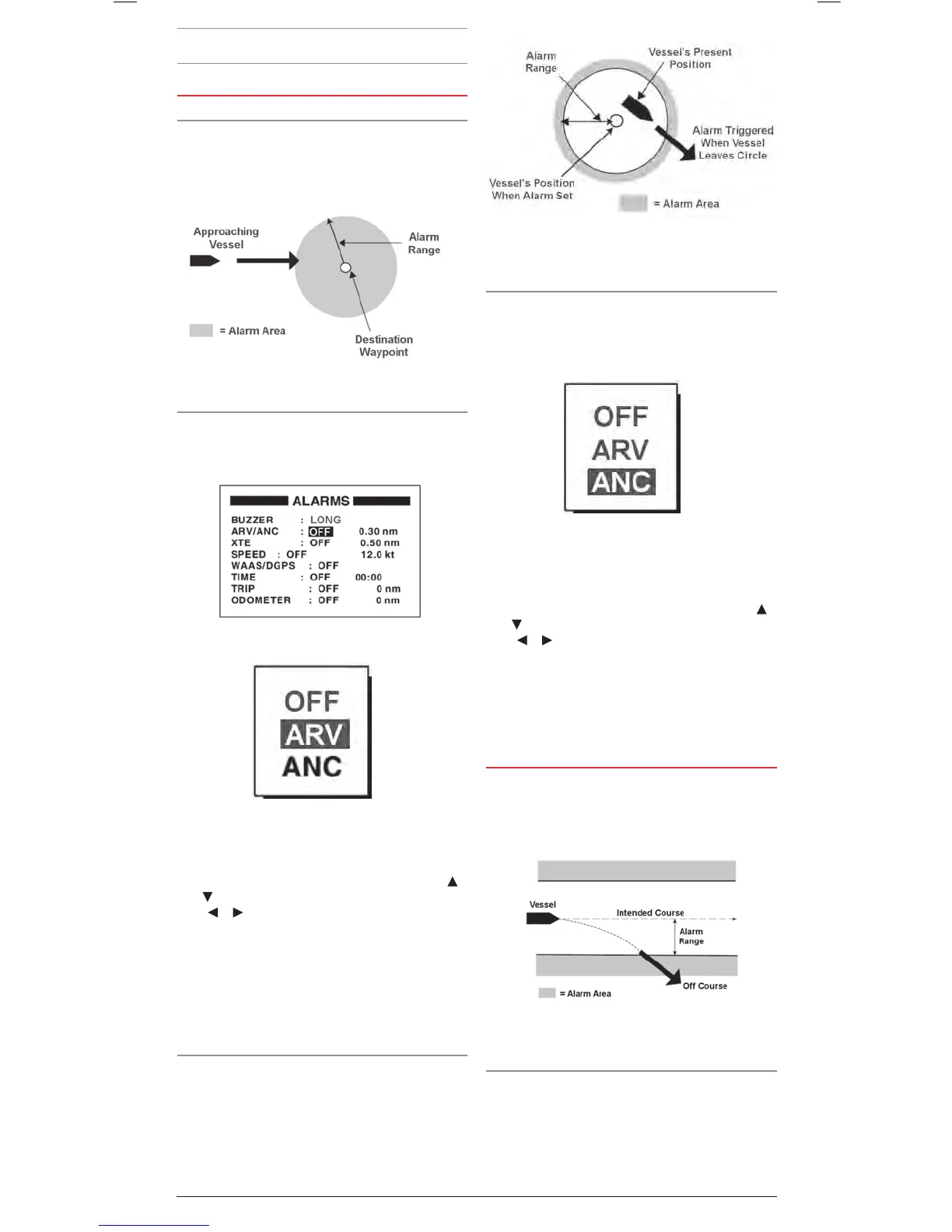
The arrival alarm alerts you when your vessel is approaching
a destination Waypoint. The area that defines the arrival zone
is a circle surrounding the destination Waypoint. The alarm is
triggered when your vessel enters the circle.
Setting the Arrival Alarm
1. From the main menu select ALARMS and press the ENT key
2. Select the ARV/ANC field and press the ENT key.
3. The Arrival/Anchor Options list appears.
4. Select ARV and press the ENT key.
5. The Alarm Range field is automatically highlighted. Press the
ENT key.
6. Use the Cursor keypad to enter the alarm range. Use the
or keys to change the number at the cursor position and
the or keys to move the cursor position left or right.
When finished press the ENT key.
7. Press MENU twice to exit and return to the
navigation screen.
When your vessel approaches a destination Waypoint at the
range set here the buzzer sounds and the message ARV
ALARM! is displayed.
Anchor Watch Alarm
The Anchor Watch alarm warns you that your anchored vessel is
moving excessively when it should be at rest. It works similarly
to the arrival alarm except that it alerts you when your vessel
leaves a circle rather than enters it. When setting the alarm
you should allow for the possible distance your vessel may
legitimately drift while at anchor. The alarm distance should
be set to warn if the anchor is dragging and your position is
moving excessively.
Setting the Anchor Watch Alarm
1. From the main menu select ALARMS and press the ENT key
2. Select the ARV/ANC field and press the ENT key.
3. The Arrival/Anchor Options list appears.
4. Select ANC and press the ENT key.
5. The Alarm Range field is automatically highlighted. Press the
ENT key.
6. Use the Cursor keypad to enter the alarm range. Use the
or keys to change the number at the cursor position and
the or keys to move the cursor position left or right.
When finished press the ENT key.
7. Press MENU twice to exit and return to the
navigation screen.
When your vessel drifts beyond the range set here the buzzer
sounds and the message ANC ALARM! is displayed.
CROSS TRACK ERROR (XTE) ALARM
The XTE error occurs when your ship strays from its intended
course. The XTE is useful when navigating through narrow
channels or as a simple warning in case you are distracted
while navigating.
Setting the XTE Alarm
1. From the main menu select ALARMS and press the ENT key
2. Select the XTE field and press the ENT key.
3. The XTE Options list appears. Select ON and press the
ENT key.
4. The Alarm Range field is automatically highlighted. Press the
ENT key.
Arrival Alarm
Anchor Alarm
XTE Error Alarm


 To Next Page