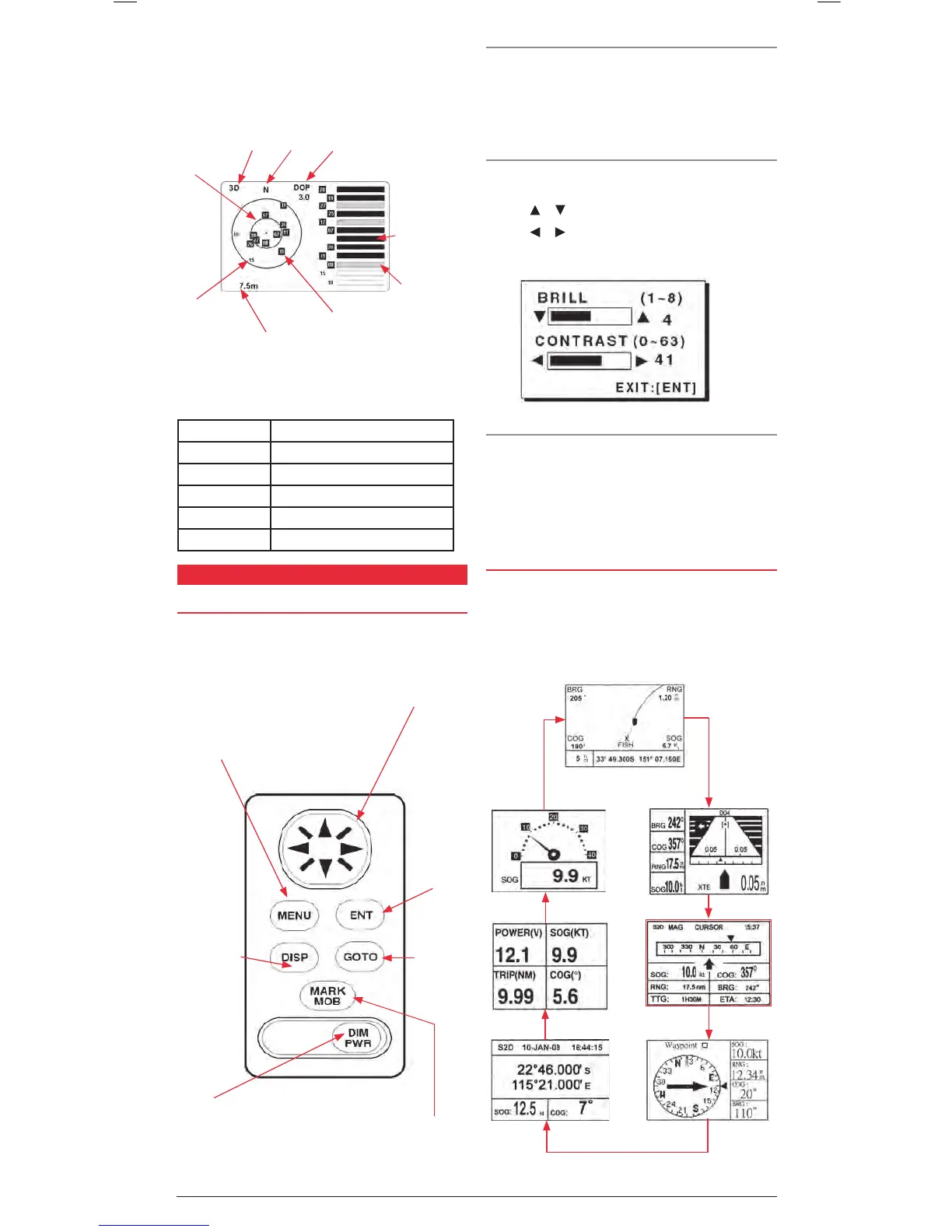
downloaded that signal bar will become solid. A hollow bar
indicates the receiver is not yet receiving a signal from that
satellite (it may be blocked by obstacles).
To access the satellite display page select SATELLITE
from the main menu.
The following table shows the receiver status indicators that can
be displayed in the top left of the satellite page.
INDICATOR MEANING
2D 2D GS position fix
3D 3D GPS position fix
S2D 2D SBAS GPS position fix
S3D 3D SBAS GPS position fix
SIM Simulator mode
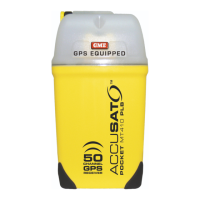
CONTROLS
USING THE KEYPAD
TURNING THE UNIT ON AND OFF (DIM/PWR)
To turn the GP450X on, briefly press the DIM/PWR key. The
unit will beep and turn on.
To turn the GP450X off, press and hold the DIM/PWR key for 3
seconds. The unit will count down then turn off.
ADJUSTING THE DISPLAY CONTRAST AND BACKLIGHT
(DIM/PWR)
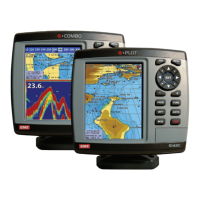
To adjust the display brilliance and contrast, briefly press the
DIM/PWR key.
Press the
or keys to adjust the Brilliance.
Press the
or keys to adjust the contrast.
Press the ENT key to exit and save the new settings.
MARK/MOB
Briefly press the MARK/MOB key to save the current location
as a Waypoint.
Press and hold the MARK/MOB key to store your current
location as an MOB (Man Over Board) Waypoint. You will be
offered an option to immediately navigate back to the point.
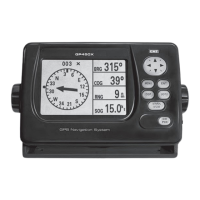
CYCLING THROUGH THE DISPLAYS (DISP)
Briefly press the DISP key to cycle through the available
navigation screens. The GP450X has seven display modes –
Plotter, Highway, Steering, Compass, Navigation Data, and
two user configurable display options - Big Numbers
and Speedometer.
First Press: Screen Zoom range.
Also escapes from
current function.
Second Press: Accesses Main
Menu options.
Cycles through
Navigation
Display screens.
Turns unit On or OFF.
Allows adjustment of
screen contrast and
backlight brilliance.
Cursor Keypad: Adjusts cursor position
on screen. Selects
Menu items. Enters
alphanumeric data.
Accepts
selected
menu items.
Selects or
cancels a
destination.
Short Press: Marks your current
position as a waypoint.
Long Press: Marks your current
potion as an MOB point.
Receiver Status
North
Dilution of Precision
DOP (value).
Bars show
signal level.
Receiving /Using
Signal.
Downloading
Data.
45
0
Elevation
5
0
Elevation
Altitude
Satellite numbers being used
for positioning are highlighted
on the display.


 To Next Page