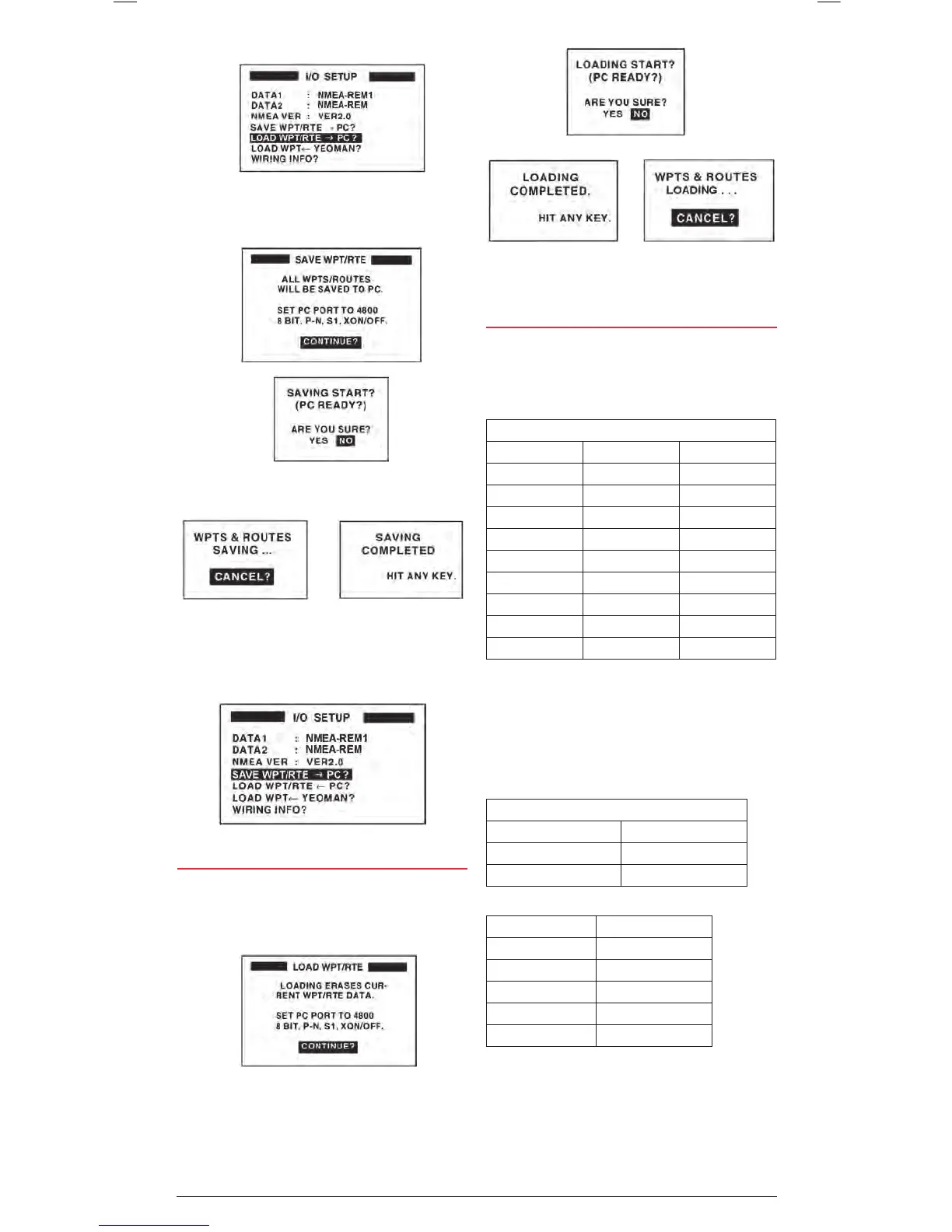
6. Choose SAVE WPT/RTE -> PC and press the ENT key.
7. The SAVE WPT/RTE page is displayed. Press the ENT key
to continue.
8. At the next window select YES and press the ENT key.
9. Data will be saved to your PC.
UPLOADING DATA FROM A PC
1. From the main menu, select I/O SETUP and press the
ENT key.
2. Choose SAVE WPT/RTE -> PC? And press the ENT key.
3. The LOAD WPT/RTE page is displayed. Press the ENT key
to continue.
4. At the next window select YES and press the ENT key.
OUTPUT DATA FORMAT, DATA SENTENCES
NMEA 0183 version 2.0
DATA1: Current loop data with Waypoint (for connection to
another marine device).
With Waypoint
AP REM1 REM2
GLL GLL GLL
VTG GGA GGA
ZDA VTG VTG
AAM* ZDA ZDA
APB* RMC RMC
BOD* RMB* RMB*
BWC* BWC*
XTE*
(1s interval) (1s interval) (2s interval)
AP = Autopilot. REM1 & REM2 = Radar, Fish Finder, etc.
DATA2: RS-232C level (for connection to a PC or other
serial device)
With Waypoint
AP REM
GLL GLL
VTG GGA
ZDA VTG
AAM* ZDA
APB* RMV
BOD* RMB *
BWC * BWC *
XTE *
*No output when no Waypoint is set.
Data being saved. Press the ENT
key to cancel.
Saving is completed. Press any
key to exit.
Saving is completed. Press any
key to exit.
Data is being loaded. Press the
ENT key to cancel.
* No output when no Waypoint is set.


 To Next Page