13
OPERATING INSTRUCTIONS
FILM LOADING & THREADING
The top and bottom rolls of
laminating film must be of the same
width and be present simulta-
neously. A small amount of
adhesive will “squeeze out” during
lamination. Hardened adhesive
deposits can damage the heat
rollers. To avoid any damage,
select “Low-Prs Laminating” on the
roller handle, rotate the rollers at
slowest speed with heat on. Refer
to the section entitled
CARING
FOR THE LAMINATOR
for instructions regarding
removal of the accumulated
adhesive.
Adhesive will deposit on the rollers
if:
- Only one roll is used.
- Different widths of rolls are
loaded together.
- Either roll is loaded adhesive
side against a heat roller.
- One or both rolls of film are
allowed to run completely off its
core.
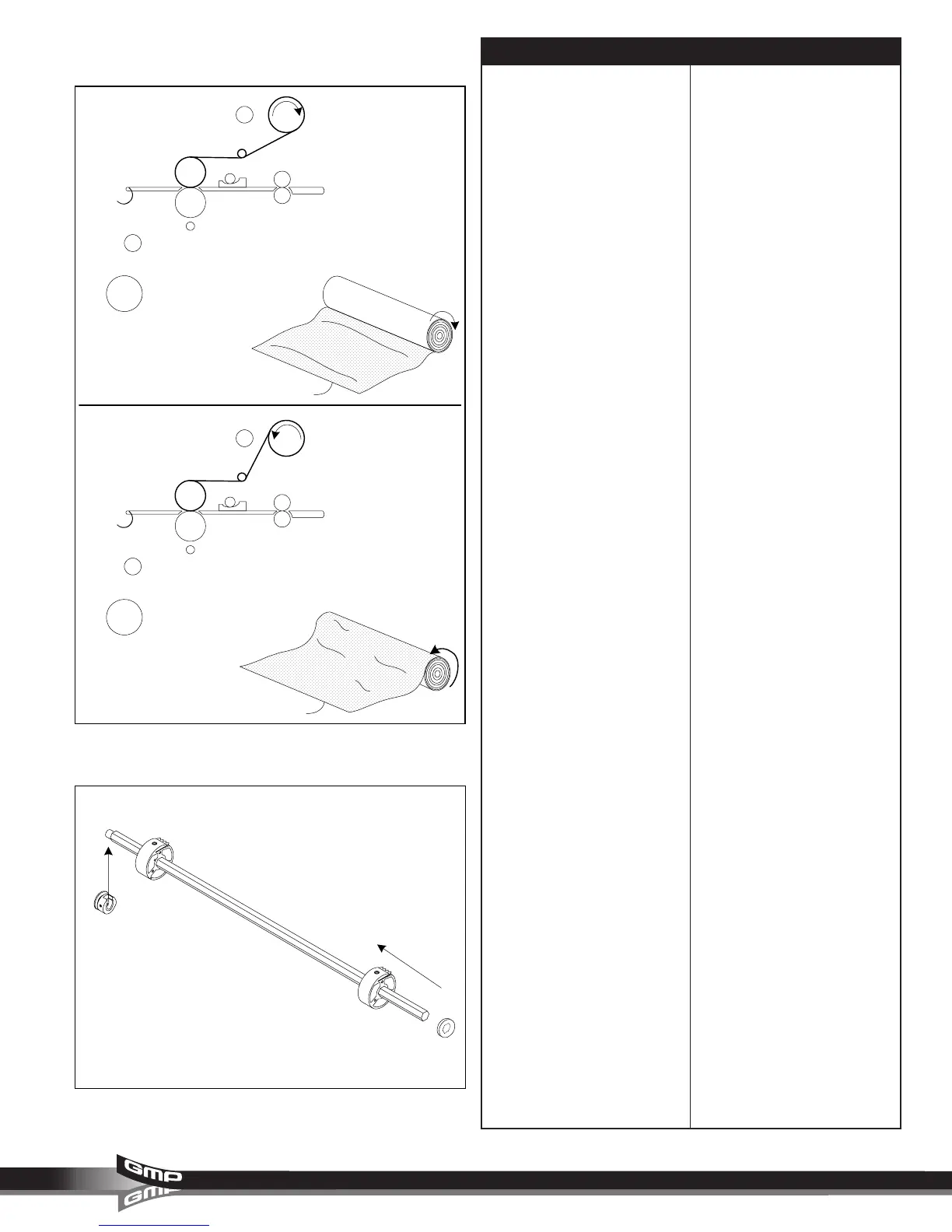
The adhesive side of the film is on
the inner side of the web (Figure
21). The shiny side of clear film
must contact the heat rollers. The
dull side of the film contains the
adhesive. Use extreme caution
when loading delustered (matte)
film as both sides appear dull.
Always change the top and bottom
supply rolls at the same time. Near
the end of each roll of GMP
laminating film is a label stating
“Warning-End of Roll”. The appear-
ance of this label on either the top or
bottom roll requires that new rolls of
film be installed as soon as the item
presently being laminated completely
exits the rear of the laminator. Do not
introduce any additional items into the
laminator when the warning label is
visible.
To load a roll of film; (Figure 22)
1. Lift up on the round end, left
side (1), of the unwind/ rewind
shaft.
2. Pull the hex end, right side (2), of
the shaft out and away from the
laminator.
3. Slide the roll of film onto the film
shaft ensuring adhesive side is
out.
4. Replace the shaft with the hex
end in first then the round end.
5. Center the roll of film.
Fig. 21
Fig. 22
Poly-in
Adhesive
surface
Pol
ester surface
Poly-out
Adhesive
surface
Pol
ester surface
(2)
(1)



 To Next Page