REWINDER
FWD.
(E) (F)
REV.
STOP
FWD.
REV.
FWD.
FWD.
REV.
REV.
R
E
V
E
R
S
E
S
T
O
P
R
U
N
"RUN"
"REVERSE"
(G)
9
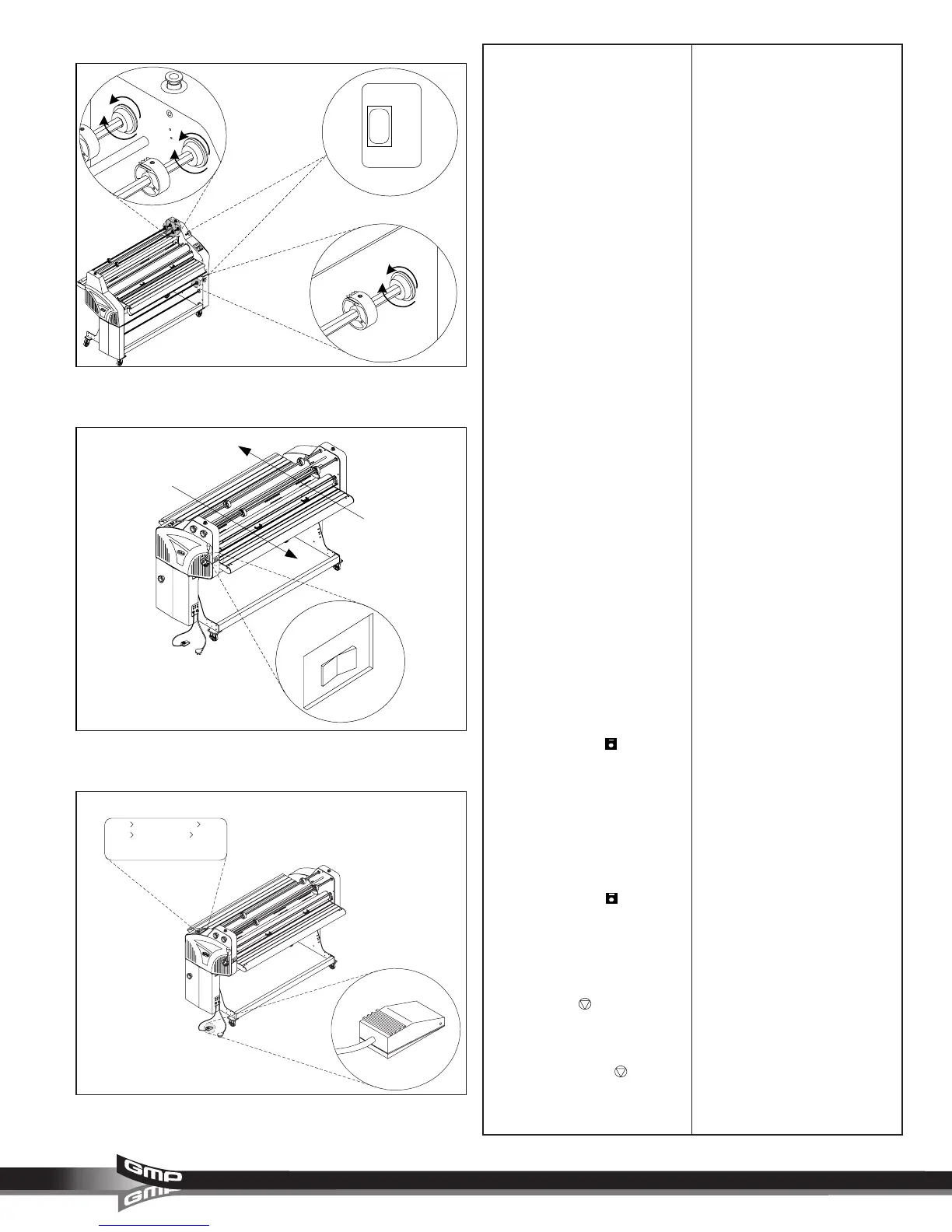
E. UPPER REWINDER DIRECTION
SWITCH: (Figure 9) This switch
enables the operator to control the
direction of the upper rewind/
unwind shafts.
“FWD.” : In this position, the motor
runs in a forward direction.
“STOP” : Stops the rewinder motor
for the rewind/ unwind shaft
selected.
“REV.” : In this position, the motor
runs in a reverse direction.
F. LOWER REWINDER DIRECTION
SWITCH: (Figure 9) This switch
enables the operator to control the
direction of the Lower rewind/
unwind shaft.
“FWD.” : In this position, the motor
runs in a forward direction.
“STOP” : Stops the rewinder motor
for the rewind/ unwind shaft
selected.
“REV.” : In this position, the motor
runs in a reverse direction.
G. REAR CONTROL SWITCH:
(Figure 10) This switch enables the
operator to run jobs from the rear
operating position of the laminator
when rear controls are enabled.
“REVERSE” : In this position, the
rollers turn from the front operating
position towards the rear operating
position.
“STOP” : Stops the movement of
the rollers.
“RUN” : In this position, the rollers
turn from the rear operating position
towards the front operating position.
ENABLE REAR CONTROL SWITCH:
To enable the rear control switch,
press and hold
JOB
until you
hear a beep, approximately 3
seconds. REAR CONTROL
replaces READY/ WAIT on the
control panel display.
Replace the rear slitter with the
safety shield properly installed and
latched.
DISABLE REAR CONTROL SWITCH:
Press and hold
JOB
again to
disable the rear control switch.
H. FOOT SW ENABLE: (Figure 11)
In this mode permits operation using
the footswitch.
To enable the foot switch, press
and hold
STOP
until you hear a
beep, approximately 3 seconds.
FOOT SW ENABLE flashes where
READY/ WAIT is indicated.
Press and hold
STOP
again to
disable the foot switch.
Fig. 9
Fig. 10
Fig. 11
Release
Foot SW Enable
TOP
JOB
SPEED0℃
BOT0℃
03
01



 To Next Page