11
Fury X-3 Installaon and Operang Instrucons
VIEWING CHARGER AND CHARGING INFORMATION
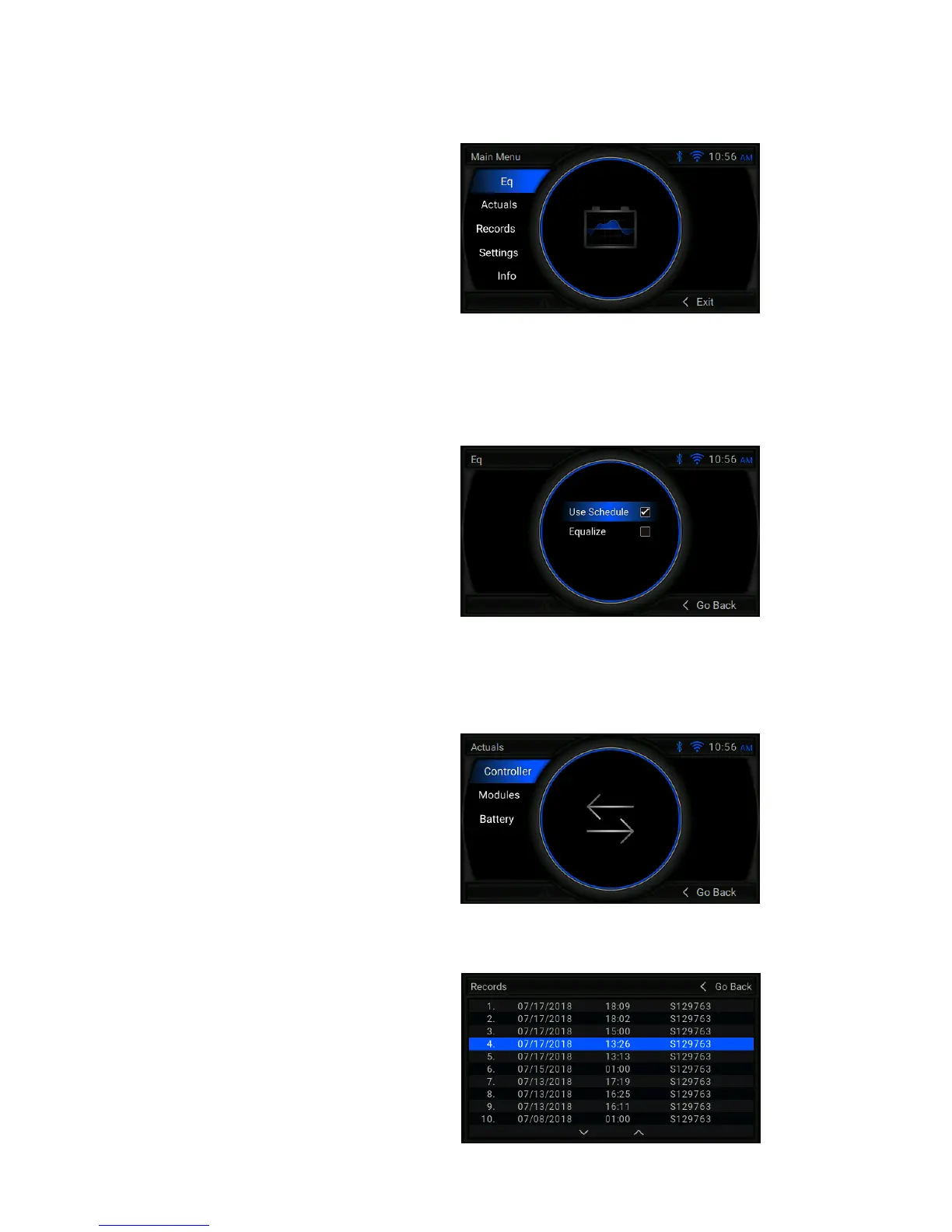
Main Menu
Eq/Mix
Actuals
Press the center or right arrow to access the Main Menu
from the idle or charging screen. All other menus are
accessed from the Main Menu. Use the arrow keys to
navigate and the center key to select opons. Main Menu
opons include:
Eq/Mix – Manually select equalizaon or mix to occur
(Note: If this feature is enabled, it is only accessible when
a baery is connected)
Actuals – View Actuals Menu
Records – Browse charge records stored on the charger
Sengs – View the Sengs Menu
Info – View system informaon
Eq/Mix Menu:
If this menu is enabled, it allows a user to manually run
equalizaon or a mixing cycle on the currently connected
baery. The selected opon is indicated by a checkmark.
Only one opon can be selected at a me. By default, the
charger will follow the user dened schedule for nish and
equalize. To manually begin an equalize cycle, navigate to
the Main Menu and select the Eq Menu. Select the Equalize
opon. A check next to Equalize indicates a nish and
equalize cycle will occur aer the regular charge cycle.
Use Schedule – The charger will follow its programmed
schedule for equalizaon and mixing.
Equalize – The charger will nish and equalize the currently
connected baery once it's fully charged.
Actuals Menu: This menu has opons to view data for
each of the power modules and baery informaon for a
connected baery.
Controller – Displays informaon about the management
controller.
Modules – Displays status informaon for each power
module in the charger.
Baery – Displays informaon about the currently
connected baery.
Records
Records Menu:
This menu holds records of the 100 most recent charges
always starng with the most recent. Select a record by
using the Up and Down arrow keys. To view a selected record
details, press the center key. Use the le arrow key to go
back to the previous screen.


 To Next Page