BlueSense Module
GO Systemelektronik GmbH Faluner Weg 1 24109 Kiel Germany Tel.: +49 431 58080-0 Fax: -58080-11
Page 13 / 16
www.go-sys.de info@go-sys.de
Appendix A – Calibration Optical Sensors
Sensor Article-No. 461 6724 – 461 6750 – 461 6751/6752 – 461 6753 – 461 6754 – 461 6756 – 461 6757
The calibration is carried out with the AMS software. AMS is part of the BlueBox PC Software.
1 Direct Input of Calibration Coefficients
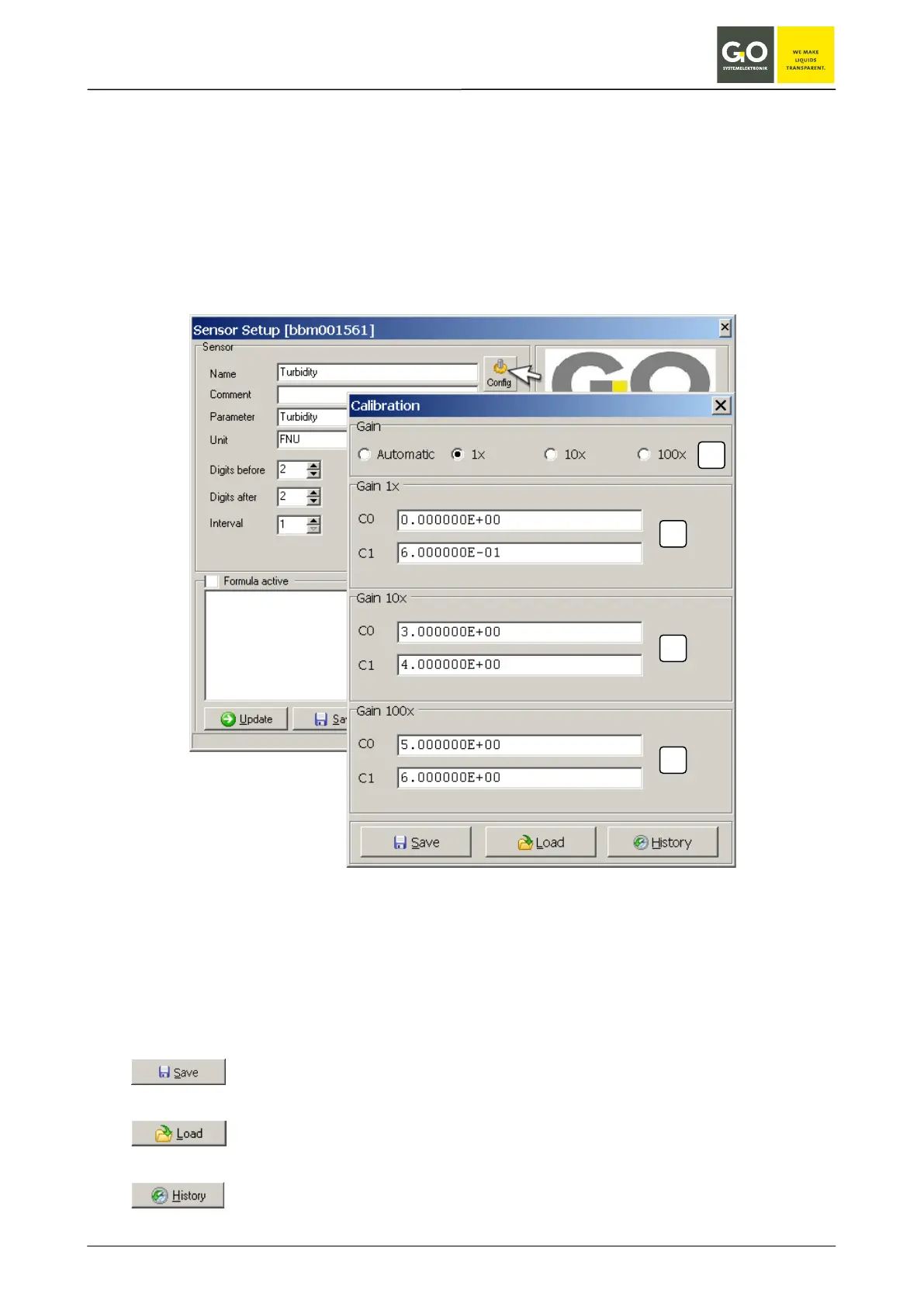
Click the Config button in the Sensor Setup window of the particular sensor.
Example Turbidity:
[1] Radio buttons for selecting the gain factor
At
Automatic there is an automatic range switching.
[2] Coefficient at gain factor 1
[3] Coefficient at gain factor 10
[4] Coefficient at gain factor 100
Opens a window for choosing the file storage path.
Saves the calibration settings as .cal-file on the PC.
Opens a window for choosing the file storage path.
Already stored calibration settings are loaded from the PC.
Opens the calibration history.
1
2
3
4


 To Next Page