EasyManua.ls Logo

Godex DT2 - Page 31

Godex DT2
39 pages
Print Icon
To Next Page IconTo Next Page
To Previous Page IconTo Previous Page
Loading...
27
DT2 / DT4 series User Manual
DT4
DT2
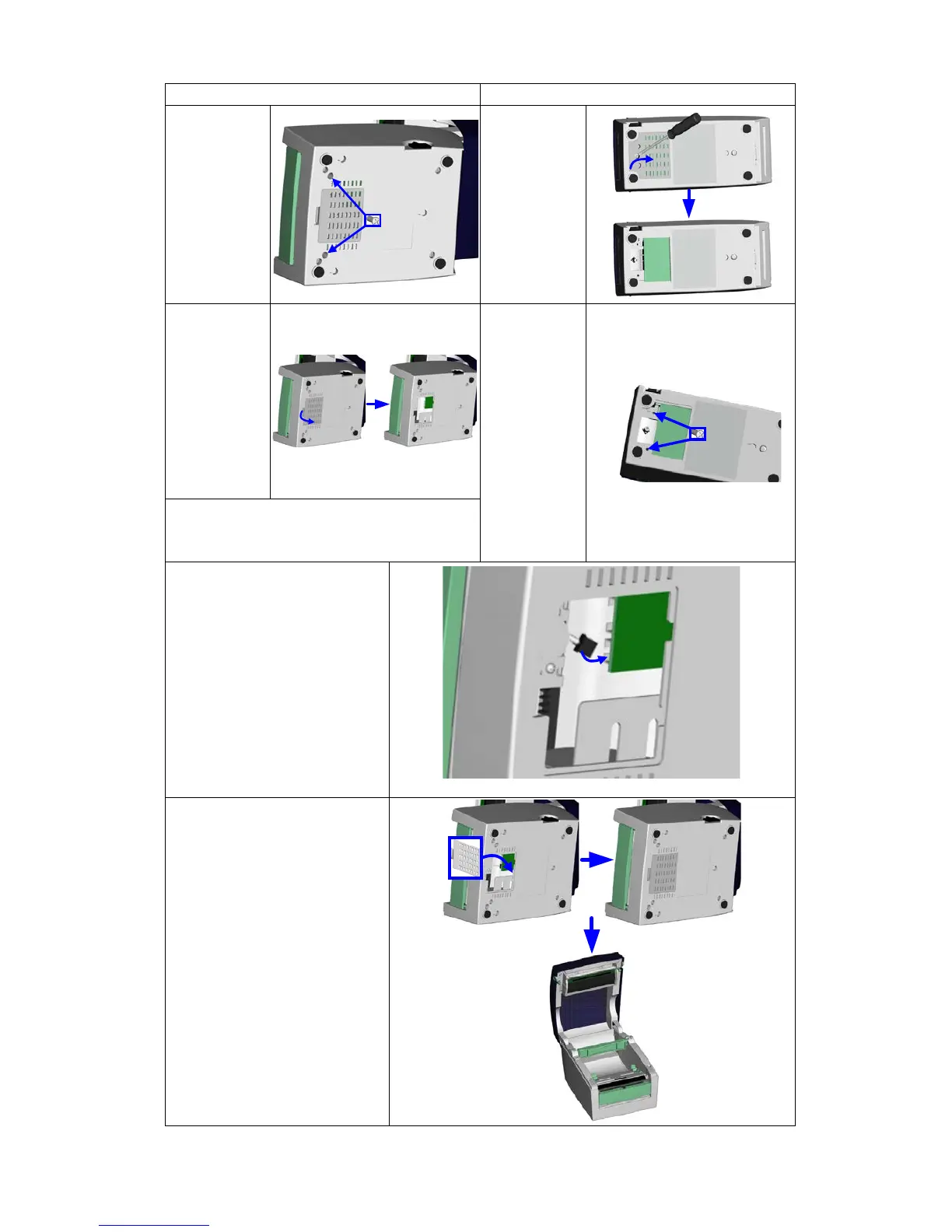
5.
Turn the
printer
upside
down and
tighten the
screws to
secure the
label
dispenser.
5.
Turn the
printer
upside
down and
remove the
screw that
secures the
cover on the
bottom of
the printer.
6.
Open the
cover on
the bottom
of the
printer to
access the
motherboar
d.
6.
Tighten the
screws to
secure the
label
dispenser.
Note
You can use a coin or screwdriver to open
the cover.
7. Connect the cable to
the motherboard.
Note
The motherboard has two
connectors, one for the
cutter and the other for the
dispenser.
Please make sure that you
are using the correct
connector.
8. Close the cover again
(DT2: and secure it with
the screw).
9. Place the printer the
right way up again.

Related product manuals