A complete set of windows drivers for windows 3.1,95,98 and NT 4.01
The EZ-2/4 drives will help you to print from your existing Windows applications.
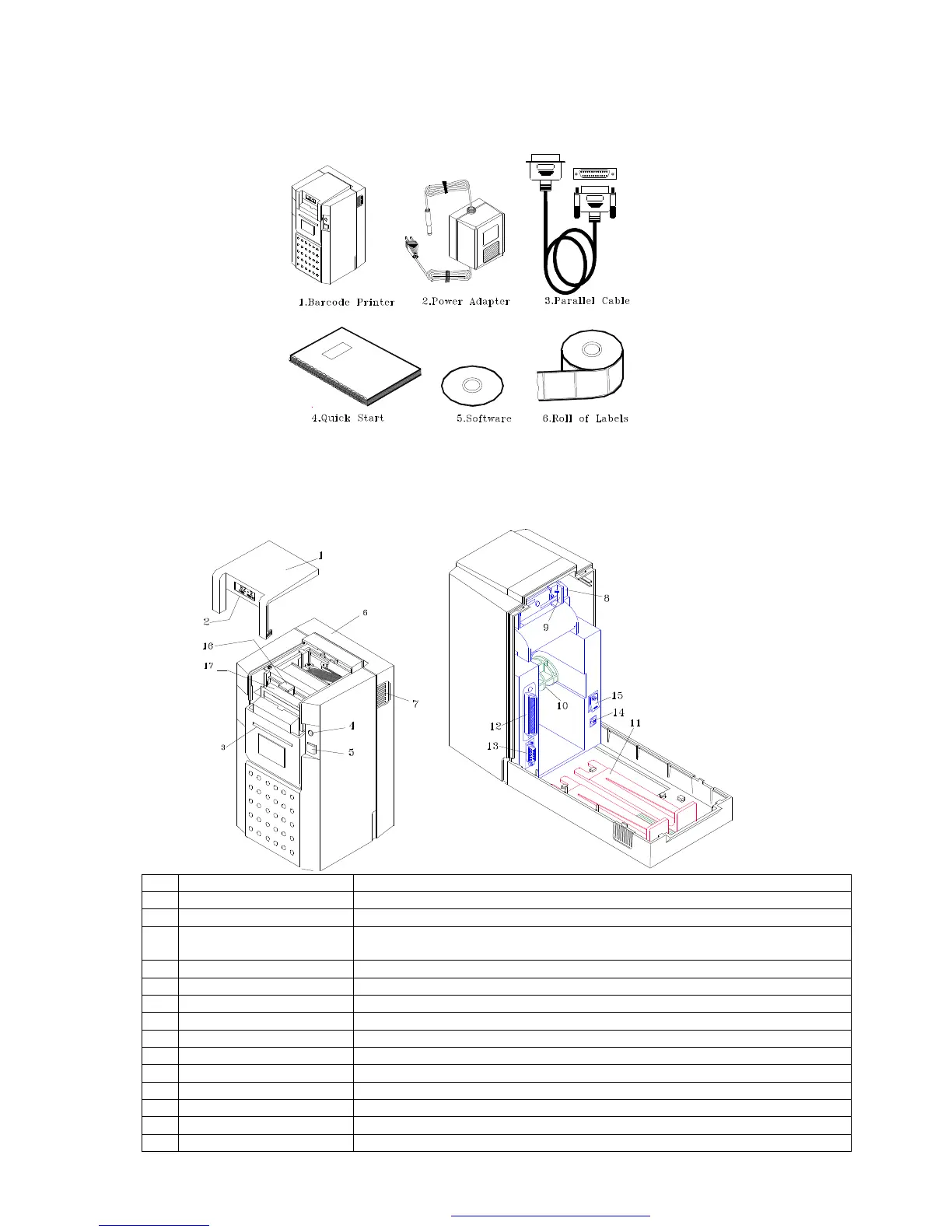
1-5. Contents of Package
Fig. 1.5.1
Please check the contents of the packet as attached.
1-6. Printer Parts
Using the following diagram to familiarize yourself with the features and components of the EZ-2/4printer (see
figure 1.6.1).
Fig. 1.6.1
Item
Parts Description
1. Top cover Used to protect the printer head.
2. Label tear line Used to tear off printed labels.
3. Liner paper output
Used to strip out the label from the liner paper. Liner paper will be stripped out
through this window.
4. Power light Used to indicate power condition. When power on, the light is green or red.
5 Feed button Used for manually feeding out labels or adjusting label position.
6 Rear cover Used to protect the roller and labels.
7 Lock switch Used to lock the rear cover.
8 Printer mechanism The engine of the printer.
9 Label guide Label guide
10 Label spindle hole Used to locate the label roller in position
11 Stands for big roll of label The big label roll holder stands
12 Parallel printer connector The printer port connector
13 Serial interface connector
Connect with host serial port
14 Power jack Connect the power cord to the unit
PDF created with FinePrint pdfFactory trial version http://www.fineprint.com



 To Next Page