12
Wireless Flash Mode
AD200Pro can only be set as slave unit (receiver end). Short press the wireless selection
button to switch the radio transmission function.
Flash Mode – TTL Auto flash
This flash has three flash modes: TTL, Manual (M), and Multi (Stroboscopic). In TTL mode,
the camera and the flash will work together to calculate the correct exposure for the
subject and the background. In this mode, multiple TTL functions are available: FEC, FEB,
FEL, HSS, second curtain sync, modeling flash control with the camera’s menu screen.
Press <MODE> Mode selection Button and three flash modes will display on the AV
panel one by one with each pressing.
TTL Mode
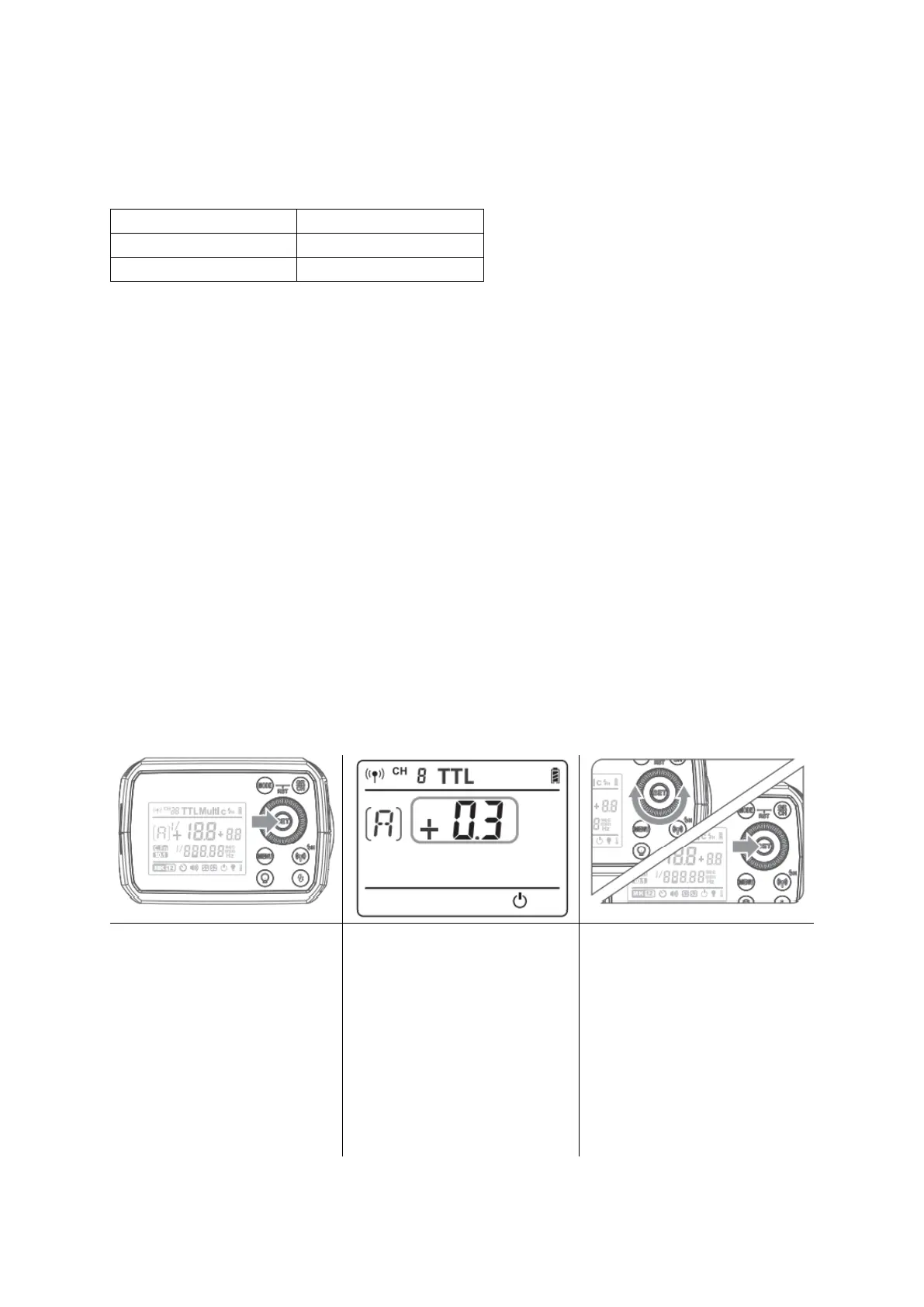
Press <MODE> Mode Selection Button to enter TTL mode. The AV panel is displayed
<TTL>.
FEC: Flash Exposure Compensation
With FEC function, this flash can adjust from -3 to +3 in 1/3rd stops. It is useful in
situations where minor adjusting of the TTL system is needed based on the
environment.
Setting FEC:


 To Next Page