Cautions
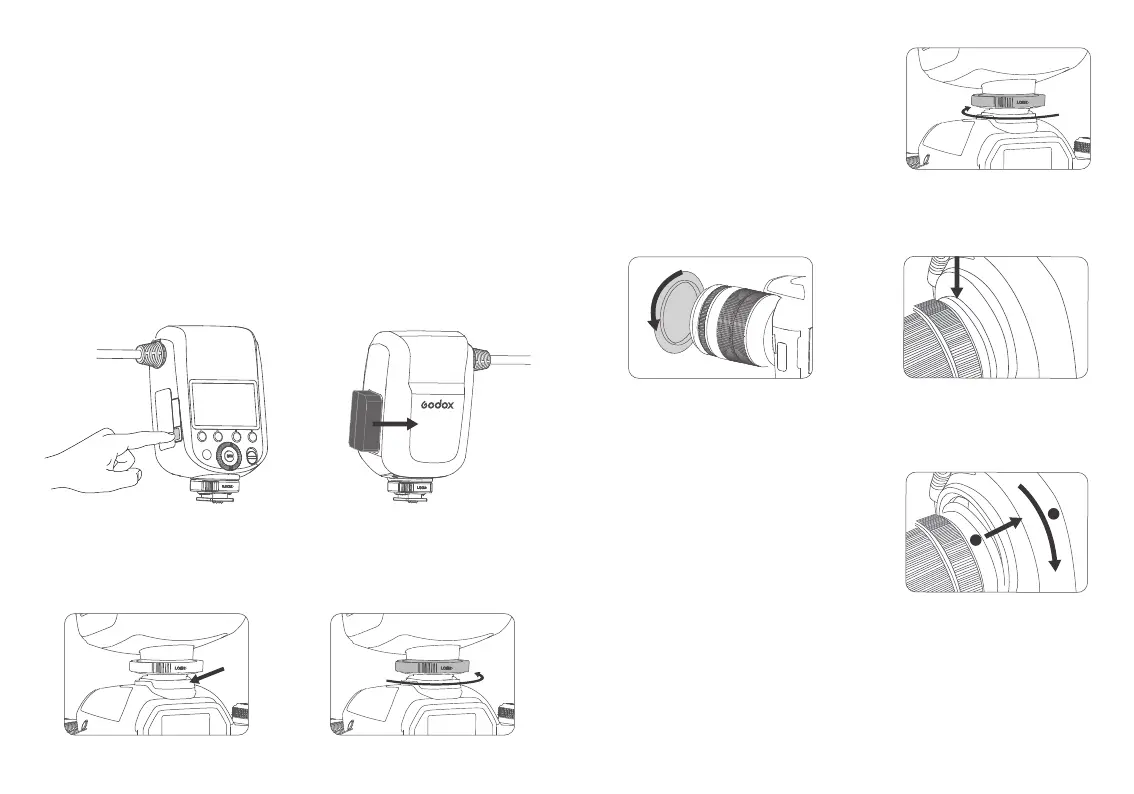
Loading and Unloading the Battery
Installation of the Controller
1. Unloading
1. Do not short circuit.
2. Do not expose to rain or immerse into water. This battery is not water proof.
3. Keep out of reach of children.
4. No over 24 hours' continuous charging.
5. Store in dry, cool, ventilated places.
6. Do not put aside or into fire.
7. Dead batteries should be disposed according to local regulations.
8. If the battery had ceased using for over 3 months, please make a full recharge.
9. Please charge the battery to approx. 60% before being placed for long time.
Long press the battery remove button
and push down the battery to unload it.
Slide the hotshoe of the controller to
completely insert it into the camera.
2. Loading
Insert the lithium battery according to
the direction, push in until it is locked.
Rotate clockwise to loosen the lock ring and take
down the controller.
1. Rotate clockwise the proper adapter ring
and mount it to the front of the lens.
2. Insert the lens with adapter ring into
the adapter ring connecting port until
it is locked.
Tips: There are 8 adapter rings applicable to MF-R76C:
49mm, 52mm, 55mm, 58mm, 62mm, 67mm, 72mm
and 77mm.
Note: It is normal that the mounted ring flash
can be rotated 360°.
Disassembly of the Controller
Installation of the ring flash
Slightly pull out the remove buckle on the
back, and then rotate to the right to remove
the ring flash.
Toggle Power switch button to <ON> to power on, and <OFF> to power off.
Disassembly of the ring flash
Power switch
1. Loosening the lock ring
1.
Rotate anticlockwise to tighten the
lock ring.
2. Tightening the lock ring:
24 25
2
1



 To Next Page