A+B
A+B
A+B
M
1/128
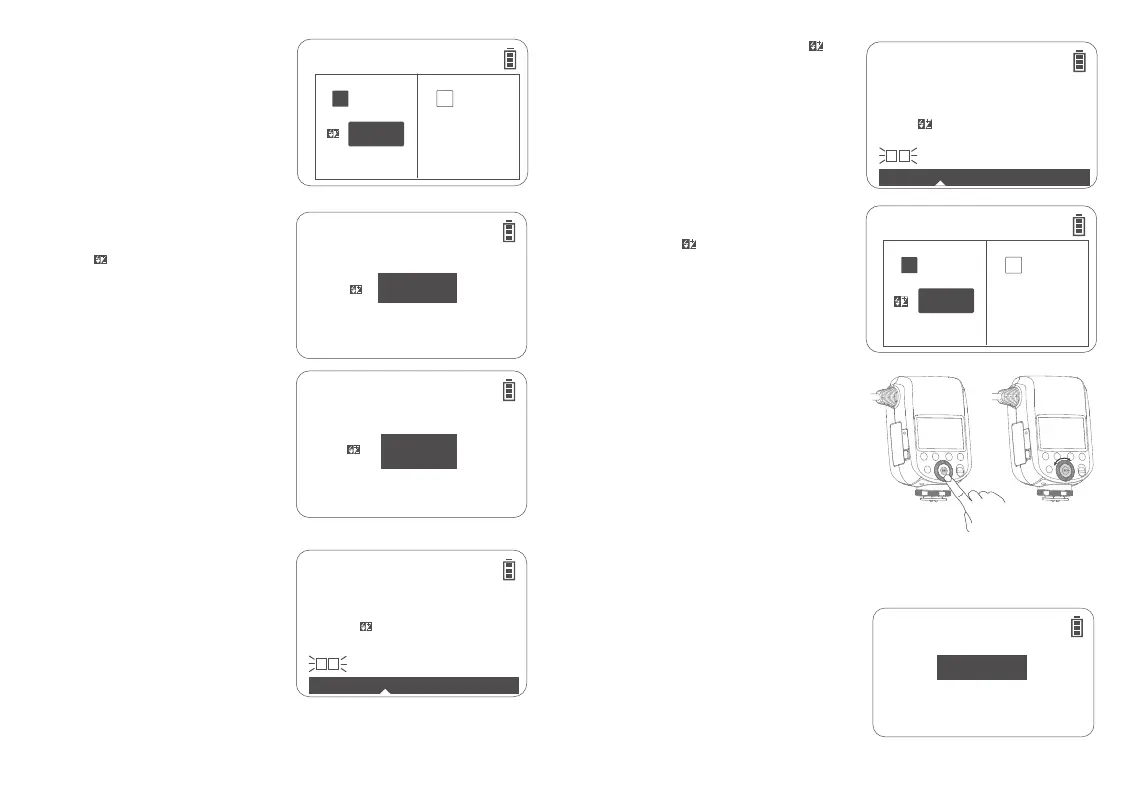
Short press the <MODE> button to switch to
<TTL > mode, and the <TTL > icon will be on
the left upper corner of the display.
Note: When the shutter button is fully pressed, the TTL
flash will fire a pre-flash that the camera will use to
calculate exposure and flash output the instant before
the photo is taken.
TTL Flash Mode
Short press the Ratio button to make <TTL>
icon and < >FEB value(-3~+3)on the
display.
Turn the select dial to adjust the FEB value
from -3 to +3 with an increment of 1/3
each stop.
Adjust the flash ratio of flash tube A to
flash tube B, to achieve brightness to
darkness ratio in different scenes.
Short press the Ratio button to make <A:B>
icon and <8:1·4:1·2 :1·1:1·1:2·1:4·1:8 > on the
display.
1.
Short press the SET button to select< >
FEB/A:B flash ratio, turn the select dial to
adjust the FEB/A:B flash ratio. The FEB value
is adjustable from -3 to +3 with an increment
of 1/3 each stop, while A:B flash ratio is
adjustable from 8:1 to 1:8 with an increment
of 1/2 each stop (for example: 8:1 – 5.6:1 –
4:1 – 2.8:1 – 2:1 – 1.4:1 – 1:1 – 1:1.4 – 1:2 –
1:2.8 – 1:4 – 1:5.6 – 1:8).
1.Overall Flash Setting
2. A:B Flash Ratio Setting
Short press the Ratio button to make <A:B>
icon and< > FEB value(-3~+3)on the
display.
3. Single Group (A or B) Flash Setting
Short press the MODE button to switch to <M > manual flash mode, and the <M> icon will be on the
left upper corner of the display.
There are 3 flash modes: flash tube A and B flash in different flash ratio, only flash tube A or B
flashes, flash tube A and B flash in the same flash ratio.
M (Manual) Flash Mode
TTL
A B
--
+1.0
TTL
+0.3
TTL
+1.0
TTL
+1.0
A B
8�1 · 4�1 · 2�1 · 1�1 · 1�2 · 1�4 · 1�8
TTL
A B
--
+1.0
TTL
A B
8�1
·
4�1
·
2�1
·
1�1
·
1�2
·
1�4
·
1�8
+3.0
1. Overall Flash Ratio Setting
Short press the Ratio button to make <M>
icon and output power on the display.
Turn the select dial to adjust the output
power from 1/1 full power to 1/256 with an
increment of 1/3 each stop.
Note: The minimum output is 1/64 when HSS is
turned on.
Short press the SET button to select
group A flash/group B flash, turn the
select dial to adjust the FEB value from -3
to +3 with an increment of 1/3 each stop.
Note:
1. “0.3” in FEB means 1/3 stop, “0.7” in FEB means 2/3 stop.
2. Adjust the FEB value to “±0” can cancel the FEB.
26 27
2.
1.
2.



 To Next Page