M
A B
1/128 --
1/128
+1.7
TX
A
M
TTL
--
--
B
C
M
M
1/256
RX
B
TTL
RX
C
Transmitter Unit Setting
Receiver Unit Setting
Wireless Setting
M
A B
1/128 1/256
+0.3
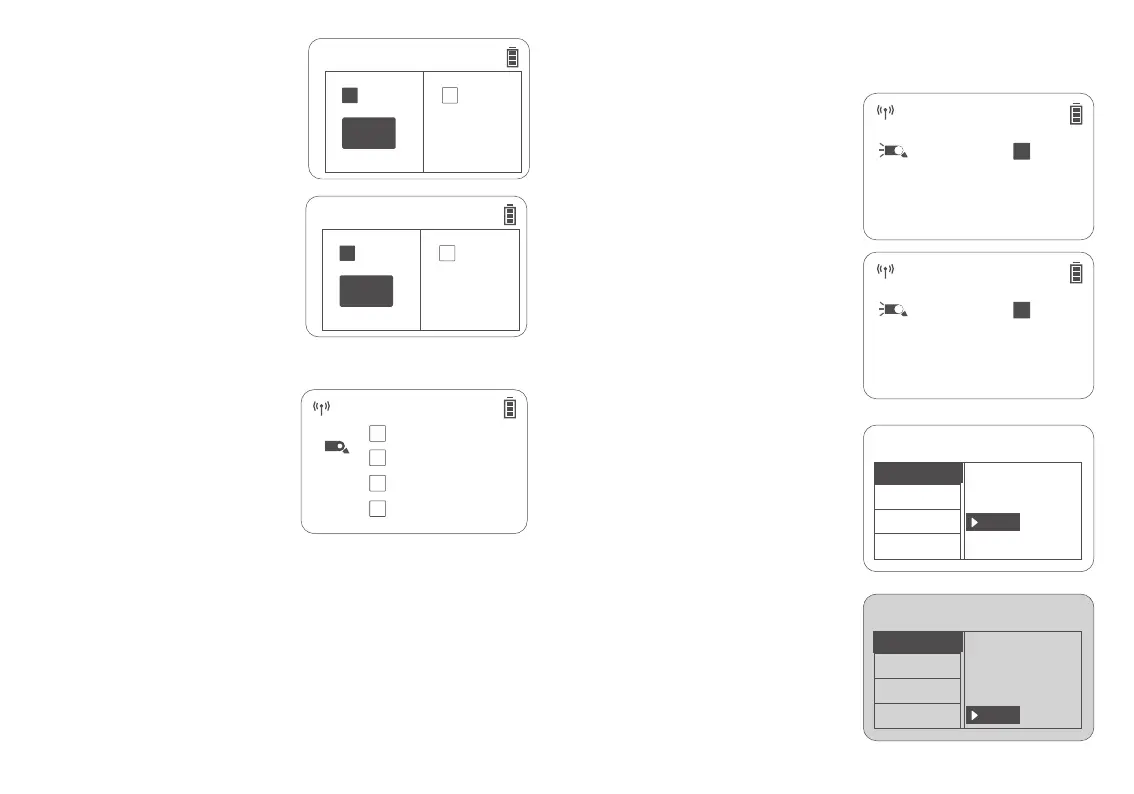
Short press the Ratio button to make <A:B>
icon and two output values on the display.
Short press the SET button to select group A
output /group B output, turn the select dial to
adjust the group A output /group B output
from 1/1 full power to 1/256 with an
increment of 1/3 each stop.
2. A:B Flash Output Setting
Short press the Ratio button to make <A:B>
icon and single group output value on the
display.
Short press the SET button to select group A
output /group B output, turn the select dial to
adjust the group A output /group B output
from 1/1 full power to 1/256 with an
increment of 1/3 each stop.
Set the flash status as a receiver unit in the menu (please refer to the wireless setting below) .
Short press the SET button or turn the select
dial to switch among A/B/C.
A means the flash is set as receiver A unit.
B means the flash is set as receiver B unit.
C means the flash is set as receiver C unit.
Short press the MENU/lock button to
enter the menu, turn the select dial to
<WIRELESS>, short press the SET button
to enter the wireless setting interface,
turn the select dial to select <TX>, then
short press the SET button to return to
the previous menu.
The wireless channel of the transmitter unit should
be set the same as the receiver units, please refer to
the wireless setting.
3. Single Group Flash Output Setting
Set the flash status as a transmitter unit in
the menu (please refer to the wireless
setting).
Turn the select dial to switch group M/A/B/C.
Turn the SET button to select,then short
press the MODE button to switch to
TTL/M/--. Turn the select dial in TTL mode to
adjust the FEB value from -3 to +3 with an
increment of 1/3 each stop. Turn select dial in
M mode to adjust the output power from 1/1
full power to 1/256 with an increment of 1/3
each stop.
Note: TTL means TTL auto flash, M means manual flash, -- means off.
The parameter values of M, A, B and C in the interface are parameter values of transmitter M, receiver A, B, and C.
One transmitter unit can control three receiver units at most, and the transmitter unit output is group M output.
The wireless channel of the transmitter unit should be set the same as the receiver units in order to control them,
please refer to the wireless setting.
Note: If group A outputs flash, then group B is off.
1. As a Transmitter Unit
Short press the MENU/lock button to
enter the menu, turn the select dial to
<WIRELESS>, short press the SET button
to enter the wireless setting interface, turn
the select dial to select <RX>, then short
press the SET button to return to the
previous menu.
2. As a Receiver Unit
28 29
MENU
WI RELESS
OFF
TX
RX
CH
ID
TCM
MENU
OFF
TX
CH
ID
TCM
Ver0.6
Ver0.6
WI RELESS
RX
CH 21
CH 21
CH 21



 To Next Page