15
• Under poorly-lit or low-contrast conditions, you can press < > button to turn
on the focus assist beam in order to make it easier to autofocus.
• The beam will automatically put out certain seconds after the last pop is fired.
The time between the last fire and the auto shutdown of focus assist beam is
called No-Flash Time. The time is user adjustable and set to 10 seconds by
default.
• Press < > button and hold for 2 seconds to enter Custom Function. Then press
“SET” button to enter “FC” mode. The LDC panel displays “FC” (Auto shutdown of
focus assist lamp) and “No-Flash Time”. Rotate Select Dial < > to set a desired
time for the flash.
• Press < > button to return.
10 seconds after the last fire, focus assist
lamp will automatically get out.
20 seconds after the last fire, focus assist
lamp will automatically get out.
30 seconds after the last fire, focus assist
lamp will automatically get out.
Buzz Function
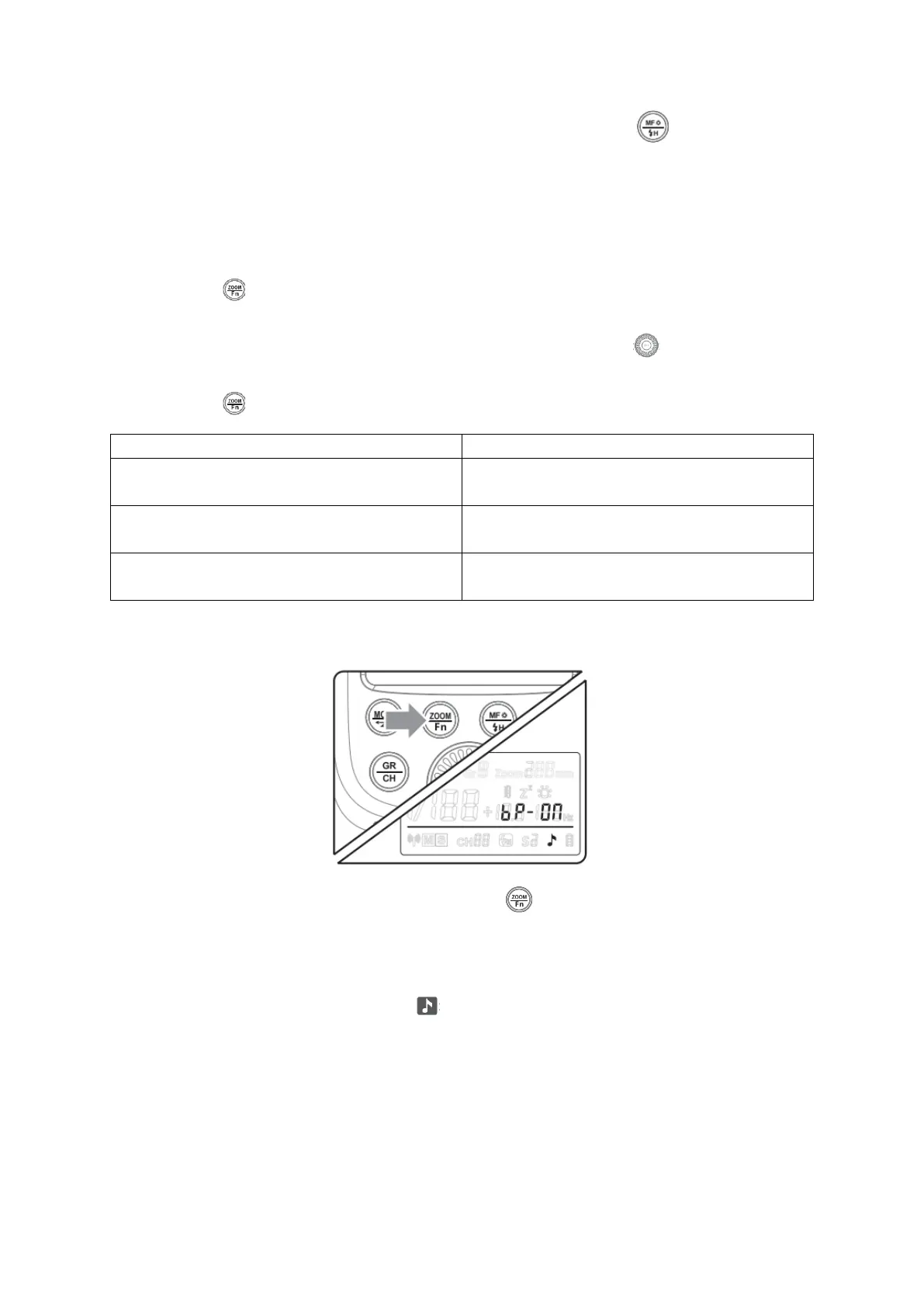
• To turn the buzz function on or off, press < > button and gold for 2 seconds to
enter Custom Function.
• Then press “SET” button to enter “bp” mode. The LDC displays “ON” means buzz
is turned on while “OF” means buzz is turned off.
• When the buzzer is turned on < > is shown on the LCD display.


 To Next Page