10
ZOOM: Setting the Flash Coverage
The flash coverage can be set to match the lens local length from 20mm to 200mm.
Press < > button and rotate Select Dial < > to change the flash coverage.
When setting the flash coverage, make sure it covers the lens focal length so that the
picture will not have a dark periphery.
Using the Flash
M Mode: Manual Mode
Press MODE Selection Button < > to enter M mode. In this mode, you can set the
flash unit onto your camera hot shoe or your trigger hot shoe for firing. Before shooting,
adjust the flash power output. When the camera’s shutter is pressed, the flash will fire
synchronously. Slave triggering mode is not available in M mode.
Multi Mode: Stroboscopic Flash
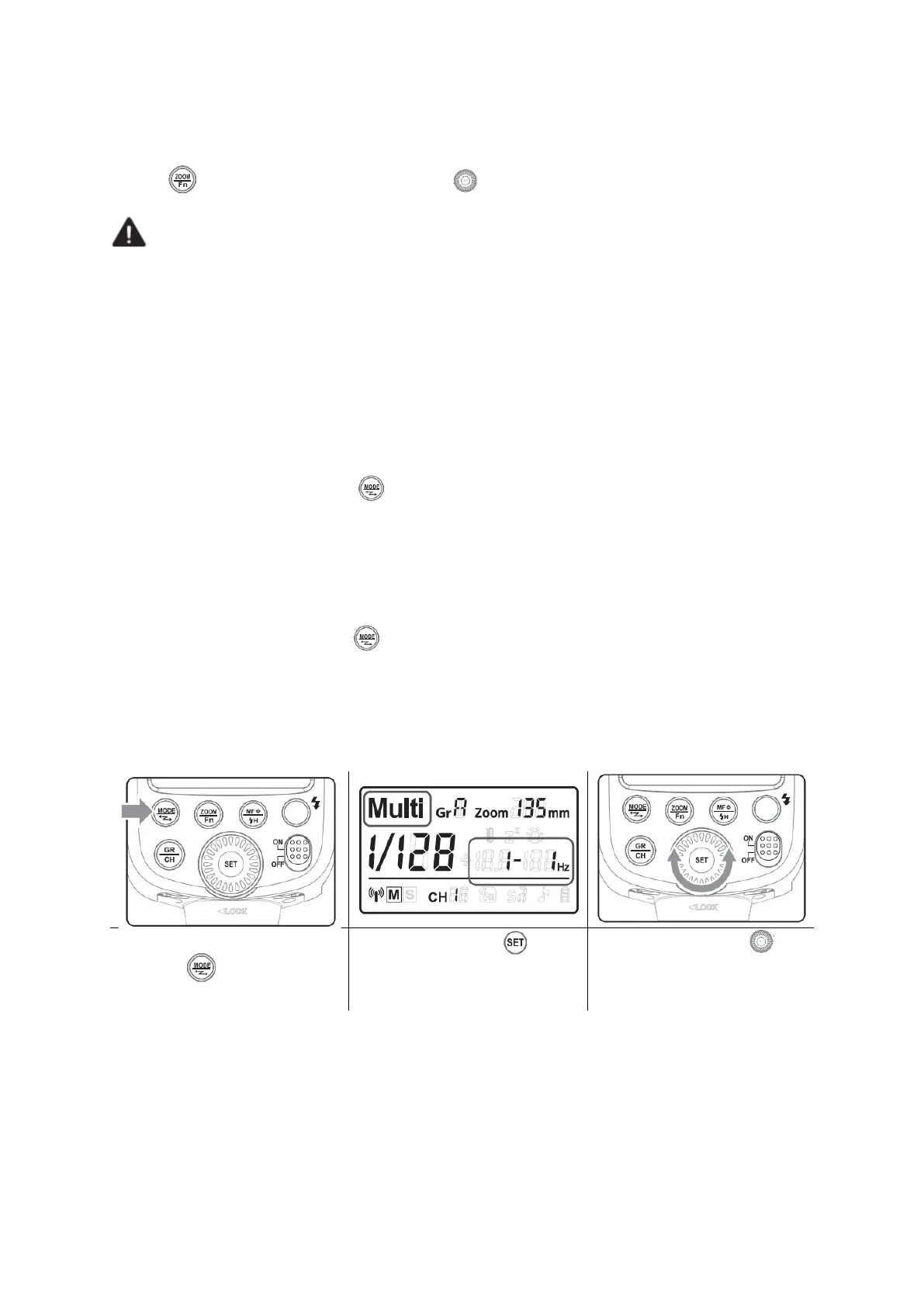
Press Mode Selection Button < > to enter Multi mode (Stroboscopic flash). With
stroboscopic flash, a rapid series of flashes is fired. It can be used to capture multiple
images of a moving subject in a single photograph. You can see the firing frequency
(number of flashes per sec. expressed as Hz), the number of flashes, and the flash
output. For setting procedures, see the following:


 To Next Page