Deutsch | 2 English | 10
2.3 Checking the battery
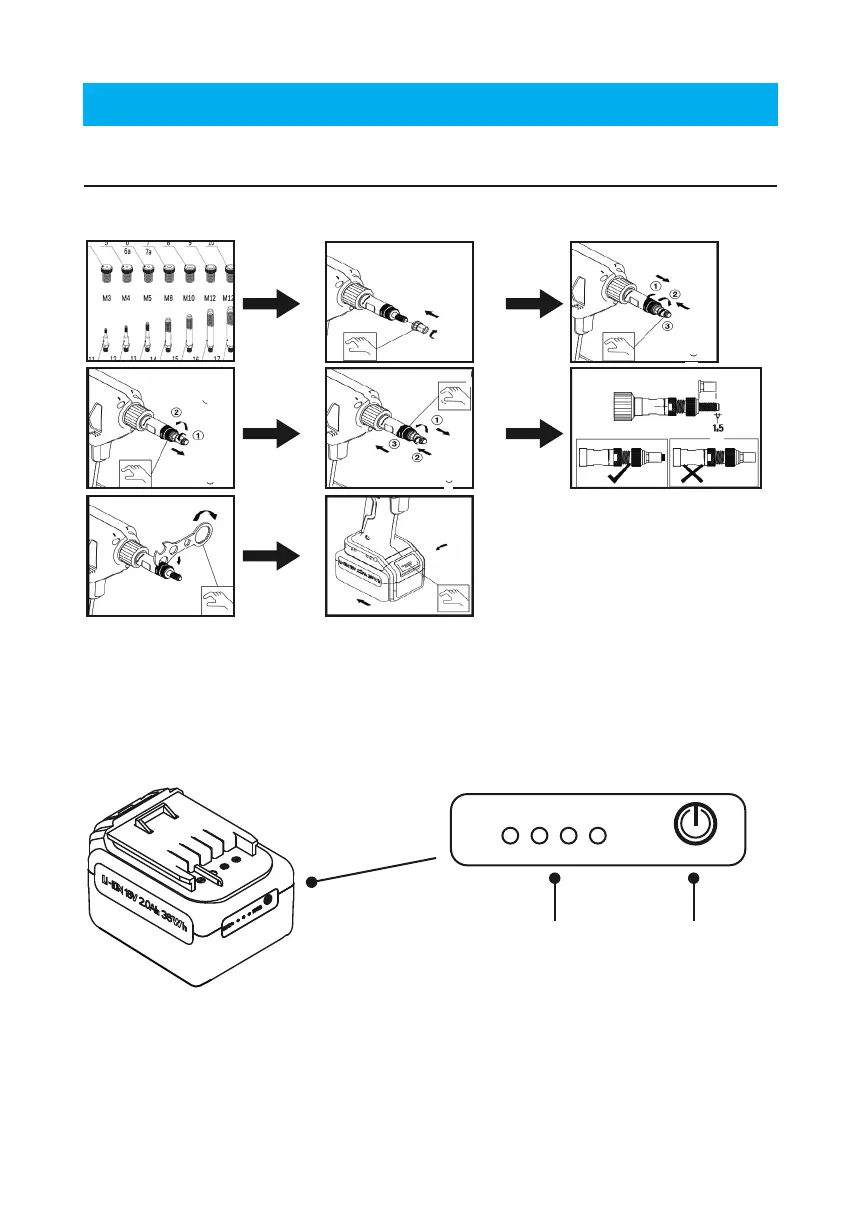
➁ Battery status indicator light ➀ Button
Press button ➀ once to check the battery.
The battery status indicator light ➁ is always green:
• Full indicator, 100% energy
• Three lights, 75% energy
• Two lights, 50% energy
• One light, 25% energy. Please charge!
2.2 Adjustment of the mandrel
Adjust the length of the mandrel correctly according to the length of the blind rivet nut
(see g.) The order of adjustment is as follows:
Make sure that the battery has been removed from the tool as shown in gure ①
According to the above illustration: ② Screw the blind rivet nut onto the mandrel. ③ Loo-
sen the counter nut and adjust according to ④ and ⑤ to achieve gure ⑥ As seen in the
bottom left of gure ⑥ , ensure the mandrel protrudes ≈ 1/16’’ past the blind rivet nut after
adjustment - the mandrel is correctly adjusted ⑦.
⑧ Last, the battery is inserted onto the tool.
www.goebelfasteners.com
④
⑤
① ② ③
⑥
⑧
⑦
1/16"



 To Next Page