2 | Deutsch11 | English
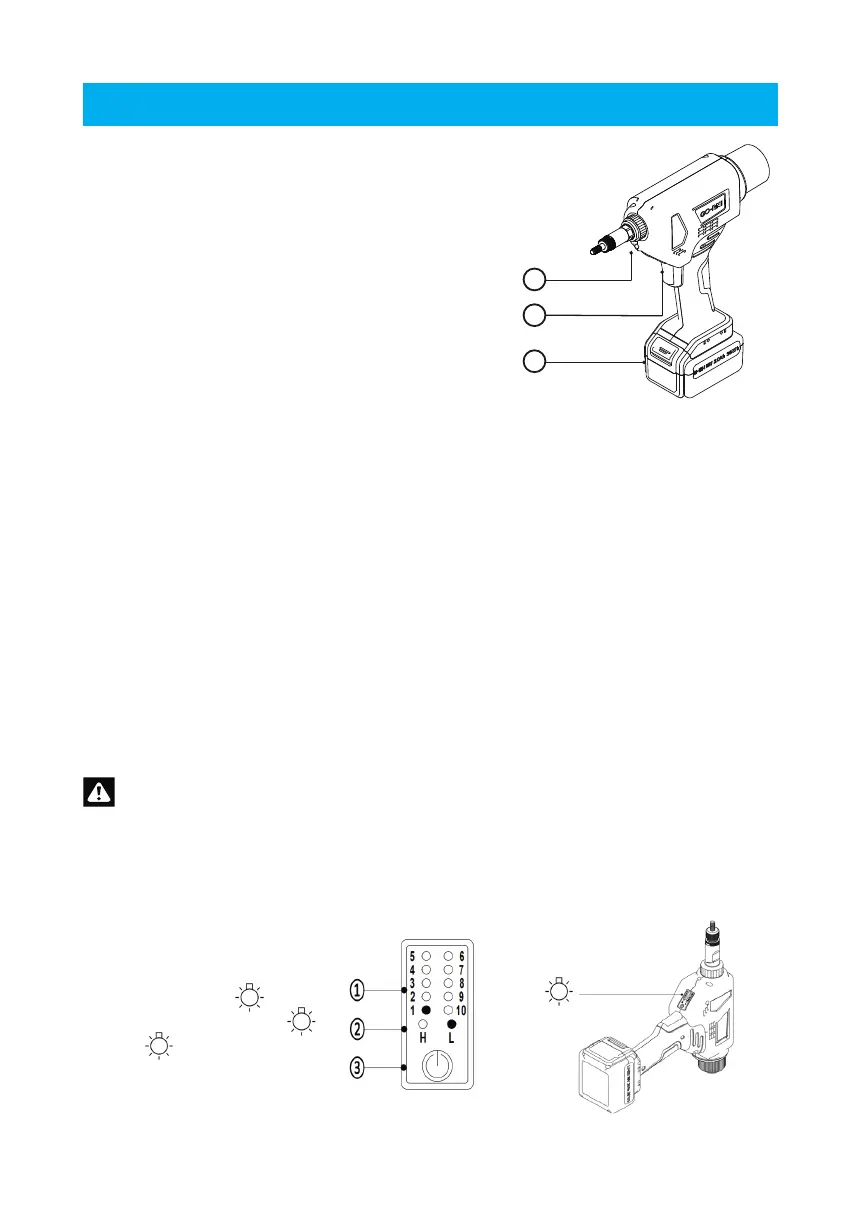
2.4 Checking the tool
1
2
3
➀ LED lighting
➁ Trigger
➂ Battery
Install the battery ➂ in the direction of the arrow.
Press the trigger ➁, the white LED illumination
lights up ➀ is always on, indicating that the power is
working normally.
Important note:
You save energy with the automatic sleep mode, no operation within one minute, the white
illumination light LED goes out automatically and the tool goes into automatic sleep mode.
Simply press the trigger again to restore power.
3. Function setting
Read the following particularly important notes carefully when you are ready to start using
the function settings.
3.1 Adjusting the traction force
The function is preset at the factory:
Stroke: 1/64" - 1/32" (indicator light 1)
Traction mode: (L) "green light on, not ashing".
The tractive force mode (L) stands for low tractive force.
Tractive force mode (H) stands for high tractive force.
Please set the traction force according to the specications and the strength of the blind
rivet nut. Before setting the traction force, enquire about the technical values of the blind
rivet nut and its range of application.
To avoid excessive stress/damage to the mandrel, it is strongly recommended to set
the pull force mode to low (L) when riveting small blind rivet nuts.
Press the button ➂ for approximately 1.5 seconds to toggle between high (H) and low(L)
traction force modes. Each time you press and hold button ➂ for the 1.5 seconds, the
traction force indicator light ➁ will illuminate green on the current setting, once you release
button ➂ the tractive force will switch to the opposite low (L).
➀ Stroke indicator light
➁ Traction force indicator light
➂ Button
www.goebelfasteners.com



 To Next Page