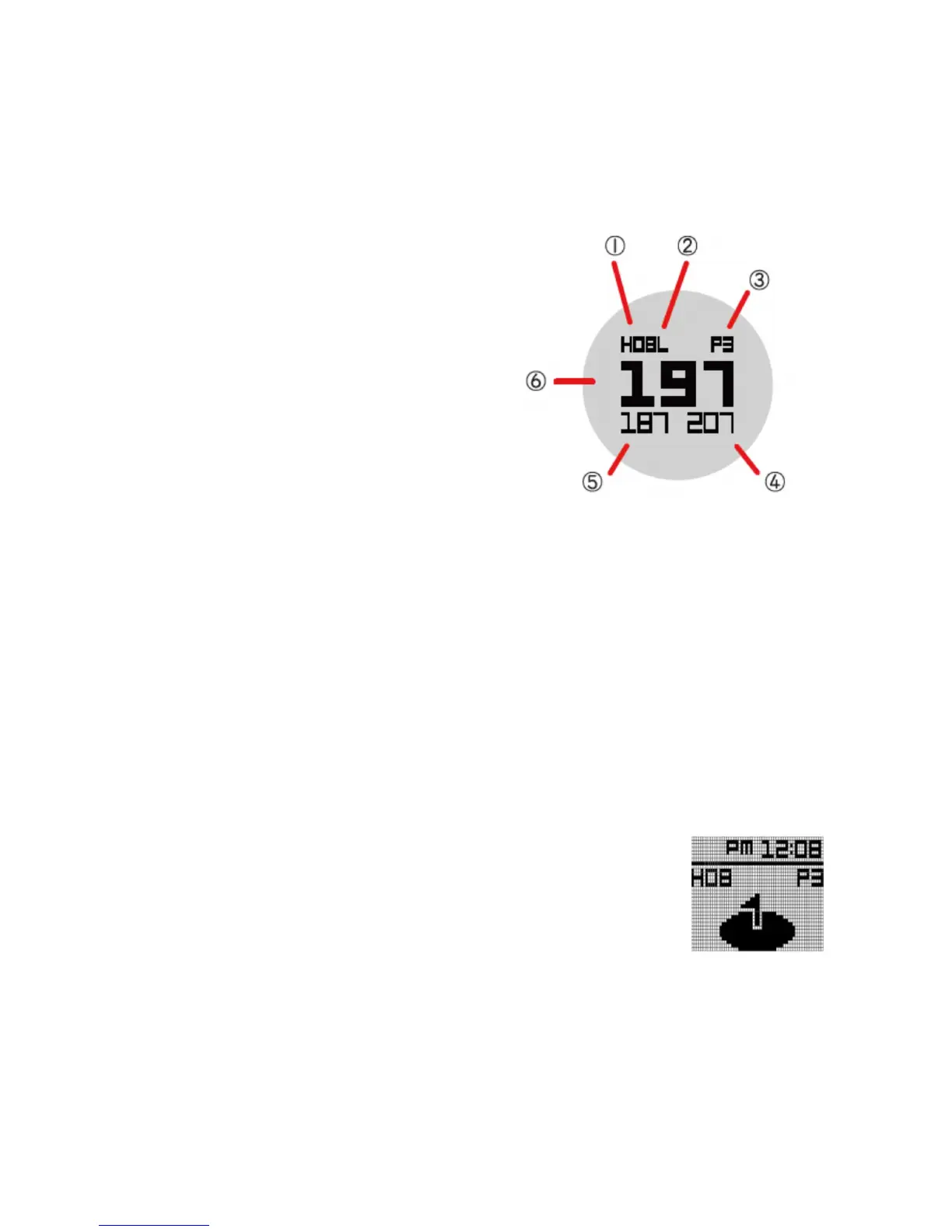
3.1 Front/Center/Back (FCB) Screen Overview
① Hole Number
Ex) H08 : 8
th
Hole of Total Golf course
② L/R Green information
③ Par Information
④ Distance to the Back of the Green
⑤ Distance to the Front of the Green
⑥ Distance to the Center of the Green
The WT6 watch will automatically advance to the next hole as you play through a course.
Please note that in rare instances it may be necessary to manually advance to the next hole
(UP button) or return to a previous hole (DOWN button). Pressing the OK button will cycle
through golf features. (FCB, Hazards, Information, Shot Distance)
If WT6 change to the wrong hole by passing through the adjacent hole, press DOWN long key
to return to the hole just played
Note : If the hole has a Left and Right green, you will see an (L) or (R)
between the hole number and par information. (This feature only
support Korea and Japan, the other country do not support it)
Note : When the distance to the center of the green is less than 20
yards, the WT6 will display a green-with-pin icon and the time.



 To Next Page