Commander III
2-19
used to increase or decrease certain values in data
entry displays and to access upper and lower level
displays. If an additional display is available from
a certain screen, an up (▲) or down (▼) arrow will
appear on the screen. Pressing the left (◄) and right
(►) navigation buttons simultaneously will toggle the
display screen between English and the language
selected in the Screen Setup menu (see later).
OK button: The OK button is used to open a selected
menu item or to store values in data entry displays.
Escape button (ESC): The escape button (ESC) is
used to return to upper level menus or to return values
to their previous settings in data entry displays.
Numbered buttons (1-8): The numbered buttons are
used to directly open a numbered menu item, or to
select a data entry box in a data entry display.
Main Menu
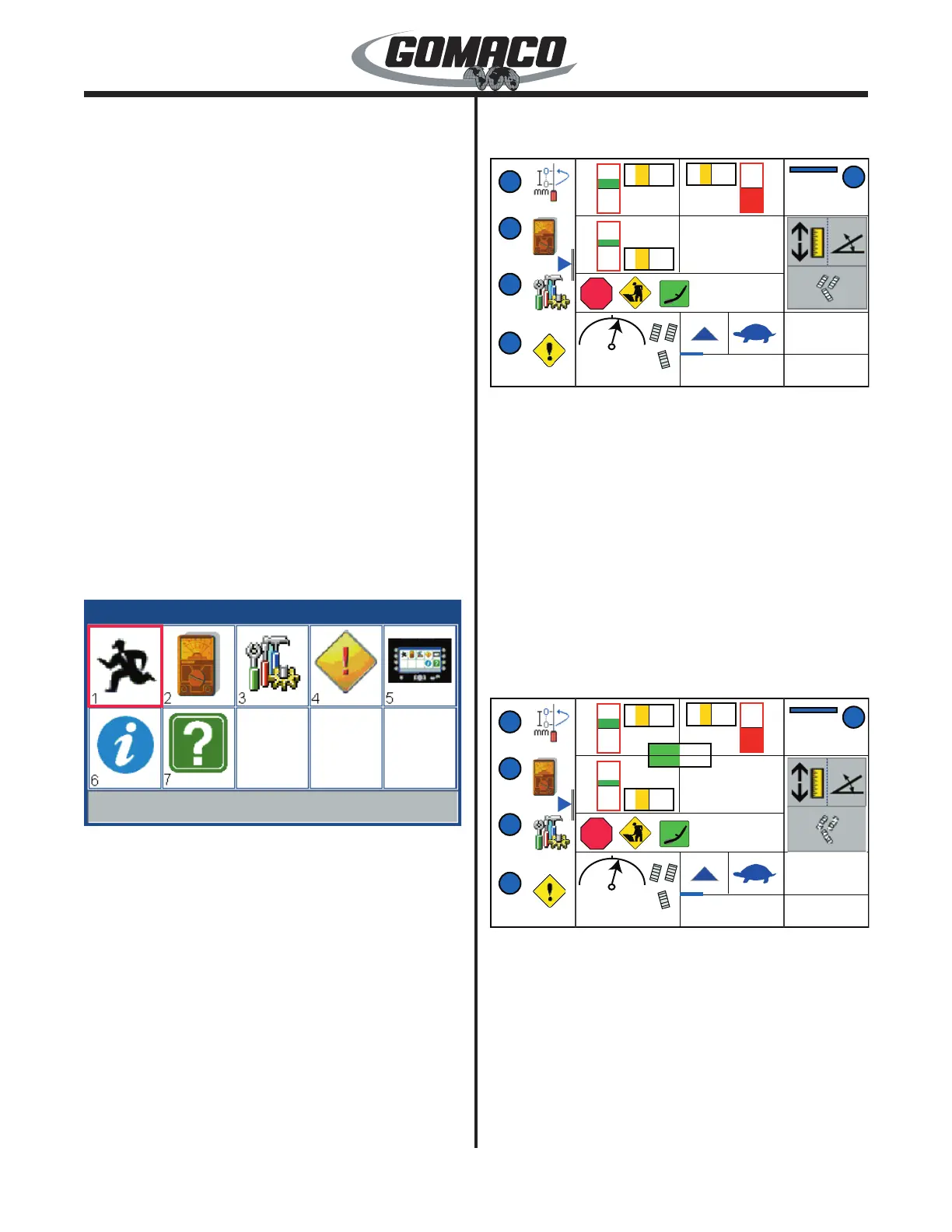
When the G+ controller is started, the run menu
appears on the screen. The main menu may be
accessed from any of the sub-menus by pressing the
escape button (ESC).
022G+
Run Menu
022G+
The various sub-menus available from the Main Menu
are the Run menu (#1), the Test menu (#2), the Setup
menu (#3), the Fault menu (#4), the Screen Setup
menu (#5), the About menu (#6) and the Help menu
(#7). Press the navigation buttons to move the red
selection cursor to the desired menu icon. The title of
the selected menu icon will appear in the status bar at
the bottom of the screen. Press the OK button to enter
the display screen. If a numbered button is pressed,
the display will go directly to the corresponding screen.
Below is a brief description of the sub-menus available
from the main menu:
Main Menu:
Run Menu
059G+
1
2
3
4
5
A
M
M
M
A
A
0.00%
ft/min
E-STOP
059G+
▼
The left side of the run menu contains quick navigation
icons. Press the number button indicated next to the
quick navigation icons to go to the following displays
or menus; (1) sensor offset displays under the Sensor
Setup Menu; (2) Test Menu; (3) Setup Menu; (4) Active
Fault display. Press the right (►) navigation button to
view the pop up screen for the all jog elevation mode
(see description later). Press the down (▼) navigation
button to access the slope compensation/transition
Run menu (see description later). Pressing the ESC
button from one of the displays accessed in the Run
Menu will return the display to the Run Menu.
Note: The fault icon will ash yellow when a fault
is detected in the system.
159G+
1
2
3
4
5
A
M
M
M
A
A
0.00%
ft/min
E-STOP
~
159G+
▼
-157
-157
-151
-31
-12º
12º
-12º
-47 1000
-50
-40
Deviation and auto/manual indicators: The top
center section of the menu contains the rectangular
deviation and auto/manual indicators. The vertical
rectangles are grade indicators. The horizontal
rectangles are steering indicators.
The rectangular grade (vertical) and steering
(horizontal) deviation indicators show the error signal
strength. If a steering sensor moves to the left or right,
a bar appears in the left or right half of the indicator. If



 To Next Page
 Loading...