EasyManua.ls Logo

Goodman TSTATG2152-2 - Page 12

Goodman TSTATG2152-2
40 pages
Print Icon
To Next Page IconTo Next Page
To Previous Page IconTo Previous Page
Loading...
SET
MTuWThF
AM
Day
COOL
8:00
:
SET
MTuWThF
AM
Day
HEAT
8:00
:
MTuWThF
PM
Evening
6:00
:
SET
MTuWThF
PM
Evening
COOL
6:00
:
OWNER'S MANUAL
Next Page
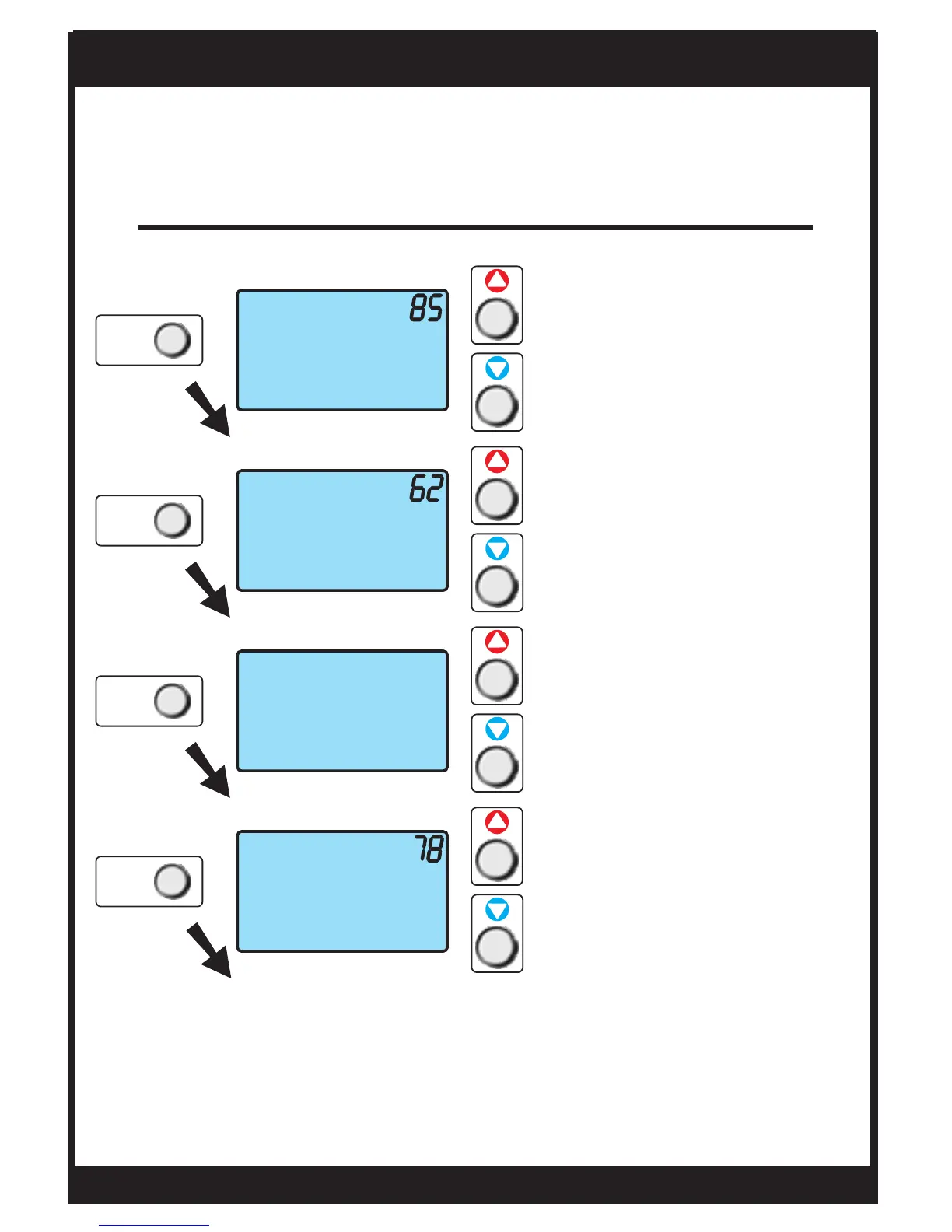
Weekday Programming
Time Period Programming
Use these buttons to
adjust the cool setpoint for
the day time period.
Use these buttons to
adjust the heat setpoint for
the day time period.
Use these buttons to
adjust the start time for
the evening time period.
Use these buttons to
adjust the cool setpoint for
the evening time period.
Press NEXT
to advance
Press NEXT
to advance
Press NEXT
to advance
Press NEXT
to advance
Page 12
TSTATG2152-2
NEXT
NEXT
NEXT
NEXT

Other manuals for Goodman TSTATG2152-2

Related product manuals