Advanced Setup
This is normally done by the installer at initial installation.
Press NEXT
to advance
Press NEXT
to advance
Press NEXT
to advance
Press NEXT
to advance
Continued
* ON is only available if the thermostat
is system powered.
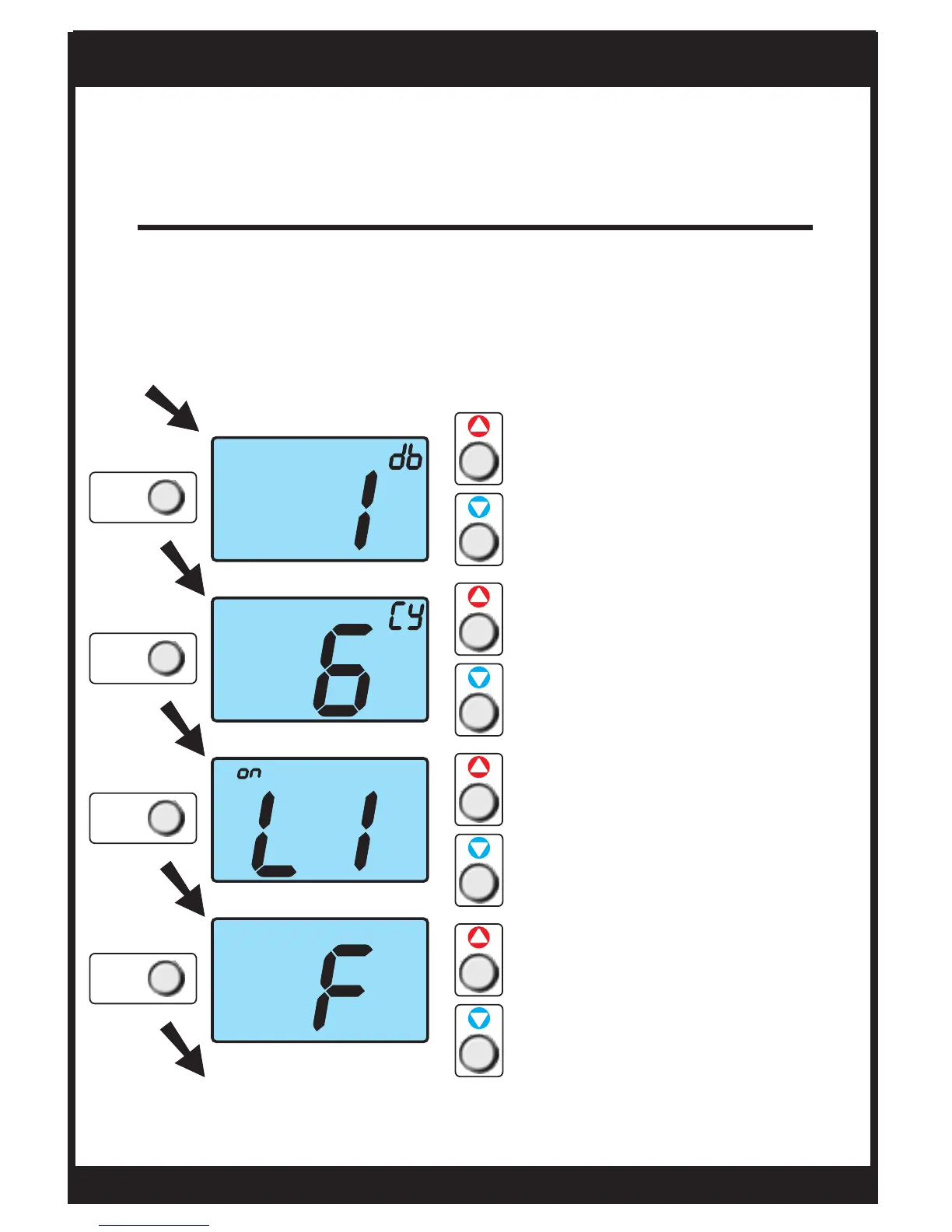
Enter advanced setup by sliding the Program Switch to
SET. When the clock is flashing, press the NEXT button for
5 seconds. Do not release the button until this screen
appears.
Use these buttons to
adjust the Cycles Per Hour
from 2 to 6.
d=no limit (zoning)
d1=d+no compressor
lockout (page 19).
Select backlight operation
when a button is pressed:
OFF: Never turns on.
2,4,6 or 8: Seconds back-
light will be on.
ON: Always on.*
Use these buttons to select
thermostat operation in
degrees C or F.
Use these buttons to
adjust the deadband
from 1 to 6 degrees.
Page 18
OWNER'S MANUAL
TSTATG2152-2
NEXT
NEXT
NEXT
NEXT


 To Next Page