88
88
SET
MTuWThF
SaSu
AM
PM
Morning
Evening
Day
Night
AUX
HEAT
COOL
I2:00
:
FILTER
OWNER'S MANUAL
Press NEXT
to advance
Press NEXT
two times
to advance
Slide the Program Switch to OFF or RUN to
return to normal operation.
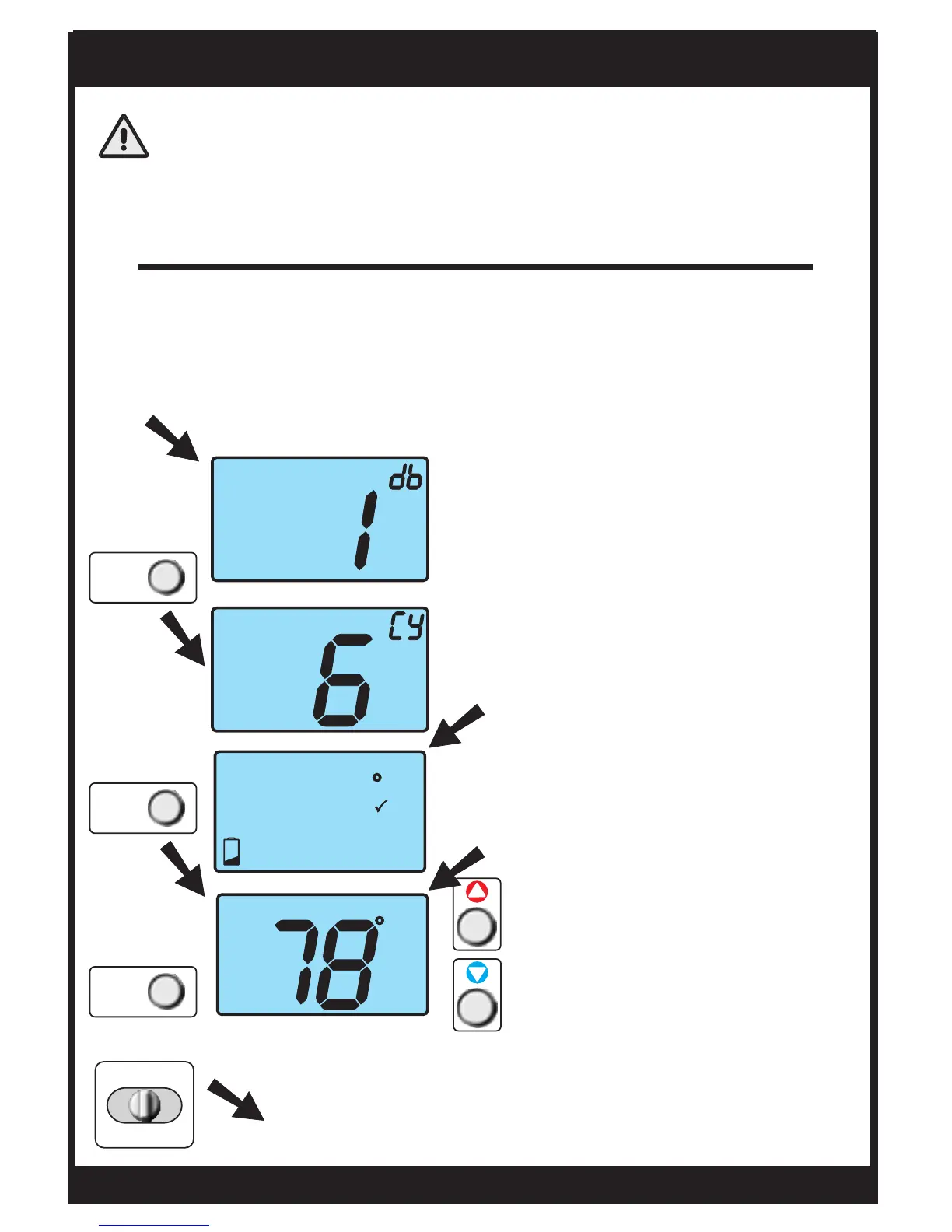
Calibration
CAUTION
Enter advanced setup by sliding the Program Switch to
SET. When the clock is flashing, press the NEXT button for
5 seconds. Do not release the button until this screen
appears.
Under normal circumstances it will not be necessary to adjust
the calibration of the temperature sensor. If calibration is
required, please contact a trained HVAC technician to
correctly perform the following procedure.
Press NEXT
to store the
new value
Press the NEXT button twice
to advance to the calibration
screen.
Adjust the temperature
reading using the WARMER
and COOLER buttons, then
press the NEXT button to
store the new value.
When the Cycles Per Hour is
flashing, press and hold the NEXT
button until this screen appears.
Page 21
TSTATG2152-2
NEXT
NEXT
NEXT
PROGRAM
RUN OFF SET


 To Next Page